The deal is half the reason they walked in
Walk through any market in Pakistan during the last ten days of Ramadan and you'll feel it: the haggling, the banners, the sense that everyone is hunting a better price. Shoppers here are sharp on value and they remember who gave them a good deal. Eid, Back-to-School, Independence Day — these aren't dates on a calendar, they're the days your tills are supposed to be busy.
The catch is that a discount run by hand at a crowded counter goes wrong fast: a code applied twice, a cashier guessing the percentage, GST calculated on the wrong figure. ClearRing's Promotion Engine exists to let you run the campaign without bleeding margin or jamming up the queue.
Where your promotions live
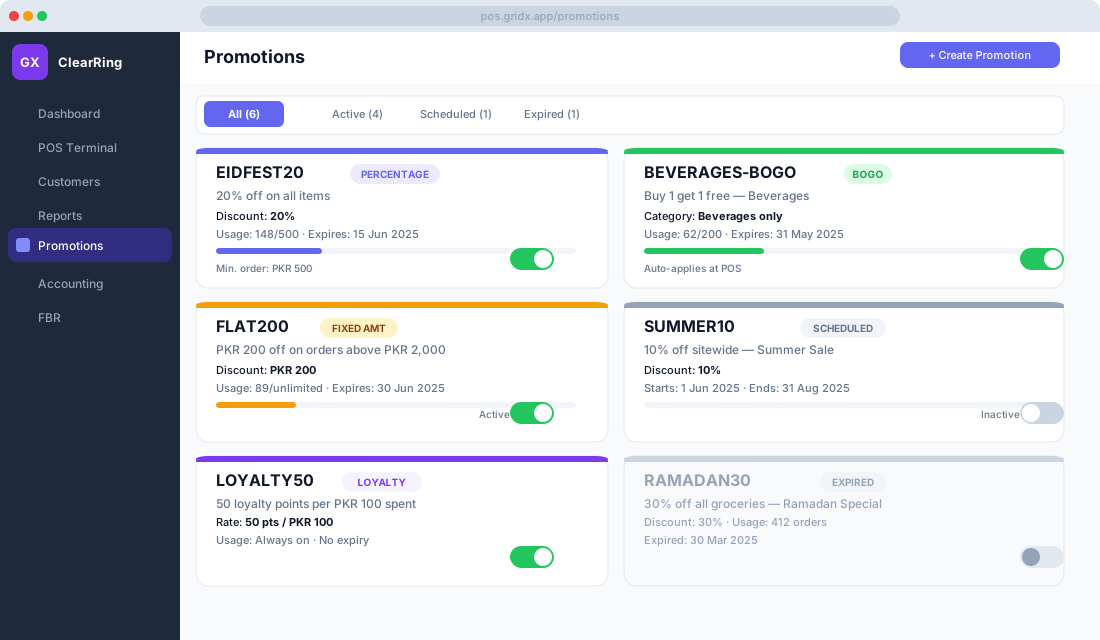
Open Promotions in the sidebar and every offer you've built shows up as a card. Each one carries its promo code or name, a type badge marking it as Percentage, Fixed Amount, BOGO, or Loyalty, the discount value, a usage counter against its limit, the expiry date, and an active/inactive toggle. One glance tells you what's running and what's about to lapse.
The kinds of offers you can run
The everyday workhorse is the percentage discount — a slice off the cart total or off specific products and categories. Take an Eid run coded EIDFEST20: 20% off, perhaps with a minimum order of PKR 500 and a maximum discount cap of PKR 2,000 so a large basket doesn't run away with your margin, valid 10 to 20 June 2025, capped at 500 redemptions. The minimum and the cap are optional, but on a big campaign they're the difference between a promotion and a leak.
A fixed-amount discount knocks a flat figure off instead — say FLAT200, PKR 200 off orders above PKR 2,000. That threshold does quiet work for you: customers add another item or two to cross it, and your average basket creeps up.
BOGO covers buy-one-get-one, free or discounted. A BEVERAGES-BOGO offer might give a second beverage free on any beverage bought, set to auto-apply with no code so it simply triggers the moment two eligible drinks are in the cart. You can also make the second item half price rather than free if that suits the margin better.
A minimum-order threshold unlocks a reward once a customer spends enough — spend PKR 3,000 and get free delivery, or a complimentary item. And a loyalty multiplier runs a limited burst of double or triple points; earning 3× loyalty points through Ramadan, for instance, nudges regulars to consolidate their shopping with you for the month.
Building one
Creating a promotion follows a short, predictable path. Click Create Promotion, then enter a promo code such as SUMMER10 — or leave it blank if you want the offer to auto-apply. Pick the type, set the discount value, and then set the eligibility rules: all products or specific categories, a minimum cart value, a per-customer usage limit like one redemption each, and a total usage limit. Set the start and expiry dates, toggle Active to launch now or leave it inactive to schedule for later, and click Save. That's the whole thing.
How it behaves at the till
When a cashier clicks Apply Promo Code and types or scans the code, ClearRing runs four checks before it does anything: is the code active and inside its validity window, has this customer already hit their per-customer limit, is the minimum order value met, and does the cart actually hold the right products or categories. Pass, and the discount drops onto the cart as a line item. Fail, and the cashier gets a plain message explaining exactly why — no shrugging at the customer.
Codeless offers like BOGO need no prompting. The moment the cart qualifies, a green banner appears: "BEVERAGES-BOGO applied — 1 free item added." The cashier sees it happen and so, ideally, does the customer.
When two offers both apply
By default ClearRing applies one promotion per transaction. If several are valid for the same cart, it quietly picks the highest-value discount for the customer rather than making the cashier choose. If you want more flexibility, head to Settings, then Promotions, then Stacking Policy, where you can let specific promotions combine — allowing a promo code to stack with a loyalty redemption, say, but not with a second promo code.
Knowing whether it worked
Click any promotion to open its analytics. You'll see redemptions over time, the revenue impact weighing total discount given against the incremental revenue it generated, the average basket size before and after for offers with a minimum threshold, and the products that turned up most often in promoted carts. That's enough to decide, with evidence rather than a hunch, whether an offer earns a second outing when it expires.
For the broader picture, the Reports module carries a Discounts Report under Reports, then Sales Summary. It totals discount given per period, breaks it down by promotion code, expresses discount as a share of gross revenue, and compares against the previous period. Export it to CSV when you want to do the margin maths in Excel.
Running the Ramadan and Eid rush
Pakistani businesses routinely see revenue climb 30 to 50% across Ramadan and Eid, and a little planning turns that tide into profit rather than chaos. Through Ramadan, Sehri and Iftar bundles work well — BOGO across dates, juice, and bread combinations — alongside double loyalty points for the month and a milestone reward, such as a free item for anyone reaching 5,000 points.
For Eid ul-Fitr, a flat discount on clothing, sweets, and gift categories lands well, promo codes pushed out over WhatsApp to your customer list bring people in, and an early-bird code giving the first 100 redemptions an extra 5% off creates a useful sense of hurry. Independence Day almost writes itself: a thematic 14% discount on selected categories on the 14th of August, with BOGO on beverages and snacks.
Discounts and the FBR invoice
Every discount you apply through ClearRing is written onto the FBR invoice — the gross amount before discount, the discount itself whether line by line or at the header, and the net amount the GST is then calculated on. ClearRing computes GST on the net amount after discount, which is the correct treatment under FBR rules, so your Sales Tax Return stays accurate even in a month full of promotions. That correctness is exactly what saves you an awkward conversation at filing time.
A few habits worth keeping
Always set an expiry date; open-ended promotions get forgotten and quietly drain margin for months. Set a usage limit so a code that escapes onto a WhatsApp group doesn't blow past your campaign budget. Test the offer with a real sale at the POS before you launch, so you catch a misconfigured rule before your customers do. Watch the redemption rate — below 5% and the offer probably isn't compelling enough; above 40% and the code has likely been shared far beyond your intended audience. And move expired promotions to the Expired tab so your active list stays honest and easy to read.
Promotions are a lever, not a reflex. Pull them with an expiry, a limit, and a quick look at the numbers afterward, and they'll grow your busy seasons instead of quietly shrinking your margin.