How to run promotions, coupon codes and line and order discounts
Shops give discounts all the time: a weekend sale, a coupon from an Eid campaign, a cashier discount on one item. This guide shows how a manager sets up a promotion and how the cashier applies promotions, a coupon, a line discount and an order discount at the terminal, with the manager's PIN where the shop requires it.
Who it is forStore manager and cashierTime20 minutesProductPOSLevelIntermediate
Before you start
Steps
1
Create a promotion
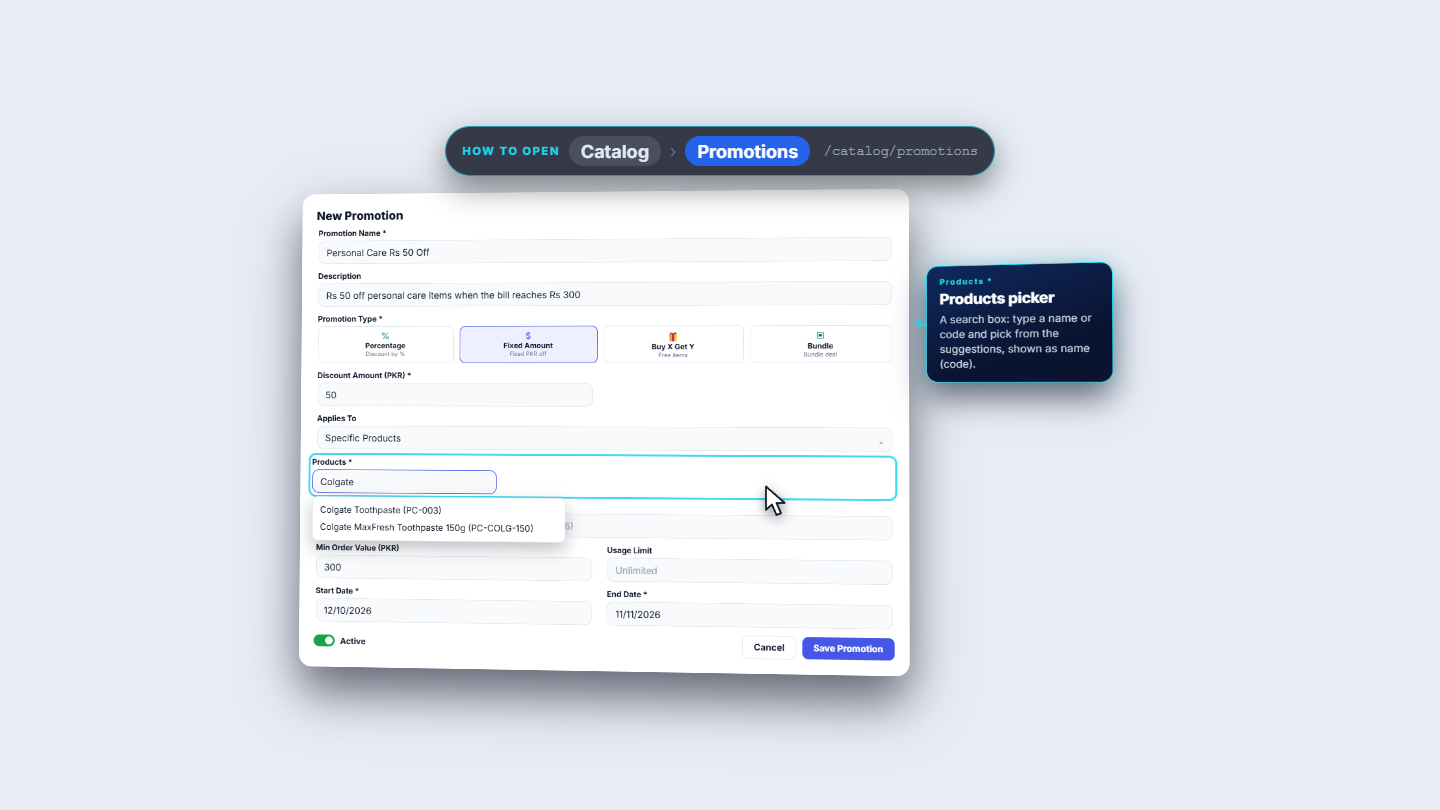
Open Catalog › Promotions and press New Promotion. Fill Promotion Name (for example Personal Care Rs 50 Off) and an optional Description. Choose a Promotion Type: Percentage, Fixed Amount, Buy X Get Y or Bundle. Type the Discount Amount (PKR) (50). In Applies To choose All Products, Order Total, Specific Products or Specific Categories; a Products or Categories picker then appears. Set Min Order Value (PKR) (300), Usage Limit (Unlimited), Start Date and End Date, turn on Active and press Save Promotion.
New Promotion form with the Products picker
2
Watch promotions apply by themselves
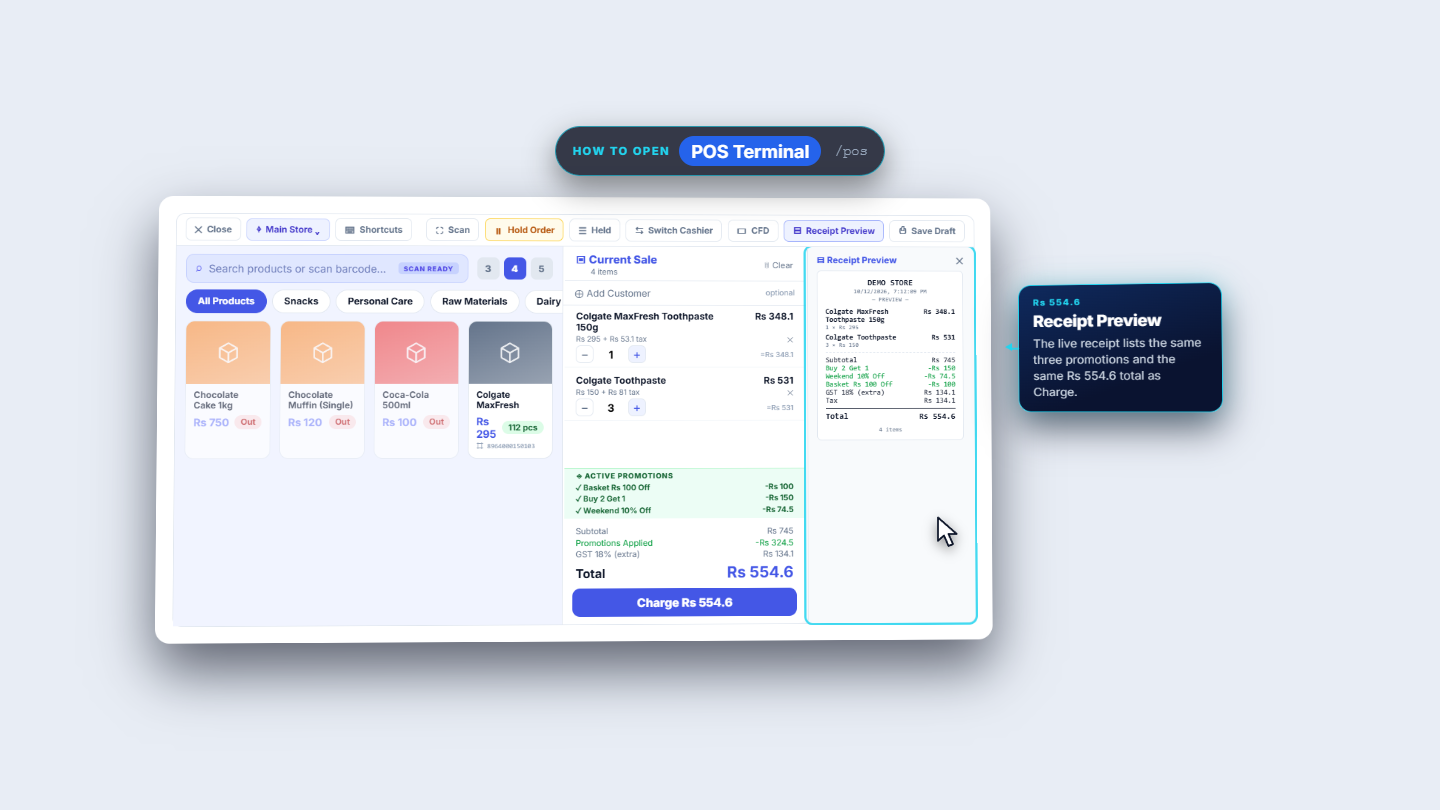
At POS Terminal the ACTIVE PROMOTIONS list shows what can apply. With one MaxFresh in the cart only Weekend 10% Off lights up (-Rs 29.5). Add three Colgate Toothpaste and the subtotal reaches Rs 745, so Basket Rs 100 Off (-Rs 100, minimum Rs 500), Buy 2 Get 1 (-Rs 150) and Weekend 10% Off (-Rs 74.5) all apply. Promotions Applied reads -Rs 324.5, GST 18% (extra) Rs 134.1 and the Total Rs 554.6, the same as Receipt Preview.
Cart with three promotions and the Receipt Preview
3
Give a discount on one line
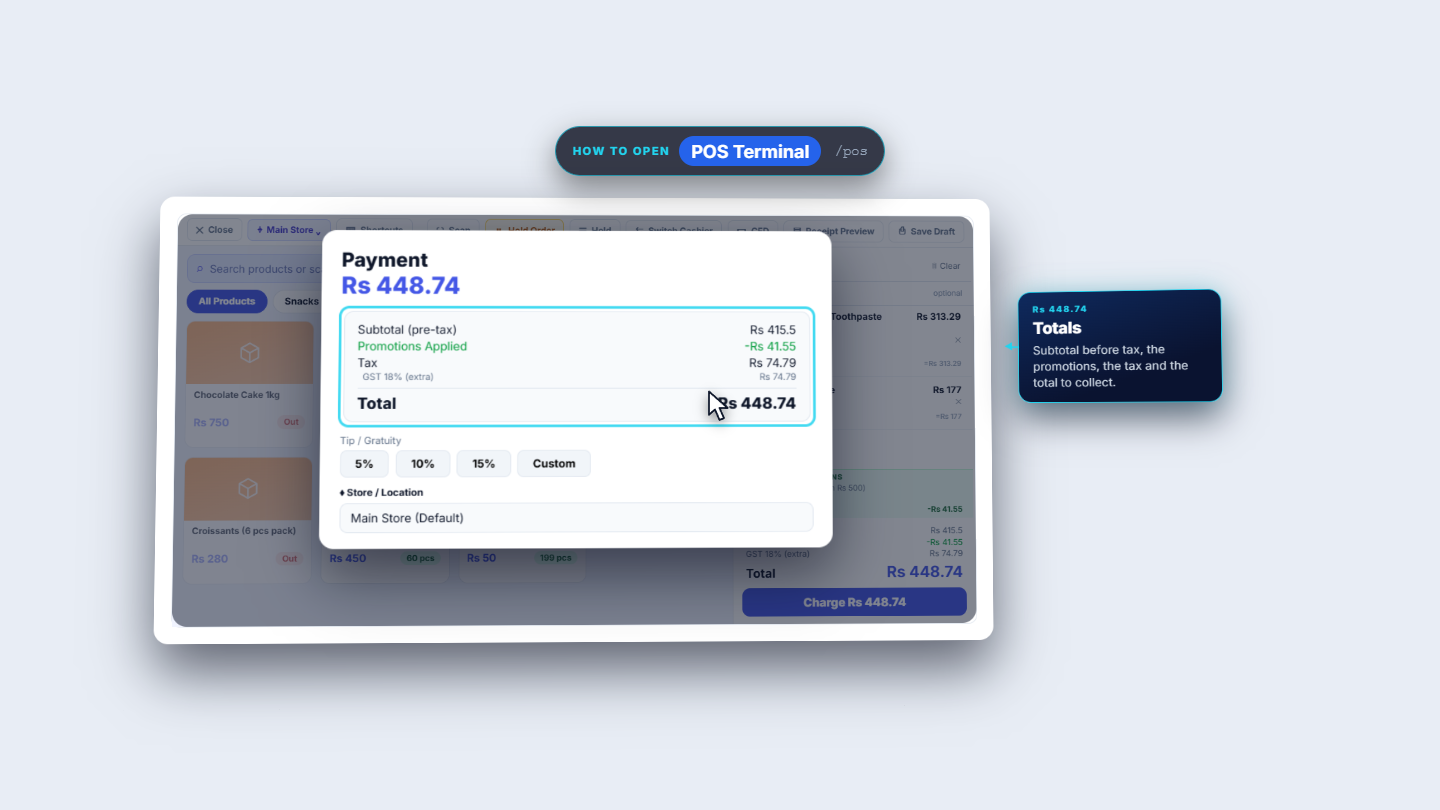
Select the MaxFresh line and press the * key. A % line discount box opens on the line. Type 10 and press Enter. The line shows -Rs 29.5 off, and its tax falls to Rs 47.79. With Colgate Toothpaste added, the subtotal is Rs 415.5, so Basket Rs 100 Off stays off (below Rs 500). Press Charge: Subtotal (pre-tax) Rs 415.5, Promotions Applied -Rs 41.55, Tax Rs 74.79, Total Rs 448.74.
Payment dialog after a 10 percent line discount
4
Try a coupon code that does not exist
In the Coupon code… box of the Payment dialog type EID2026 and press Apply. If no active promotion carries that code, the app says Coupon code not found or inactive and the total does not change. Pick Rs 500 under Amount Tendered: Change shows Rs 51.26. Press Complete Sale (INV-20261012-0010). The receipt prints the line discount under the item as Discount (10%) -Rs 29.5.
5
Give an order discount
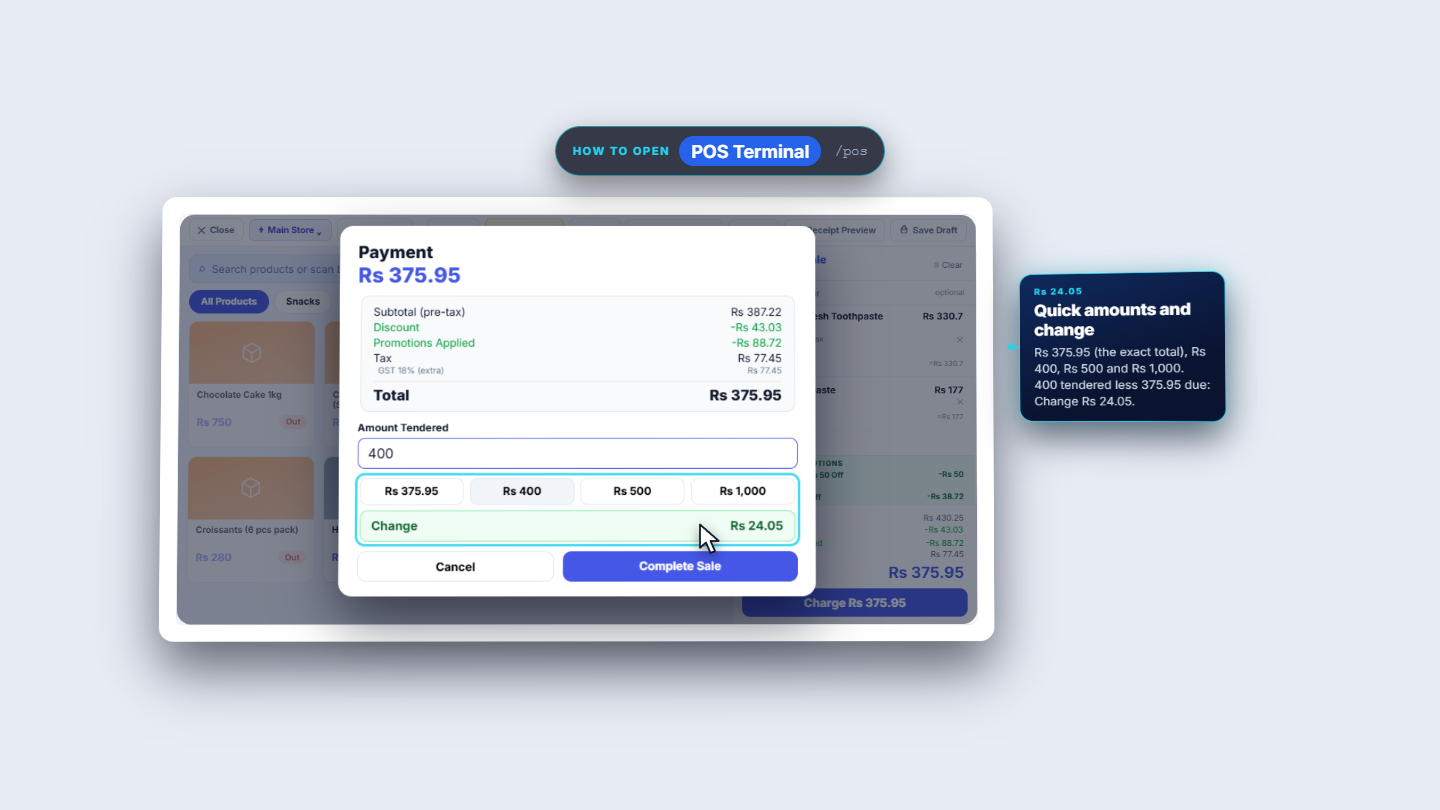
In the cart press the Add order discount link and type 10 for 10% off the whole order. A Discount row shows -Rs 43.03 with an x to remove it, and the promotions are worked out again on what is left. At Payment, Subtotal (pre-tax) is Rs 387.22, Discount -Rs 43.03, Promotions Applied -Rs 88.72 and Total Rs 375.95. Take Rs 400 in cash: Change shows Rs 24.05.
Payment with the Discount row and change
6
Handle the manager's approval
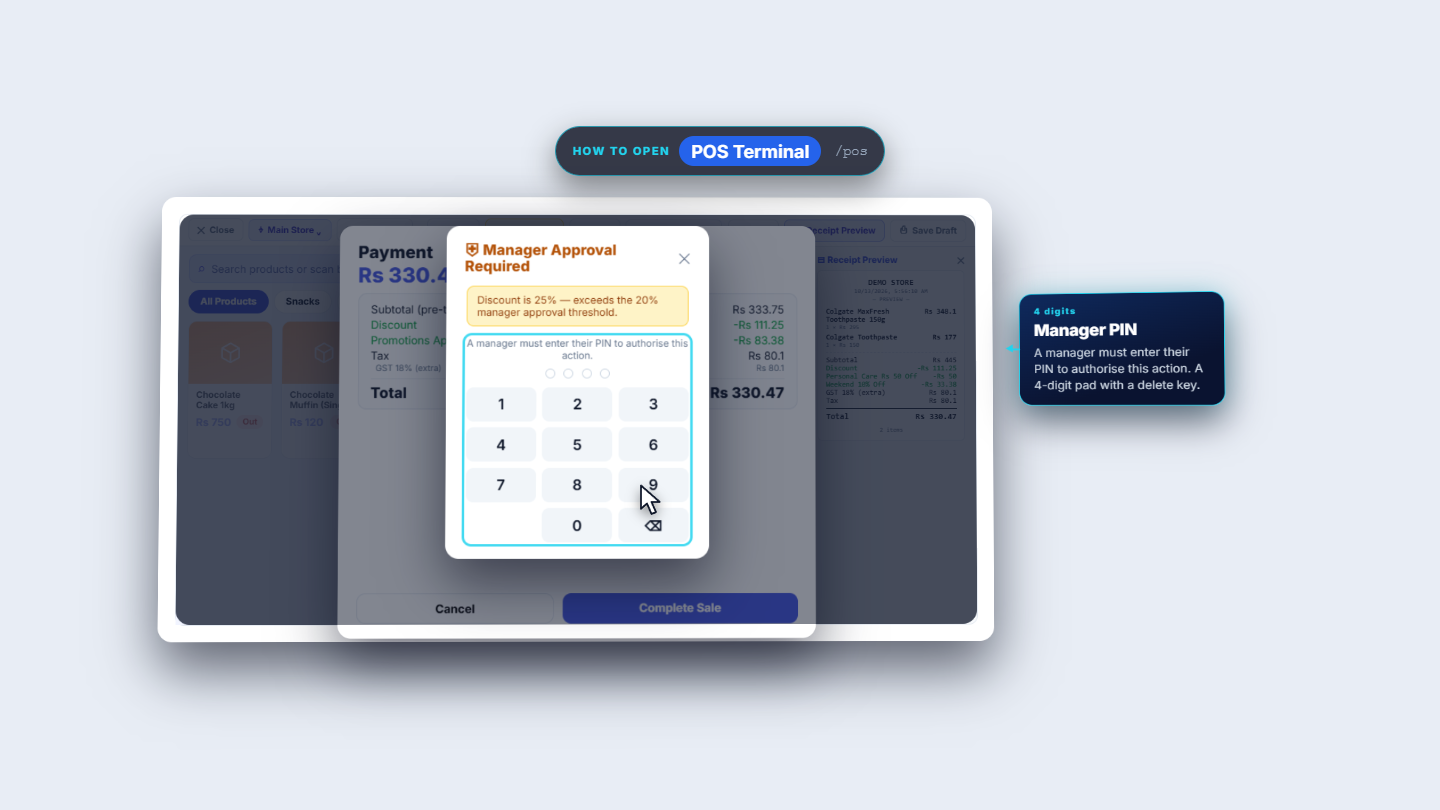
The shop can require a manager's PIN for big order discounts. In Settings the card Manager PIN Controls has Require manager PIN for voids and Discount approval threshold (%), here 20. An order discount of 25 on the cart gives Discount -Rs 111.25. On Complete Sale the app opens Manager Approval Required and says Discount is 25% — exceeds the 20% manager approval threshold. A manager must enter their PIN on the pad before the sale goes through.
Manager Approval Required with the PIN pad
7
Redeem a coupon code
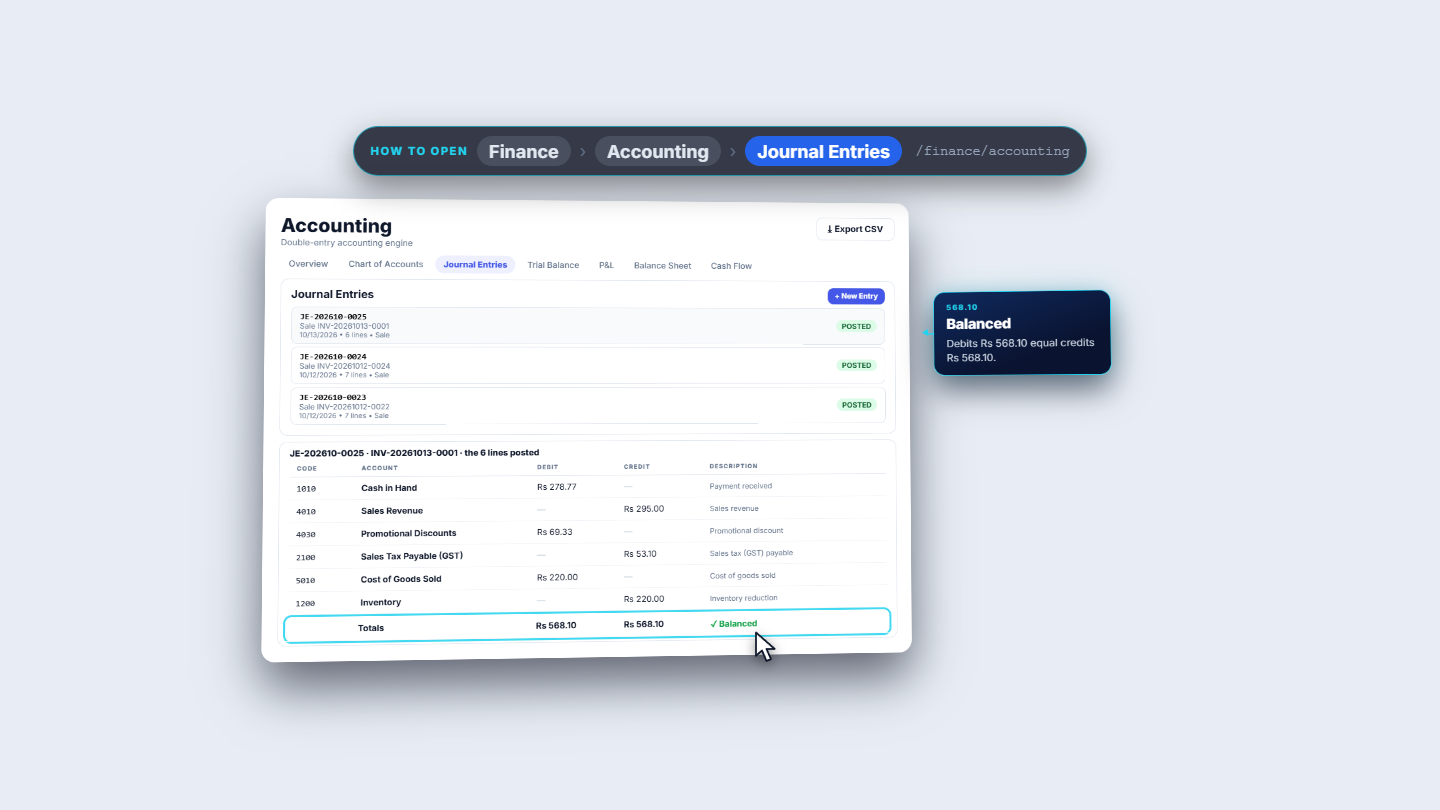
When a promotion has a code, the terminal does not list it. With one MaxFresh in the cart, Payment shows only Weekend 10% Off: total Rs 318.6. Type SPRING10 and the app says Coupon code not found or inactive. Type EID2026 and press Apply. The toast says Coupon "Eid Sale 15% Off" applied!, the box becomes a green row, and Promotions Applied becomes -Rs 69.33 and the Total Rs 278.77. Take Rs 1,000: Change shows Rs 721.23. The sale is INV-20261013-0001. In the journal (JE-202610-0025) Cash in Hand Rs 278.77 and Promotional Discounts Rs 69.33 (Weekend and Eid together) are debited, and Sales Revenue Rs 295 and Sales Tax Payable Rs 53.1 are credited.
Journal entry of the coupon sale
8
Check Sales History
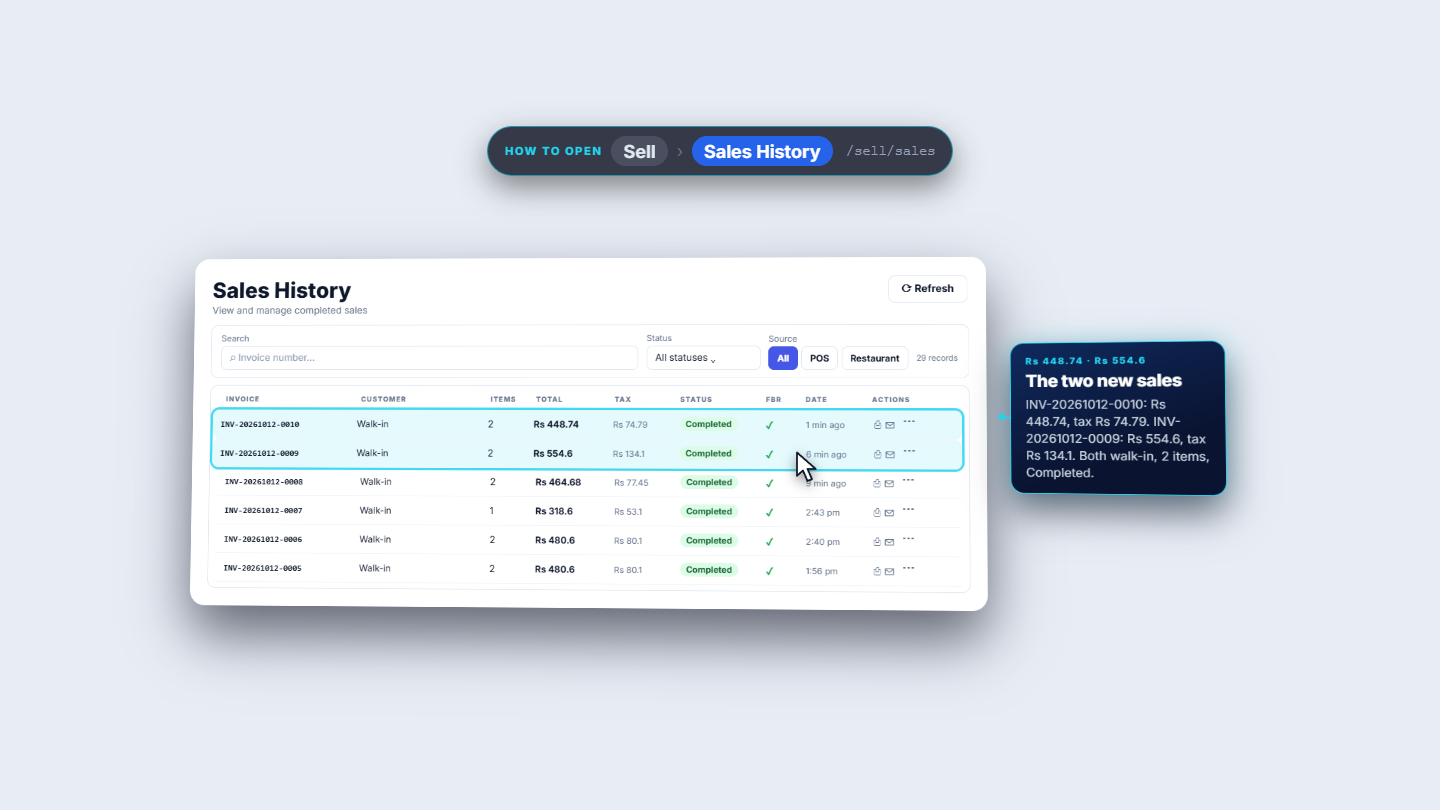
Open Sell › Sales History. The discounted sales sit on top: INV-20261012-0010 for Rs 448.74 and INV-20261012-0009 for Rs 554.6, both Completed and walk-in, with their tax.
Sales History showing the discounted sales
Check it worked
Each receipt prints every promotion with its own amount, and a line discount under its item.
The Journal Entries show Promotional Discounts for promotions and Sales Discounts for the order discount, and the Trial Balance stays balanced.
An out-of-threshold discount stops at Manager Approval Required.
Common mistakes
Mistake
What you see
Fix
Typing a wrong or inactive coupon code
Coupon code not found or inactive
Check the code and that the promotion is Active
Expecting Basket Rs 100 Off on a small bill
Promotion stays unlit
The subtotal must reach the Min Order Value (Rs 500)
Order discount above the threshold
Manager Approval Required
A manager enters their PIN, or lower the discount
Quick reference
Item
Meaning / rule
Promotion Type
Percentage, Fixed Amount, Buy X Get Y or Bundle
Applies To
All Products, Order Total, Specific Products or Specific Categories
Min Order Value
The subtotal needed before the promotion applies
Coupon Code
Must be typed by the cashier at checkout
Line discount
Percent off one line, shown under the item on the receipt
Order discount
Percent off the whole order, booked to Sales Discounts
Frequently asked questions
What happens if the cashier types a coupon code that does not exist? The app says Coupon code not found or inactive and the total does not change. Check the code and that the promotion is Active.
Why did a promotion not apply to a small bill? A promotion with a Min Order Value only applies once the subtotal reaches it. Basket Rs 100 Off needs Rs 500, so it stays off on a smaller bill.
When does a discount need the manager's PIN? When an order discount is above the Discount approval threshold (%) set in Settings under Manager PIN Controls. The app then opens Manager Approval Required.