How to change the language, time zone and layout direction
You will switch the console between English, Arabic and Urdu, set your company time zone so booking times show in local time, and check where the currency comes from. You need this when your team reads Arabic or Urdu, or when your company works in a different time zone from the default.
Who it is forTaxi or fleet dispatcher or operator ownerTime6 minutesProductFMSLevelBeginner
Before you start
Steps
1
Open the language menu
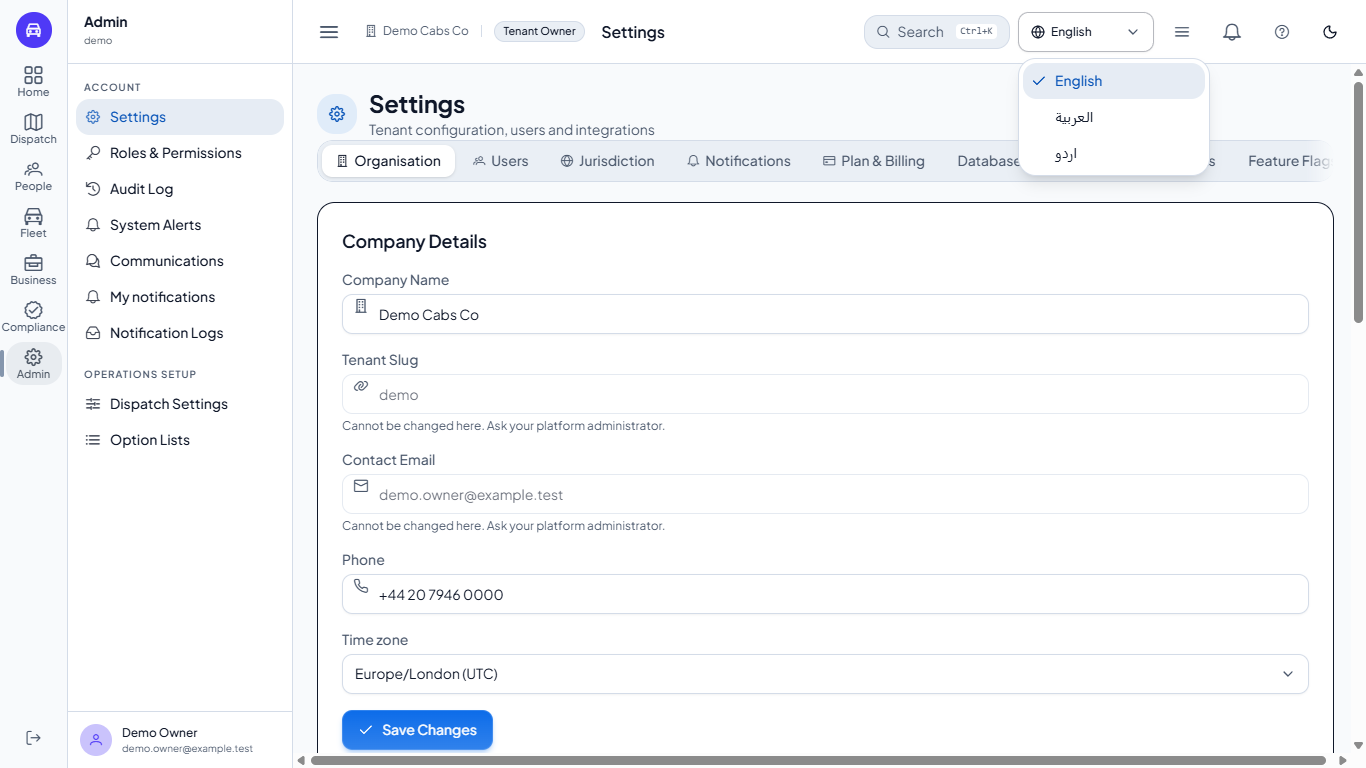
Look at the top bar of any screen. The language menu shows a globe and the name of the current language. Open it and you see three rows: English, العربية (Arabic) and اردو (Urdu). Your choice is remembered in this browser, so you only set it once on each computer.
Language menu open with English, Arabic and Urdu
2
Switch to a right-to-left language
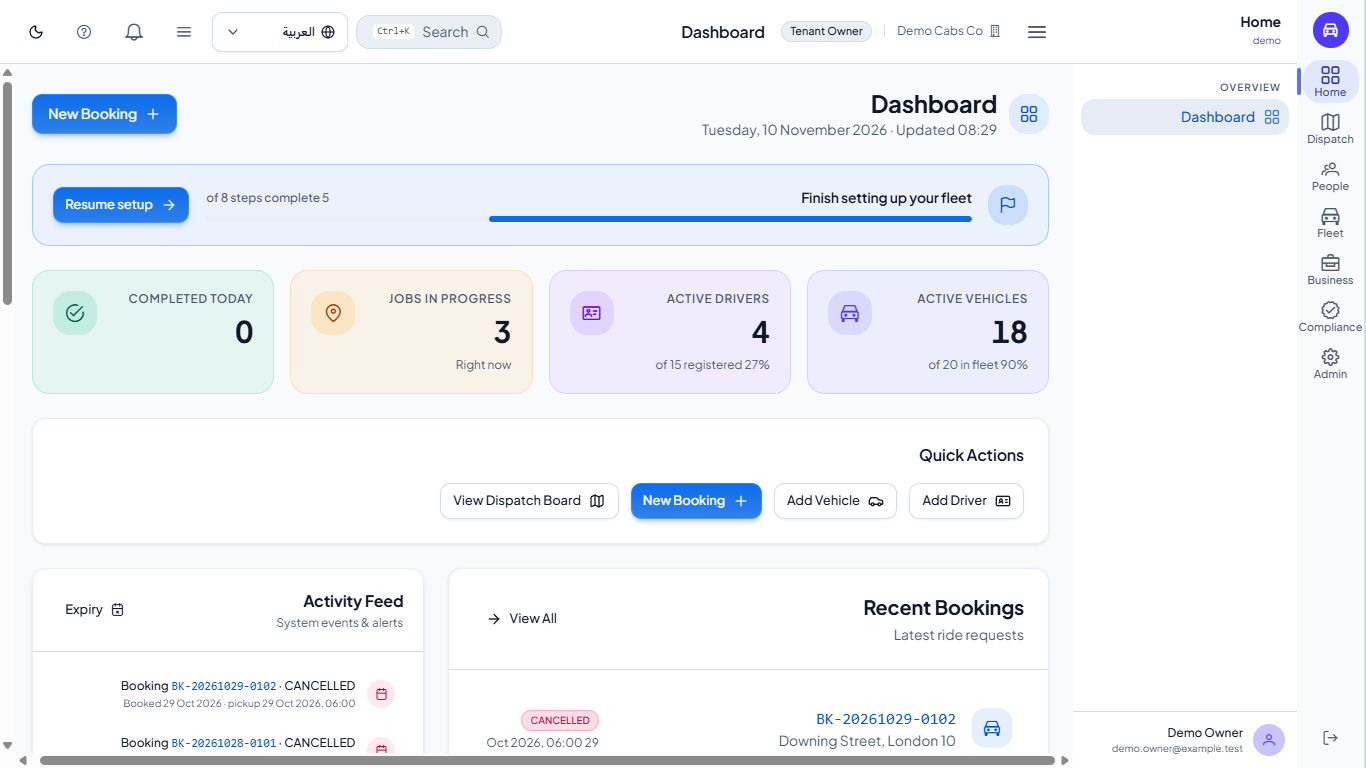
Choose العربية. The whole console turns right to left at once, with no reload: the side menu moves to the right edge, headings and cards line up on the right and the top bar mirrors. Urdu does the same. Choose English to return to left to right.
The dashboard turned right to left after choosing Arabic
3
See the translated screens
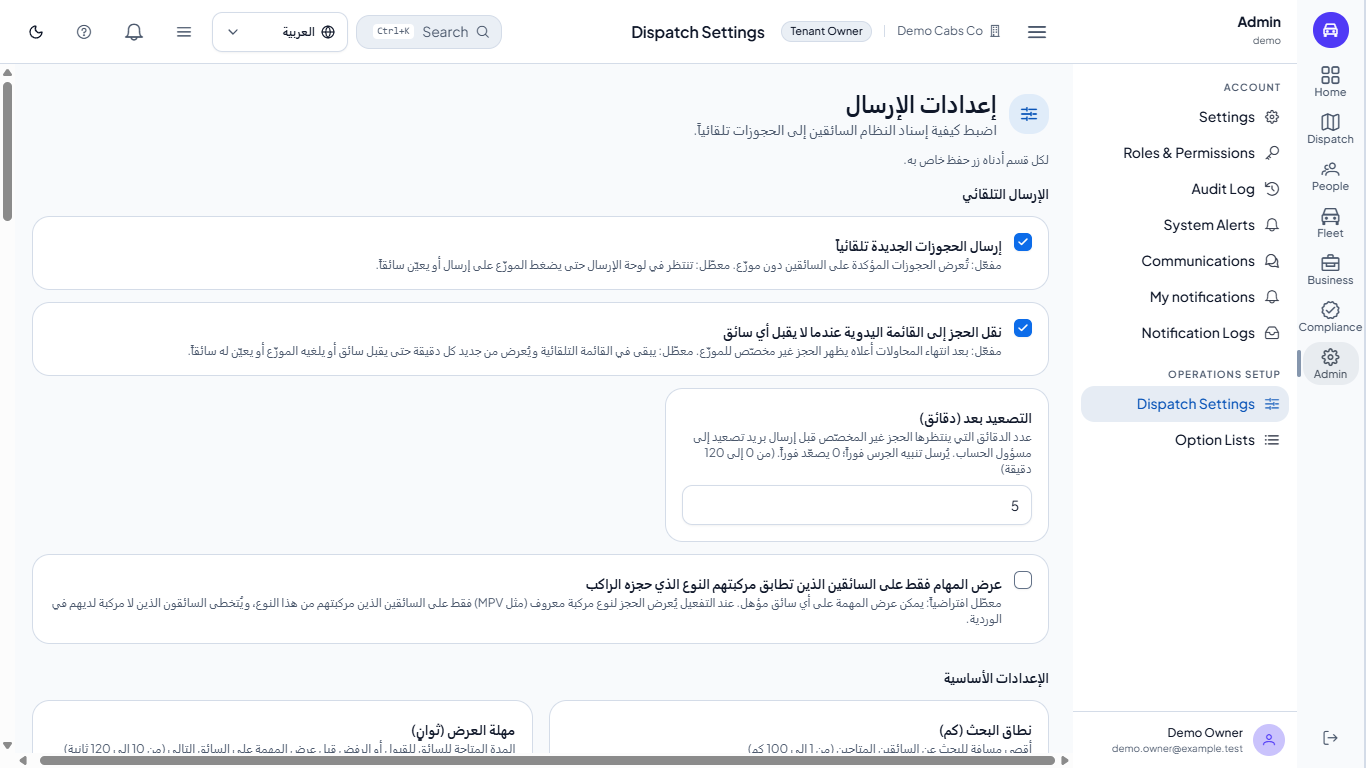
Go to Admin > Dispatch Settings. The whole page, its heading, section titles (automatic dispatch, basic settings, tie-break rule and scoring weights), options and help text, such as automatic dispatch and the escalation time in minutes, is shown in Arabic (or in Urdu), with the checkboxes and numbers on the right, and a range such as "from 0 to 120 minutes" keeps its numbers in order. The menus around it, the dashboard and most other screens are still shown in English for now, so a page may mix both languages.
Dispatch Settings with its options in Arabic
4
Set the company time zone
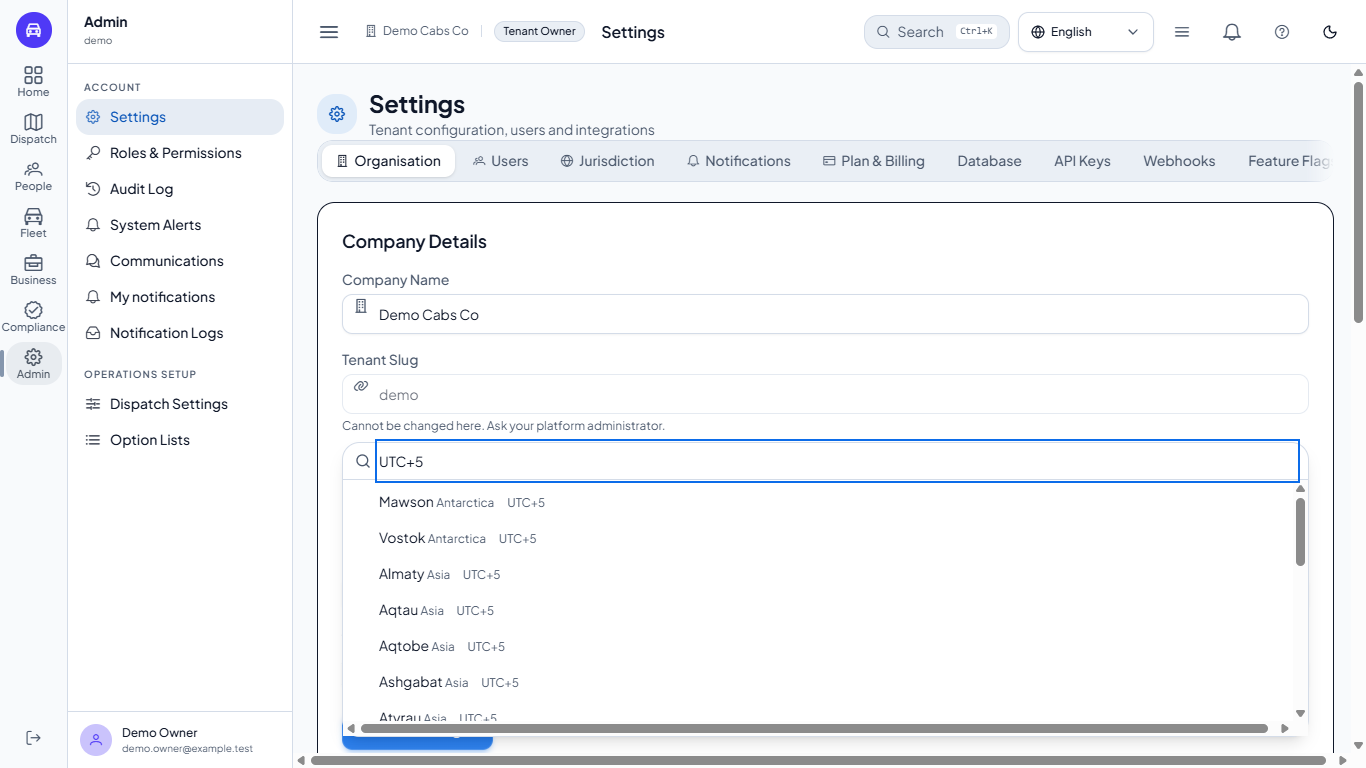
Go to Admin > Settings, open Organisation and find Time zone. Each zone shows its current UTC offset. Type a city or an offset in the search box, for example karachi or UTC+5, pick Karachi, Asia, UTC+5, and click Save Changes. A message Saved - Organisation details updated appears. Open Dispatch > Bookings: the Scheduled times now follow that zone and show the offset, for example 06:00 GMT+5. If you type or send a zone that does not exist, the server refuses it and the old zone stays.
The Time zone list under Settings, Organisation
5
Check the currency
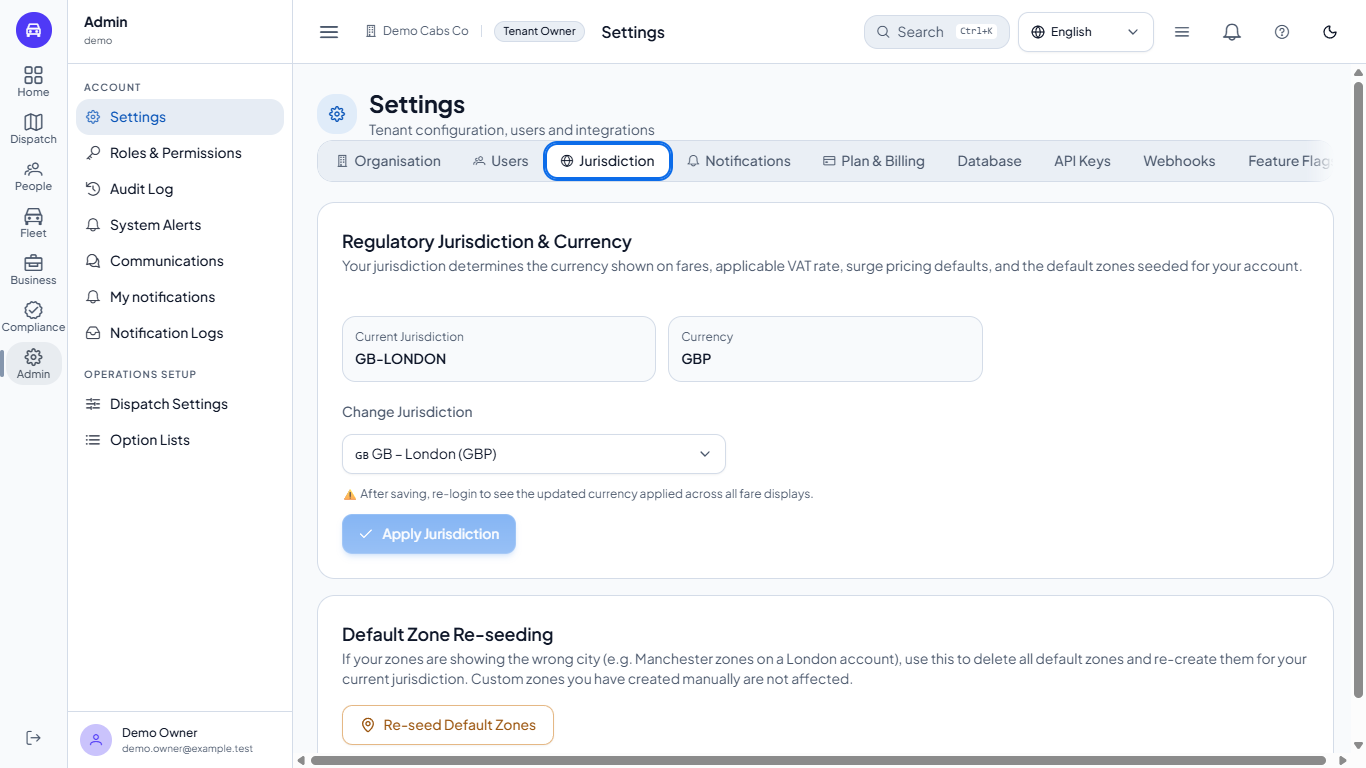
Currency does not come from the language or the time zone. Open Admin > Settings > Jurisdiction. It shows your Current Jurisdiction (here GB-LONDON) and Currency (GBP). To change it, pick another jurisdiction in Change Jurisdiction and click Apply Jurisdiction, then sign in again so every fare shows the new currency. Below it, a separate Default Zone Re-seeding card can re-create the default zones for the current jurisdiction.
The Jurisdiction tab with GB-LONDON and GBP
Check it worked
After choosing Arabic the menu is on the right and the page direction is right to left; choosing English brings it back.
After saving a time zone, the Bookings list shows times with the new offset, for example GMT+5.
Common mistakes
Mistake
What you see
Fix
Expecting every screen to change language
Menus and many pages stay in English
Dispatch Settings is translated; other screens follow later
Changing the time zone to change the currency
Fares still show pounds
Change the jurisdiction under Settings > Jurisdiction instead
Not signing in again after a new jurisdiction
Old currency on some fare displays
Sign out and in again
Quick reference
Item
Meaning / rule
Language menu
Top bar; English, Arabic, Urdu; remembered per browser
Right to left
Arabic and Urdu mirror the whole layout
Time zone
Company setting under Settings > Organisation; bookings follow it
Jurisdiction
Sets the currency, VAT and surge defaults
Frequently asked questions
Does my language choice change for my colleagues? No. It is stored in your own browser, so each person picks their own.
Does changing the time zone change old bookings? No. The stored times stay the same moment; they are only displayed in the new zone.
Can I change date or number format? Not yet. There is no setting for it, and dates keep the day month year style.