How to take a construction quote from first line to first cash
You will build one quotation from the site area, send it, record the customer's approval, convert it into a project, invoice the deposit and record the money received. Use it for a new job from the first estimate to the first payment in the bank.
Who it is forEstimator and accounts officerTime15 minutesProductBuildFlowLevelIntermediate
Before you start
Steps
1
Start the quotation
Open Estimating › Quotations. The list shows every quote with its status; the filter offers Draft, Sent, Approved, Rejected, Expired, Converted and Converted - revision draft. Click New quotation. Choose the Customer (Tariq Mehmood), then the Site: only that customer's sites are offered. Pick the Quotation template (Grey Structure), keep Quotation mode as Mixed and Commercial engagement as With material (supply & fit), then create the quotation. You get a draft, QT-0010, with six steps.
New quotation dialog with customer, site, template, quotation mode and commercial engagement
2
Let the estimator fill the quantities
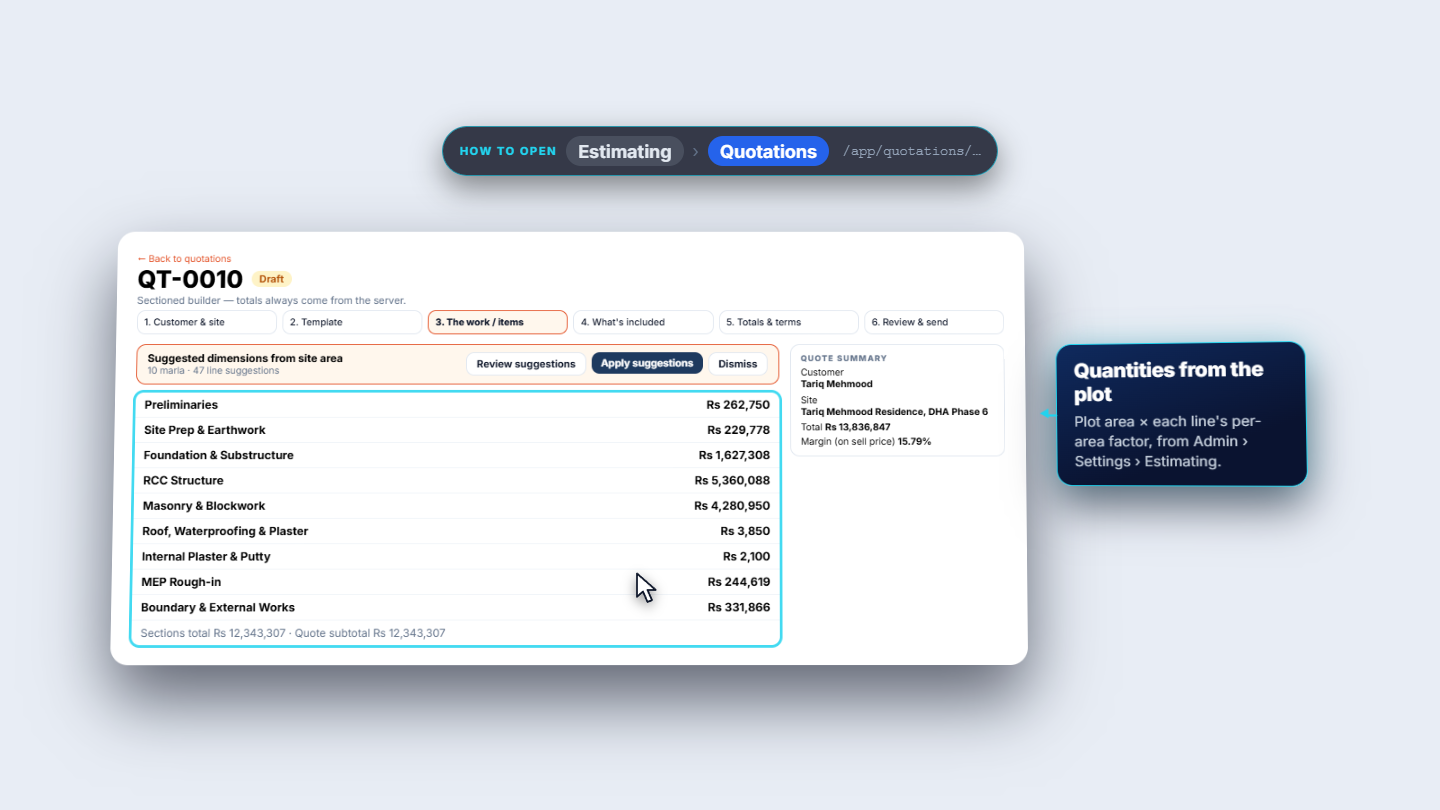
Open step 3, The work / items. The banner reads "10 marla · 47 line suggestions". Click Apply suggestions; the toast reads "Site area applied to lines". Nine sections now carry amounts, for example RCC Structure Rs 5,360,088. The sections total Rs 12,343,307.
Estimator step with the site area suggestion and the sections with their totals
3
Set the totals, terms and payment schedule
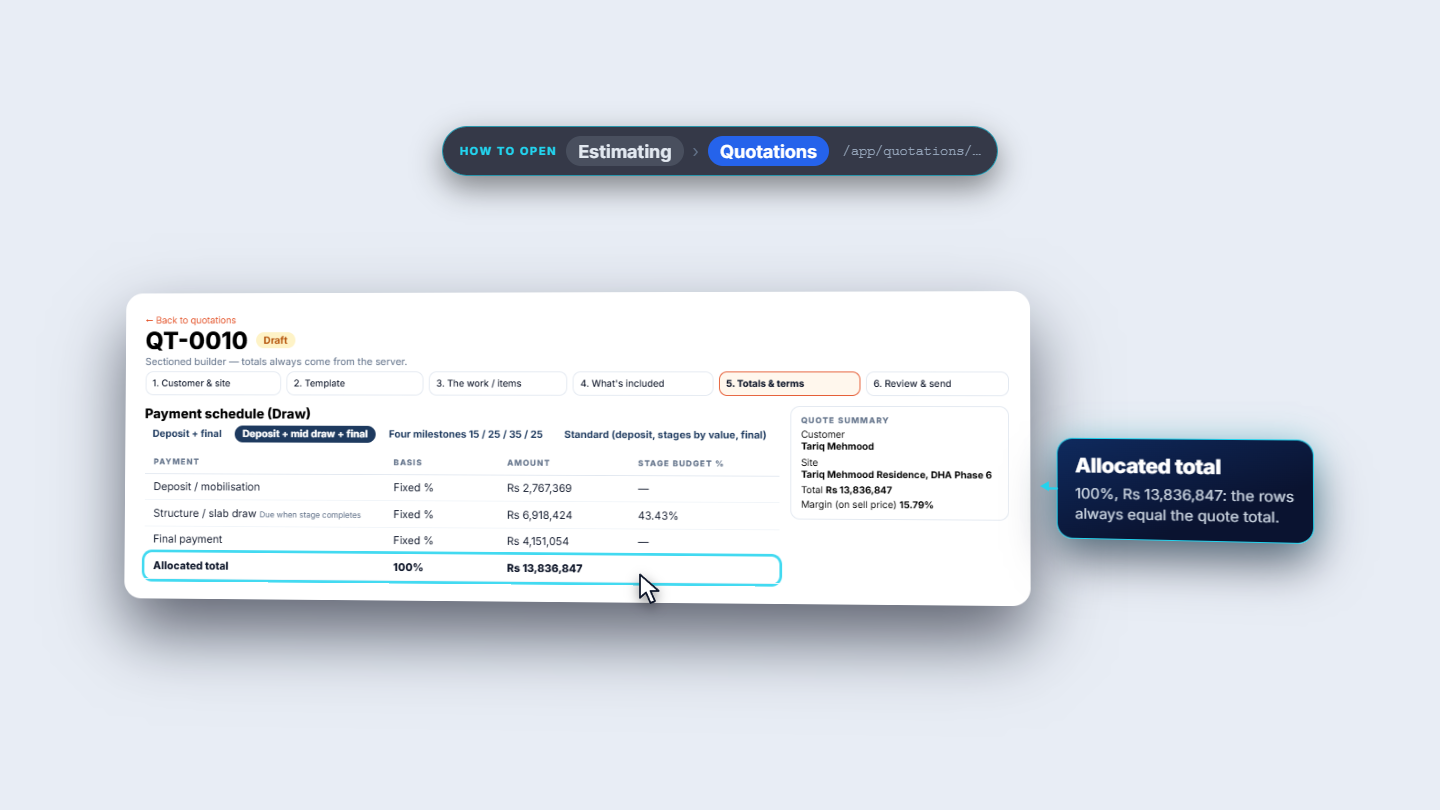
In Totals & terms read the subtotal Rs 12,343,307, the 5% customer discount Rs 617,165 and GST at 18%. The grand total is Rs 13,836,847; the estimated cost is Rs 9,874,646, a margin of 15.79% on the sell price. Set Valid until (10-Nov-2026) and the committed delivery (31-May-2027) and save: "Quotation saved". Then apply the payment pack Deposit + mid draw + final: "Draw schedule saved". The rows are Deposit / mobilisation Rs 2,767,369 (20%), Structure / slab draw Rs 6,918,424 (50%) and Final payment Rs 4,151,054 (30%), allocated 100%.
Payment schedule with the Deposit, Structure and Final draws adding up to 100 percent
4
Send the quotation and record the approval
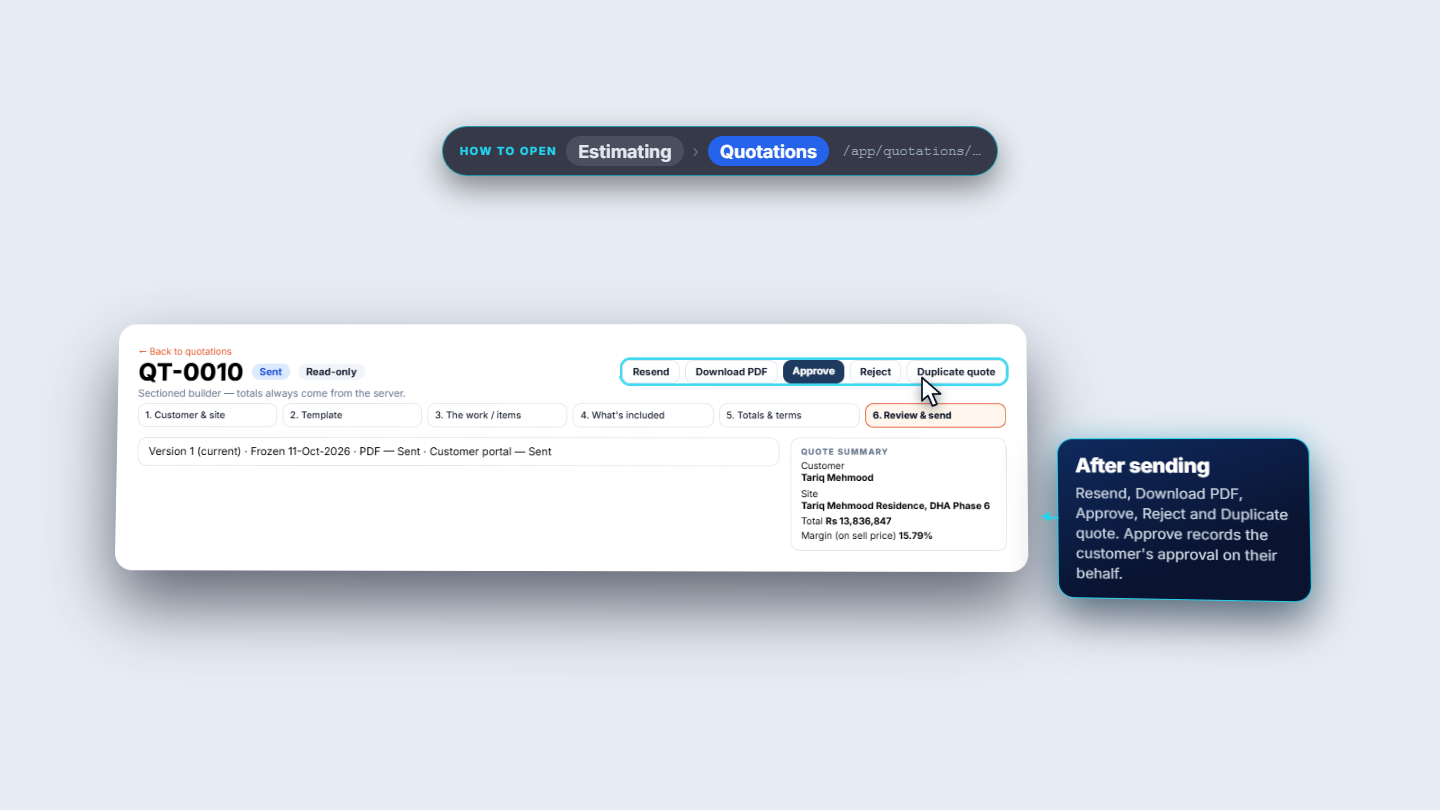
In Review & send, a quote without draws says "Not ready to send"; after the pack it says "Ready to send". Click Send quote, choose PDF and Customer portal (Email and SMS say "Not set up for your organisation yet."), click Continue, check "Confirm who receives this quotation" and click Send now. The status becomes Sent and read-only, version 1 is frozen. Click Approve. Under "How was this captured?" choose Staff on behalf, Signed PDF or In person (here In person), add a note and confirm. The page reads "This version is approved. In person".
Approve quotation dialog asking how the approval was captured
5
Convert the approved quote to a project
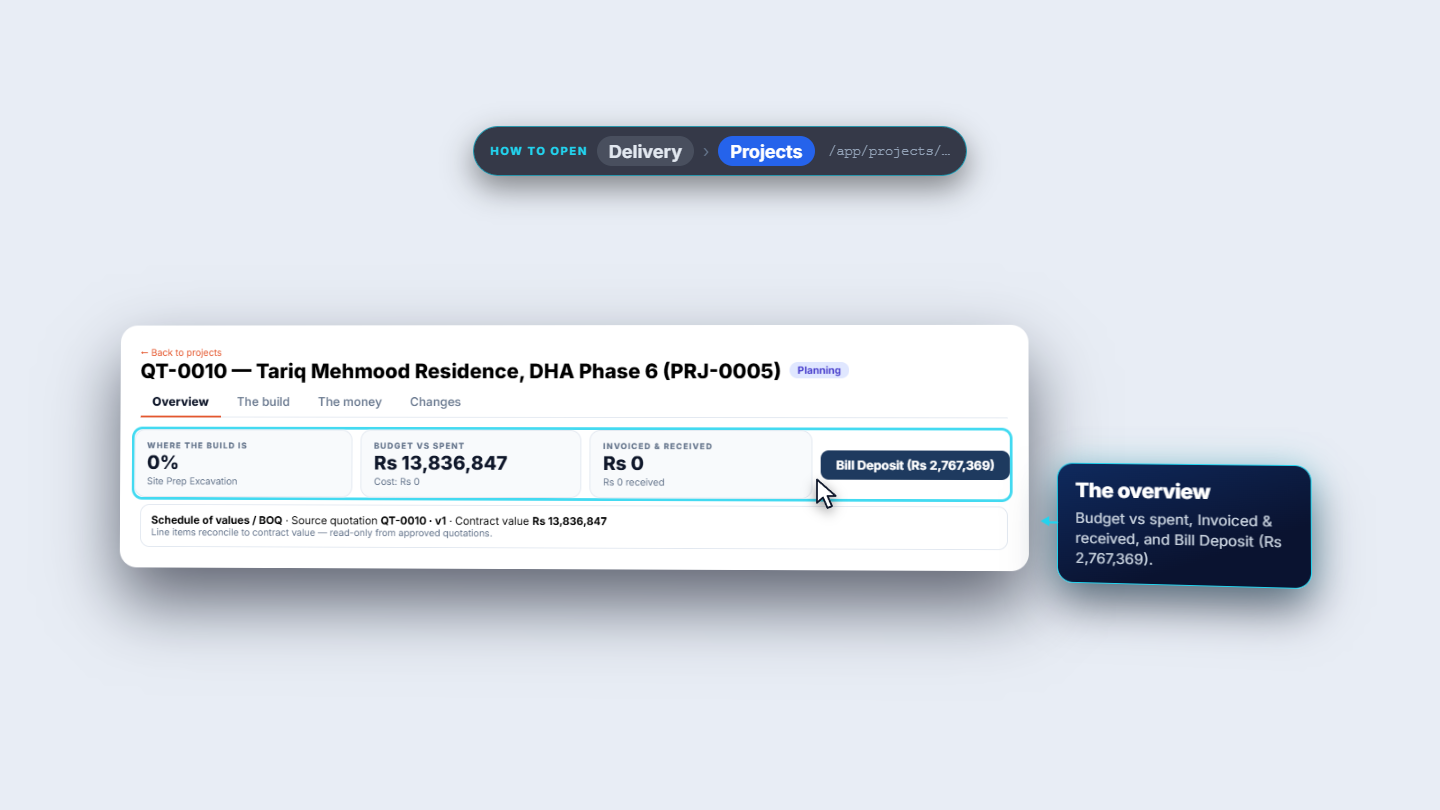
Click Convert to project. The project PRJ-0005 opens in Planning with contract CON-0004 and a contract value of Rs 13,836,847. The overview shows Bill Deposit (Rs 2,767,369). Open the Payment tab: the schedule is Deposit 20% due 11-Oct-2026, Stage draw 50% tentative 28-Feb-2027, Final 30% tentative 30-Jun-2027.
New project PRJ-0005 with its contract value and the Bill Deposit button
6
Bill the deposit
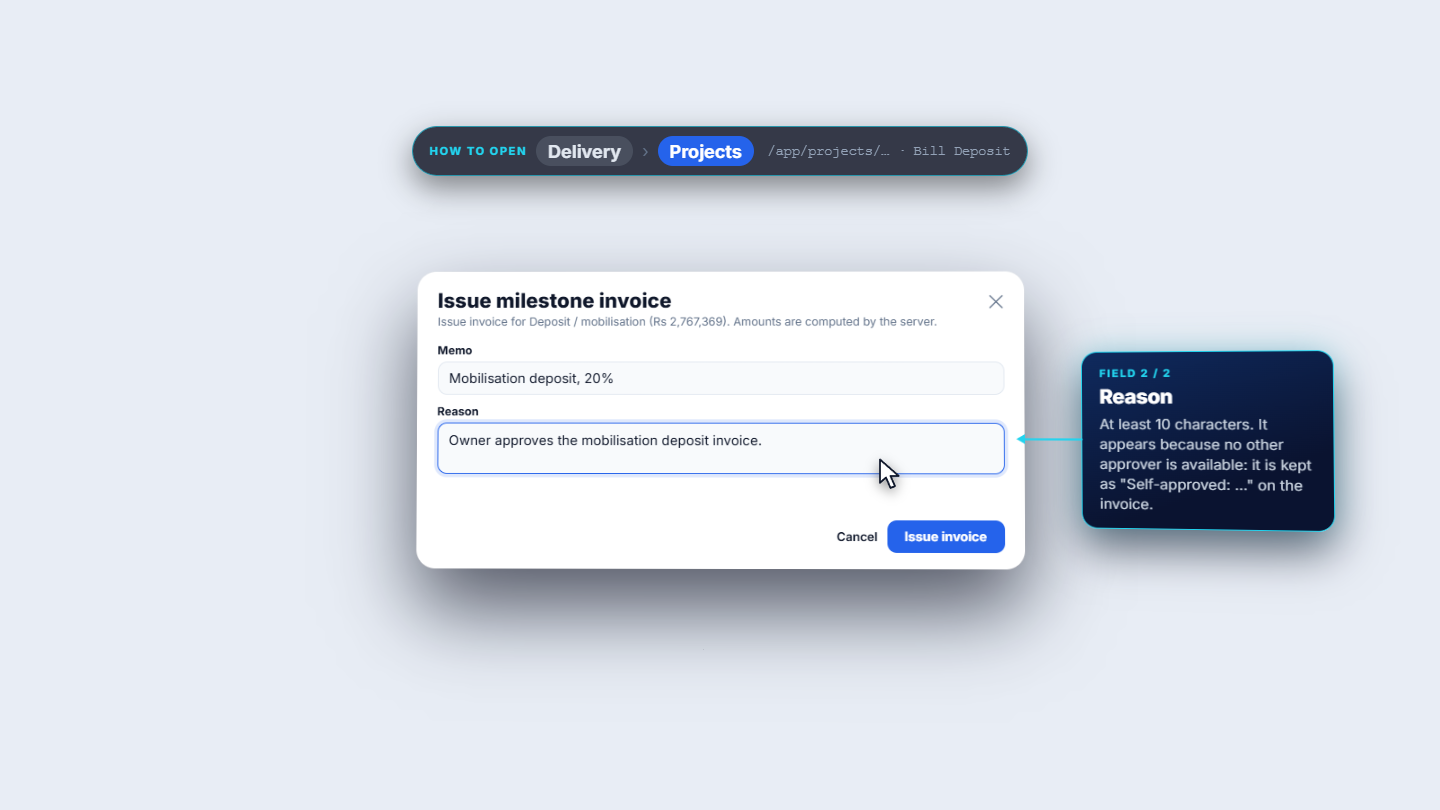
Click Bill Deposit. The dialog Issue milestone invoice is for Deposit / mobilisation (Rs 2,767,369); amounts are computed by the server. Add a Memo. If no other approver exists, a Reason field appears: give at least 10 characters to approve your own document. The result is invoice INV-000007, Issued, Rs 2,767,369, due 11-Oct-2026. The overview shows "Invoiced & received Rs 2,767,369 · Rs 0 received" and "Customer credit limit: 84.5% used".
Issue milestone invoice dialog for the mobilisation deposit with memo and reason
7
Check the invoice journal
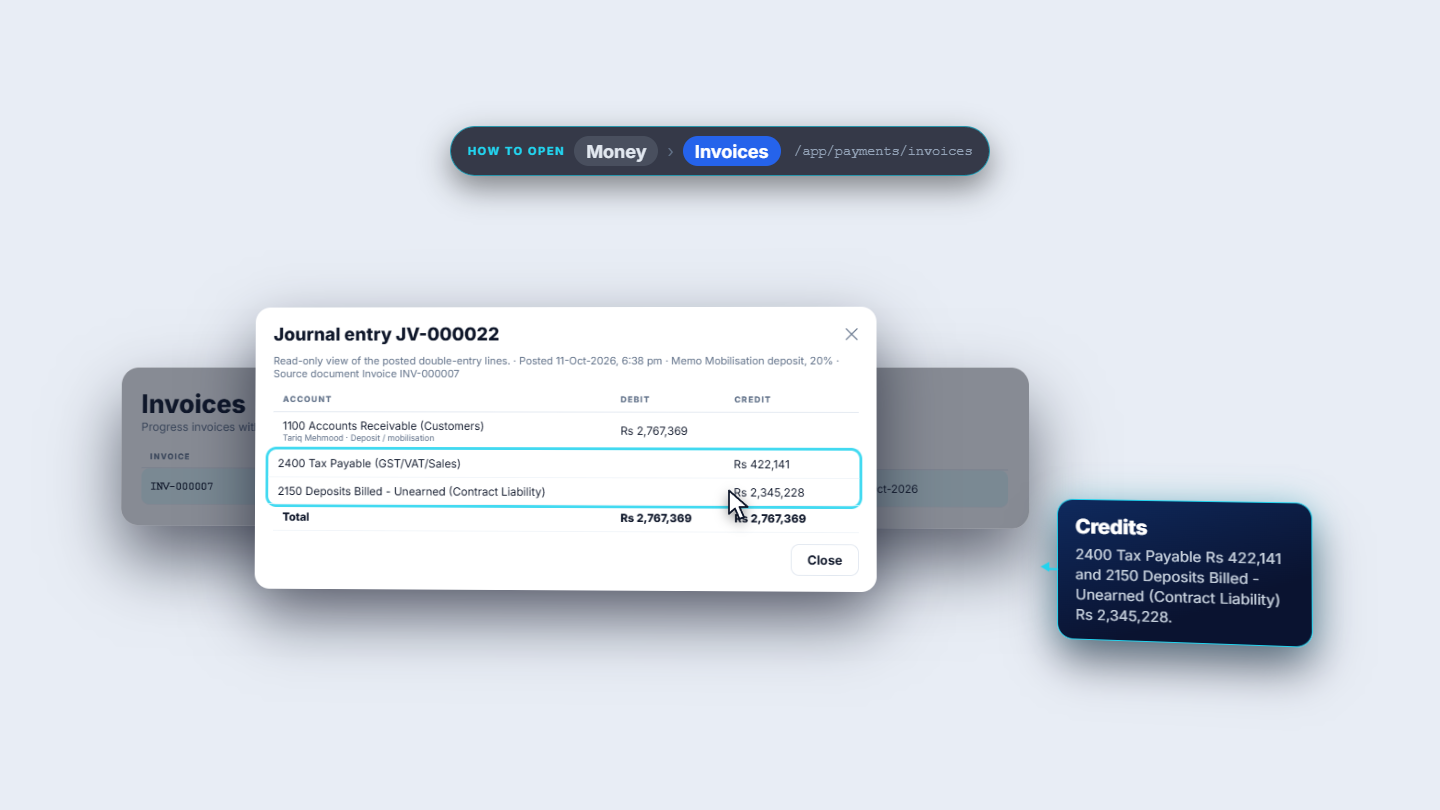
In Payments › Invoices open the row actions (Download PDF, View journal, Record receipt, Apply deposit, Void invoice) and choose View journal. JV-000022 debits 1100 Accounts Receivable (Customers) Rs 2,767,369 for Tariq Mehmood, and credits 2400 Tax Payable Rs 422,141 and 2150 Deposits Billed - Unearned (Contract Liability) Rs 2,345,228.
Journal JV-000022 with the receivable debit and the tax and unearned deposit credits
8
Record the receipt
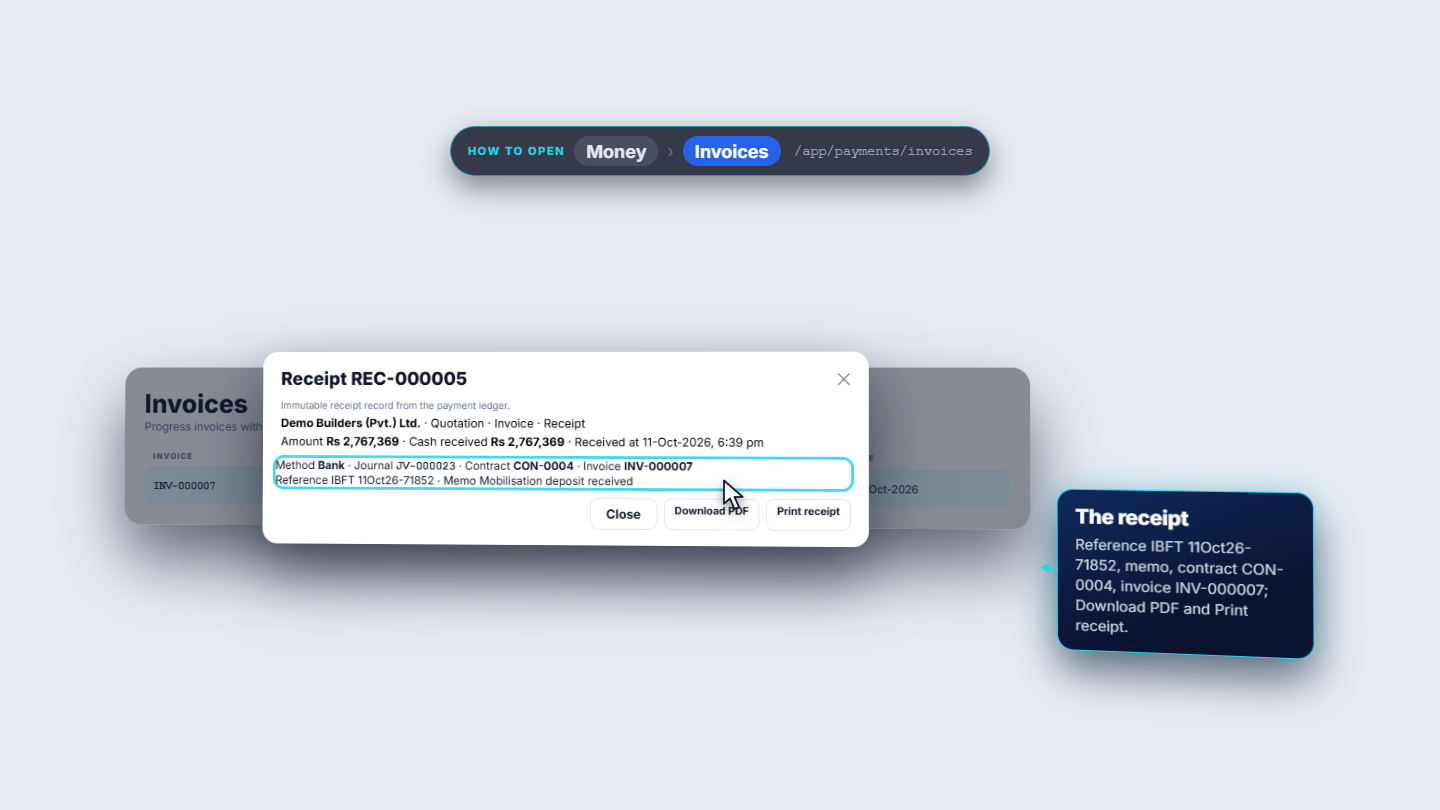
From the same row choose Record receipt: "Record payment against INV-000007. Outstanding: Rs 2,767,369." Leave the gross settled as the whole amount. Withholding tax is optional (the dialog suggests Rs 83,021, 3%); leave it at 0 here. Choose Payment method Bank, Bank account Operating bank, Reference (IBFT 11Oct26-71852) and Memo (Mobilisation deposit received), then save. You get REC-000005, Rs 2,767,369, method Bank, with journal JV-000023 and contract CON-0004. The invoice reads Paid.
Receipt REC-000005 for the mobilisation deposit with method Bank
Check it worked
QT-0010 is Sent, then approved (In person), then converted; PRJ-0005 shows contract value Rs 13,836,847.
INV-000007 for Rs 2,767,369 reads Paid.
JV-000023 debits 1001 Bank Rs 2,767,369 and credits 1100 Accounts Receivable, so the receivable for the invoice is zero. The unearned deposit liability (2150) stays until stage invoices recoup it.
Common mistakes
Mistake
What you see
Fix
Sending before the draws exist
"Not ready to send — Set up the payment schedule (draws)"
Apply a payment pack, then send
Expecting email or SMS
"Not set up for your organisation yet."
Send by PDF and Customer portal
Editing the payment schedule on the project
"cannot be edited here"
Raise a change order on the quotation
Billing the deposit with no other approver
A Reason field appears
Give a reason of at least 10 characters
Quick reference
Item
Meaning / rule
Draw schedule
Always equals the quote total
Approve
Staff on behalf, Signed PDF or In person
Deposit invoice
Debit receivable, credit tax payable and unearned deposits
Receipt
Debit Bank, credit receivable
Withholding tax
Optional; the dialog only suggests an amount
Frequently asked questions
Why does Review & send say "Not ready to send"? The payment schedule (draws) is not set up yet. Apply a payment pack, and the quote reads "Ready to send".
Can I change the payment schedule after converting to a project? Not on the project. It comes from the signed quotation and cannot be edited there; raise a change order on the quotation to change it.
Why do I have to give a reason when I bill the deposit? When no other approver is available, the app asks for a reason of at least 10 characters so you can approve your own document.
What accounts does the receipt post to? The receipt journal debits 1001 Bank and credits 1100 Accounts Receivable for the customer, so the invoice's receivable becomes zero.