How to collect a fee, take an advance and print a fee statement
A parent comes to the fee counter and you want everything about that family's money on one page. This guide shows how to take a part payment, hold a prepayment as an advance, apply or refund it, and print the statement.
Who it is forFee-counter accountant or school adminTime12 minutesProductSCMLevelBeginner
Before you start
Steps
1
Open the student's Finance tab
Click Students › All Students, open Priya Brown and choose the Finance tab. Read the four figures first: Total Billed, Total Paid, Outstanding and Advance Balance. Below them are three tabs: Invoices, Financial Ledger and Student Advances.
Collect Fee dialog opened from Priya Brown's Finance tab
2
Collect a part payment
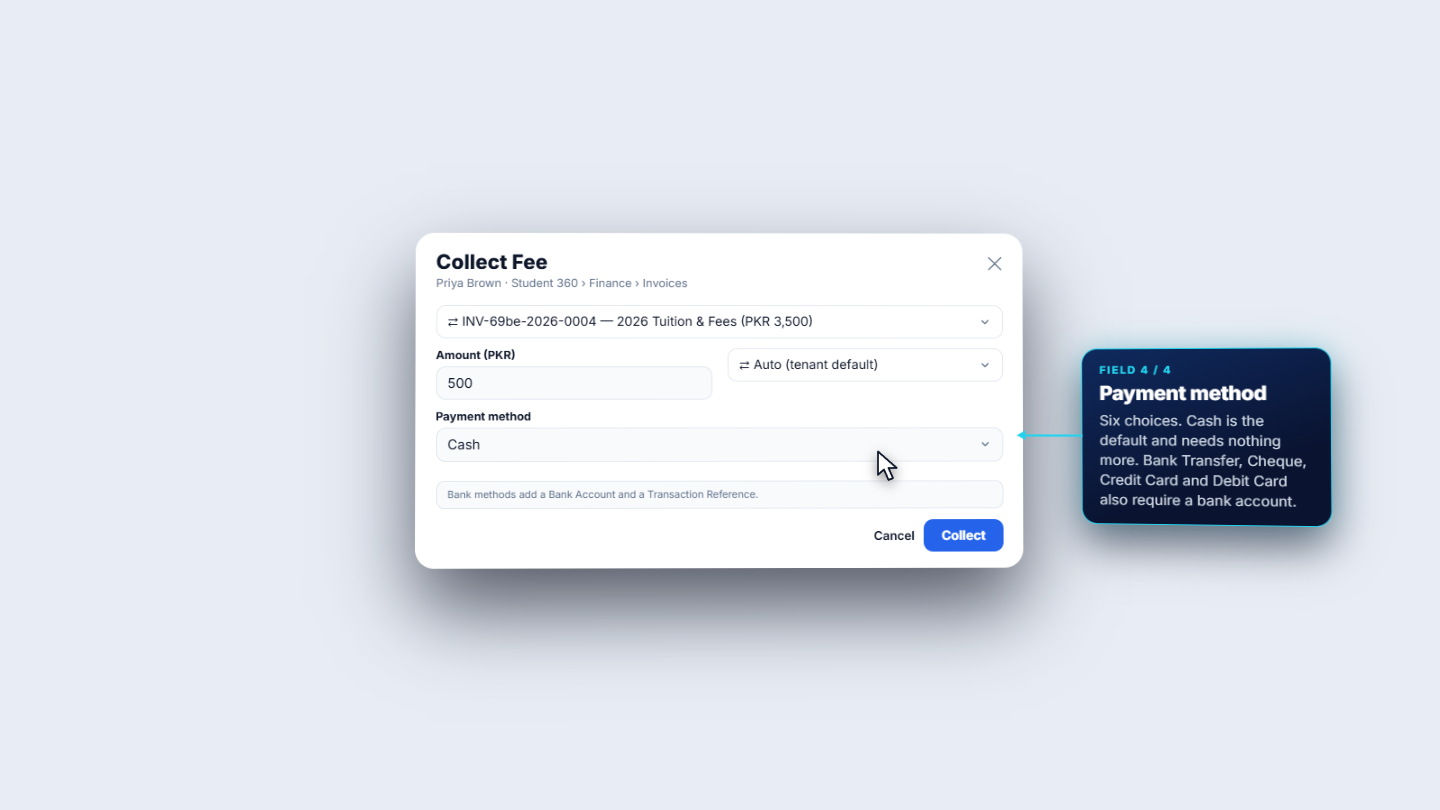
Open Invoices and press Collect Fee. The invoice is already chosen and the Amount (PKR) is prefilled with what is still due. Change it to 500 for a part payment. Leave the allocation method on Auto (tenant default) and set Payment method to Cash. Press Collect. You see the toast Payment collected. The receipt is RCP-2026-E6M3ABPP and the invoice stays Partial.
3
Check the books for that payment
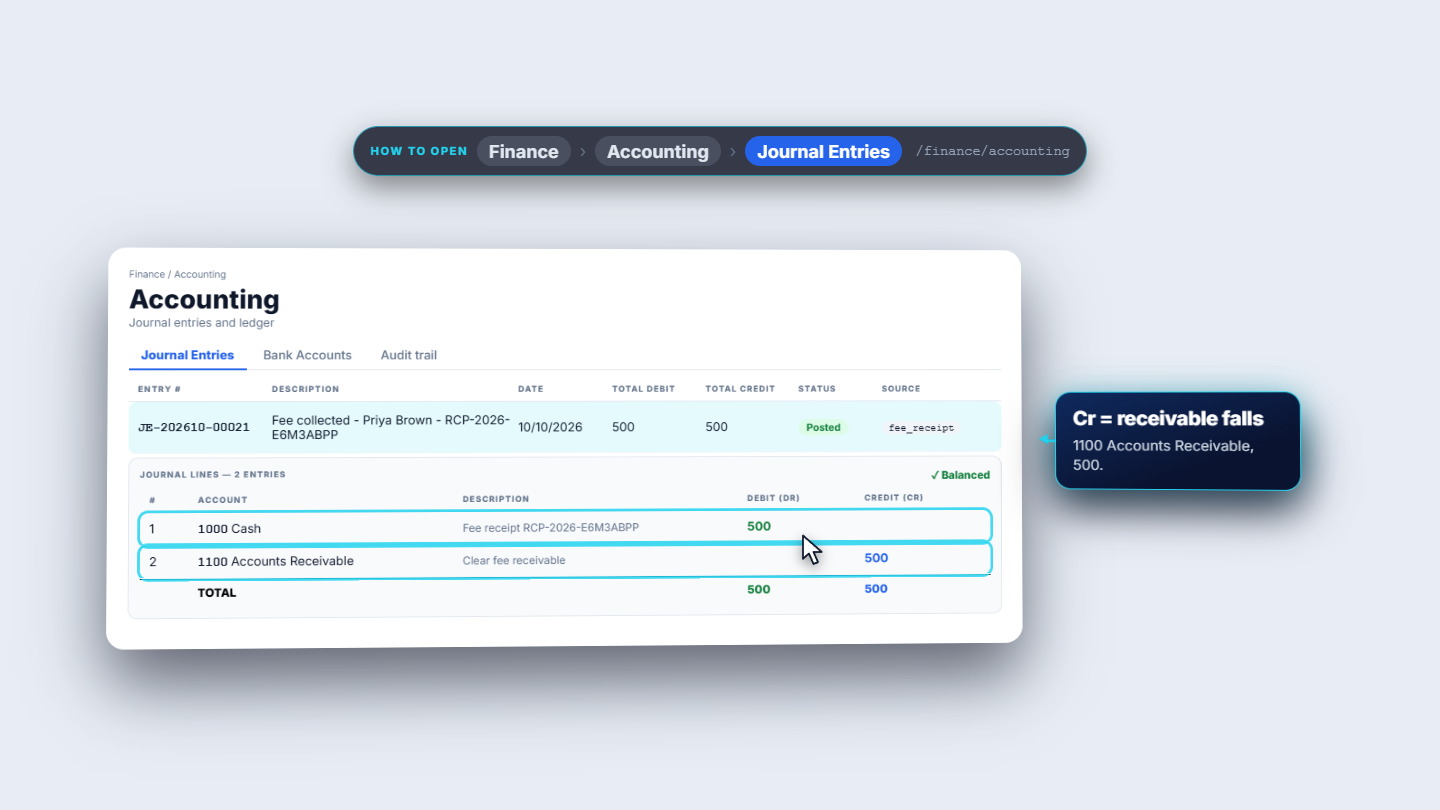
Open Accounting. The payment is journal JE-202610-00021, "Fee collected, Priya Brown". It debits 1000 Cash 500 and credits 1100 Accounts Receivable 500.
Journal entry for the cash payment
4
Receive an advance
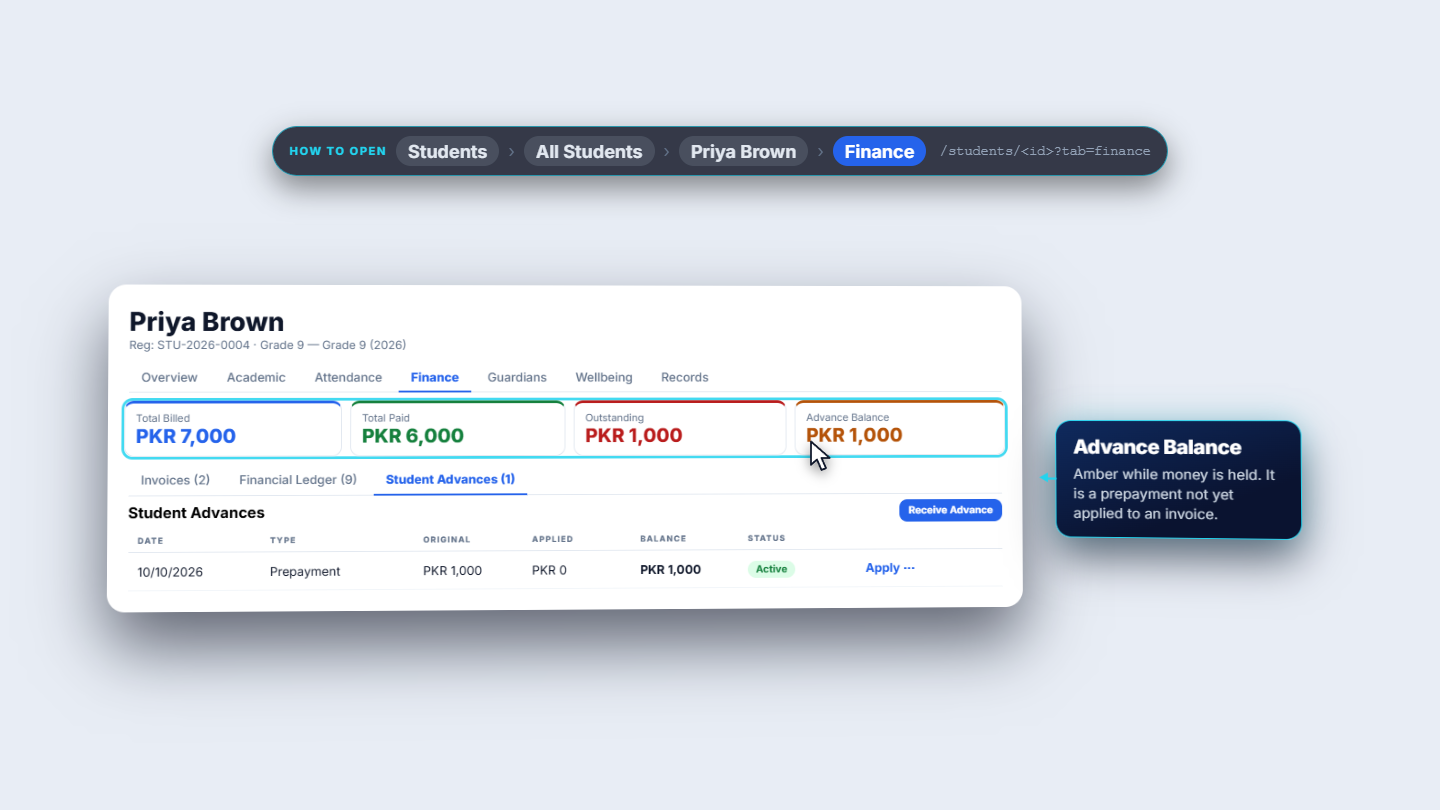
Open Student Advances and press Receive Advance. Enter 1,000 in Amount (PKR), choose Cash and write the optional Notes, for example "Term 2 prepayment". Press Receive. The toast says Advance received. The new row is a Prepayment: original 1,000, applied 0, balance 1,000, status Active. Advance Balance shows 1,000 in amber.
Student Advances tab with a new Active prepayment
5
Apply the advance to the invoice
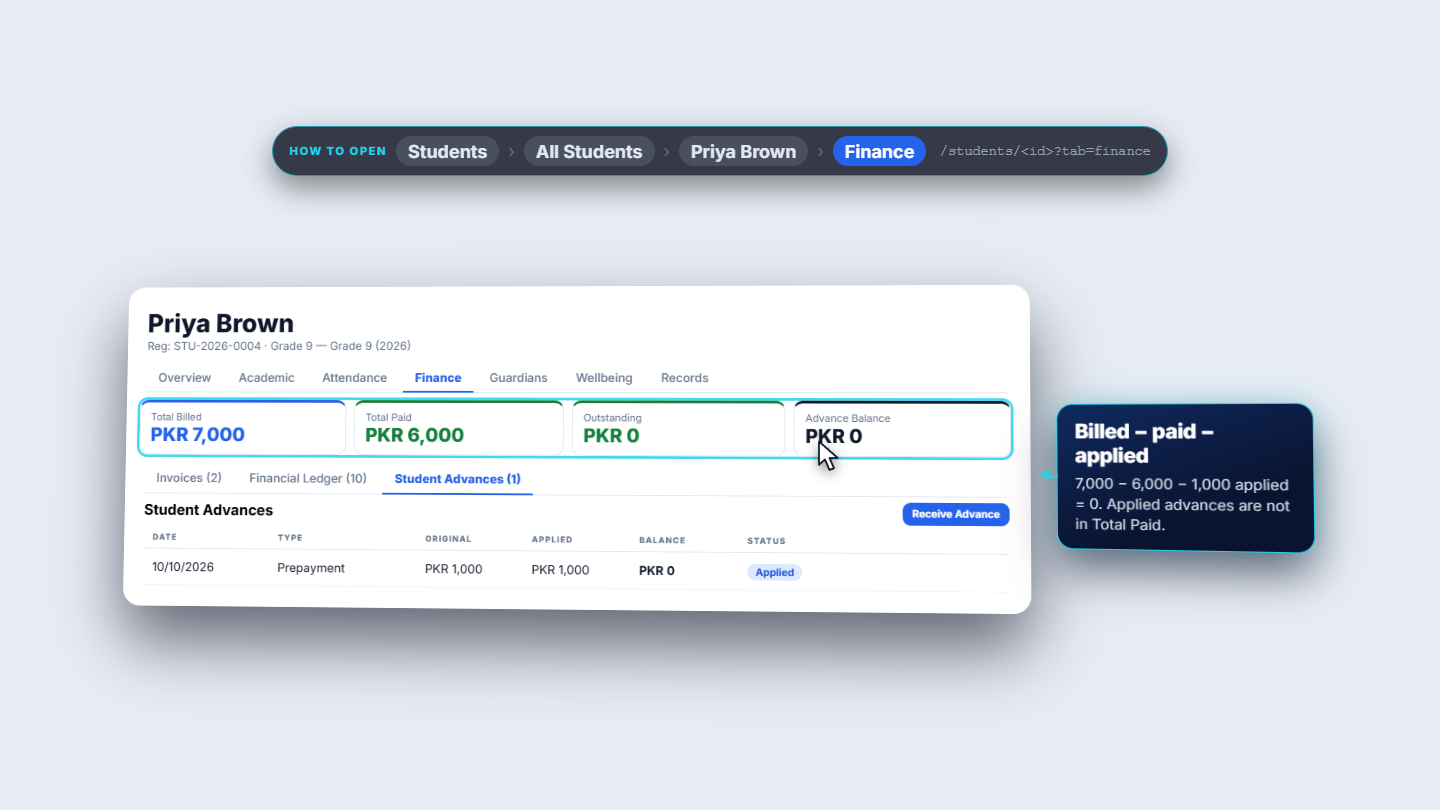
On the advance row open the row menu and choose Apply. In Apply Advance to Invoice the invoice shows 1,000 outstanding. Leave the amount blank to apply the maximum and press Apply. The toast says Advance applied to invoice; the row becomes Applied with balance 0 and Outstanding falls to 0.
Apply Advance to Invoice dialog and result
6
Refund an advance that was not needed
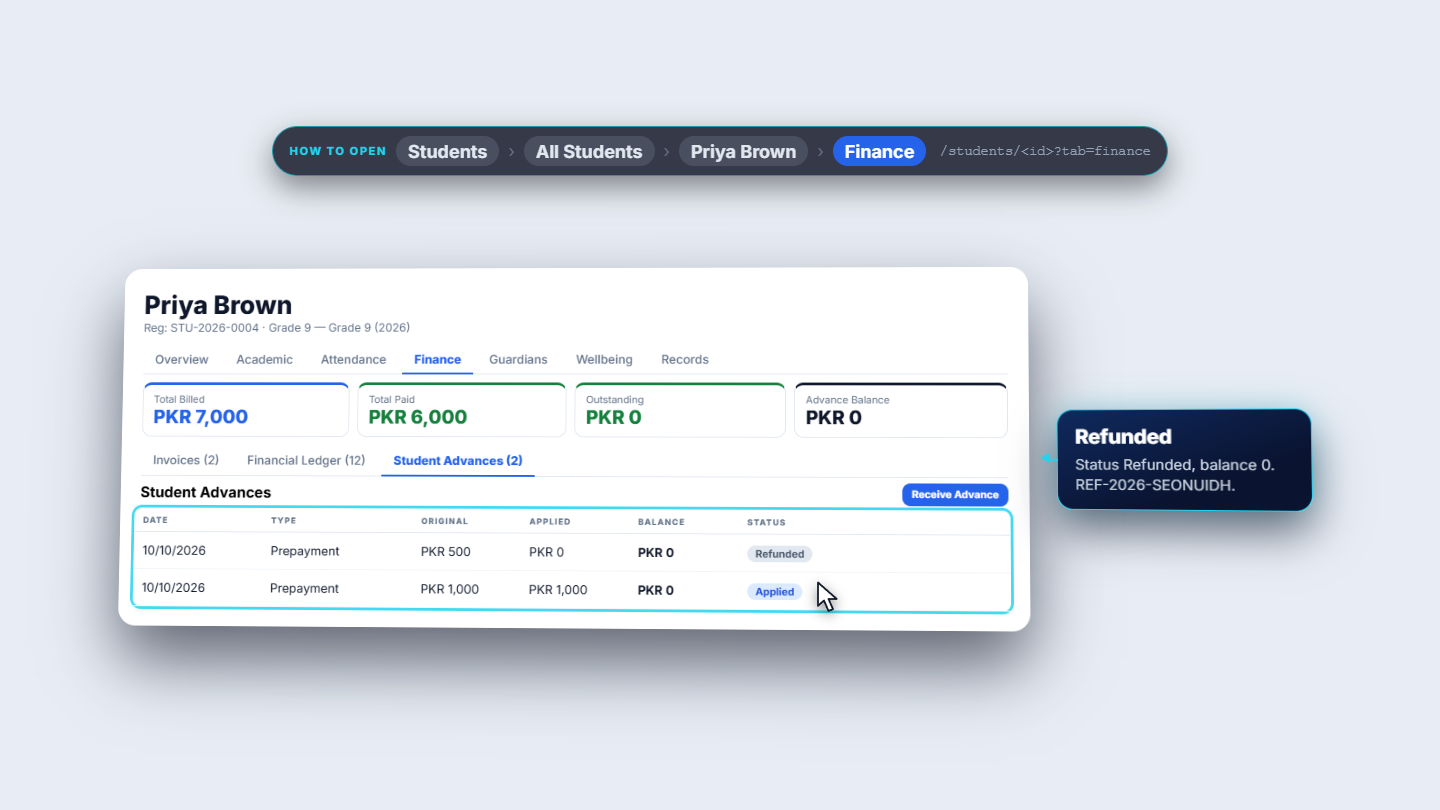
Receive a second advance (here 500). On its row open the menu, choose Refund, type a reason such as "Family moved to Karachi" and press Confirm Refund. The row becomes Refunded with balance 0 and the refund number is REF-2026-SEONUIDH.
Student Advances after a refund: row Refunded, balance 0
7
Read the ledger and print the statement
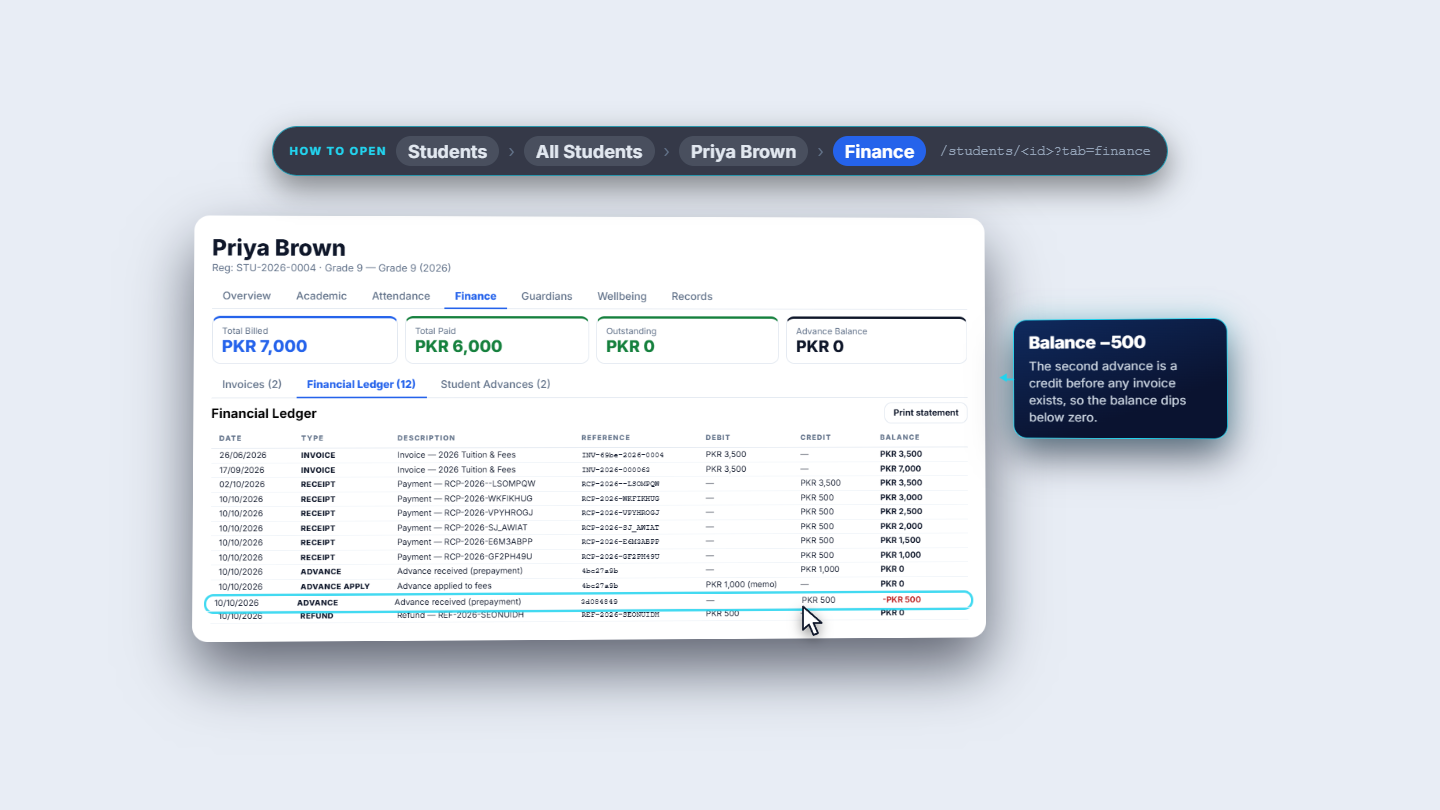
Open Financial Ledger. Each invoice, payment, advance and refund is a row with a running Balance. The advance-applied row reads "1,000 (memo)": it is shown for information and does not move the balance. Press Print statement to get a printable Fee statement with the student, Outstanding: PKR 0, the time it was generated and the whole ledger. Give it to the parent.
Financial Ledger with the running balance
Check it worked
Collect Fee shows the toast Payment collected and the invoice reads Partial until it is fully paid.
After applying the advance, Advance Balance is PKR 0 and Outstanding is PKR 0.
The refunded row shows Refunded with balance 0.
The printed statement ends at Outstanding: PKR 0.
Common mistakes
Mistake
What you see
Fix
Choosing a bank method but no bank account
The dialog adds a required Bank Account field
Choose the receiving account, or use Cash if cash was handed over
Expecting an applied advance in Total Paid
Billed minus Paid does not equal Outstanding
Subtract the applied advance as well
Expecting a partial advance refund
Refund returns the whole balance
Apply the part you need first, then refund the rest
Quick reference
Item
Meaning / rule
Total Billed
All invoices for the student
Total Paid
Payments received (applied advances are not included)
Outstanding
What is still due
Advance Balance
Prepayments not yet applied
Memo row
Shown for information, does not change the ledger balance
Frequently asked questions
Why does Billed minus Paid not equal Outstanding? Total Paid does not include applied advances. Subtract the applied advance as well.
Can I refund part of an advance? No, a refund returns the whole balance. Apply the part you need to an invoice first, then refund the rest.
Why does the payment dialog ask for a bank account? Bank Transfer, Cheque, Credit Card and Debit Card add a required Bank Account field. Choose the receiving account, or use Cash if cash was handed over.