How the admission fee, the first invoice and a part payment reach the ledger
A new applicant, Usman Farooqui, applying to Grade 9, moves money three times: a 2,500 rupee application fee, a first invoice of 14,000 rupees at enrolment, and a part payment of 6,000. This guide follows each one into the journal entries, so the accountant can check every number.
Who it is forCashier / school accountantTime20 minutesProductSCMLevelIntermediate
Before you start
Steps
1
Add the application
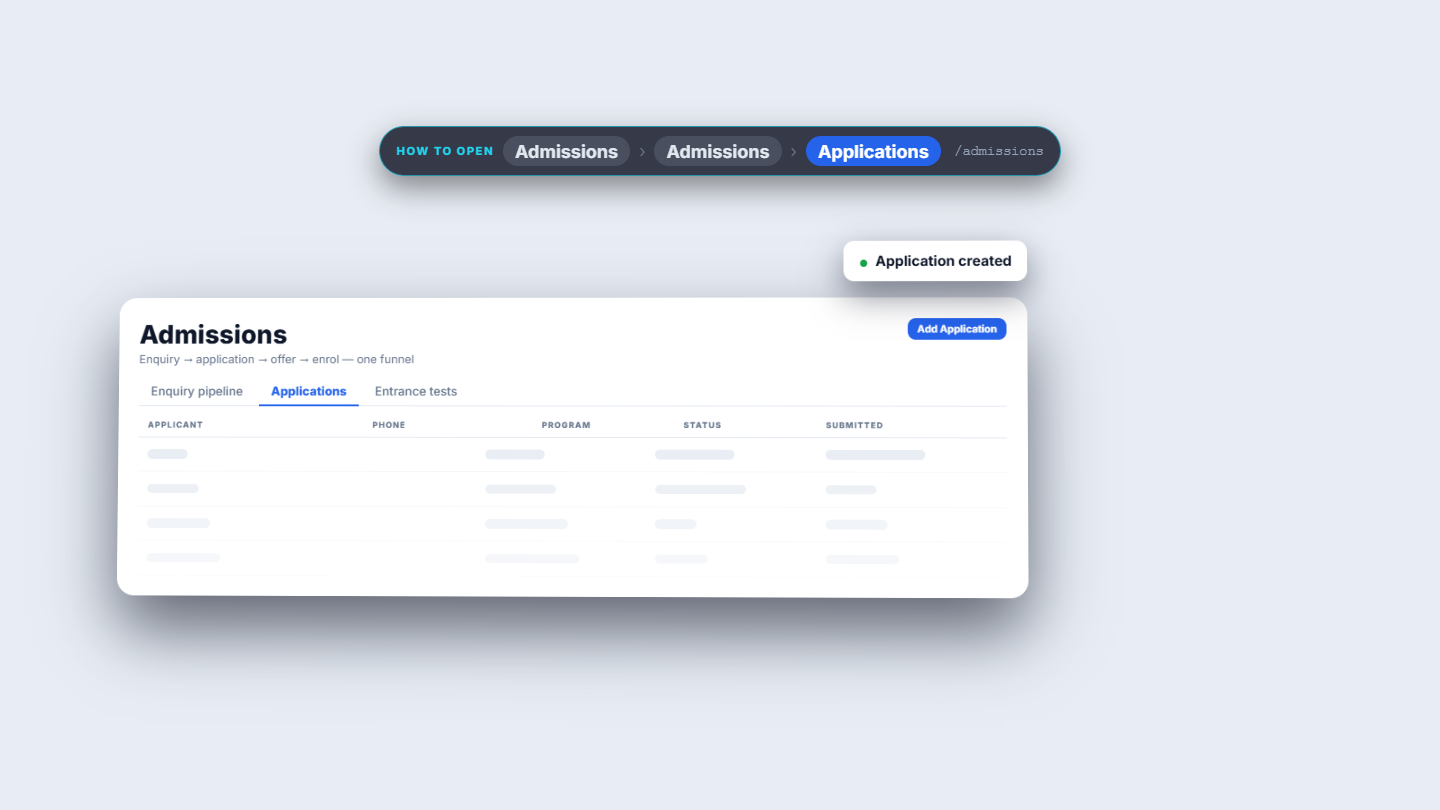
In Admissions, open the Applications tab and press Add Application. Fill Usman's name, birth date, program Grade 9 and the guardian, Adeel Farooqui. The guardian is new, so there is no duplicate warning. Press Submit Application: the toast says Application created. The new row is Pending; the eye opens Review and the wallet records the application fee.
New Admission Application form for Usman Farooqui
2
Record the application fee
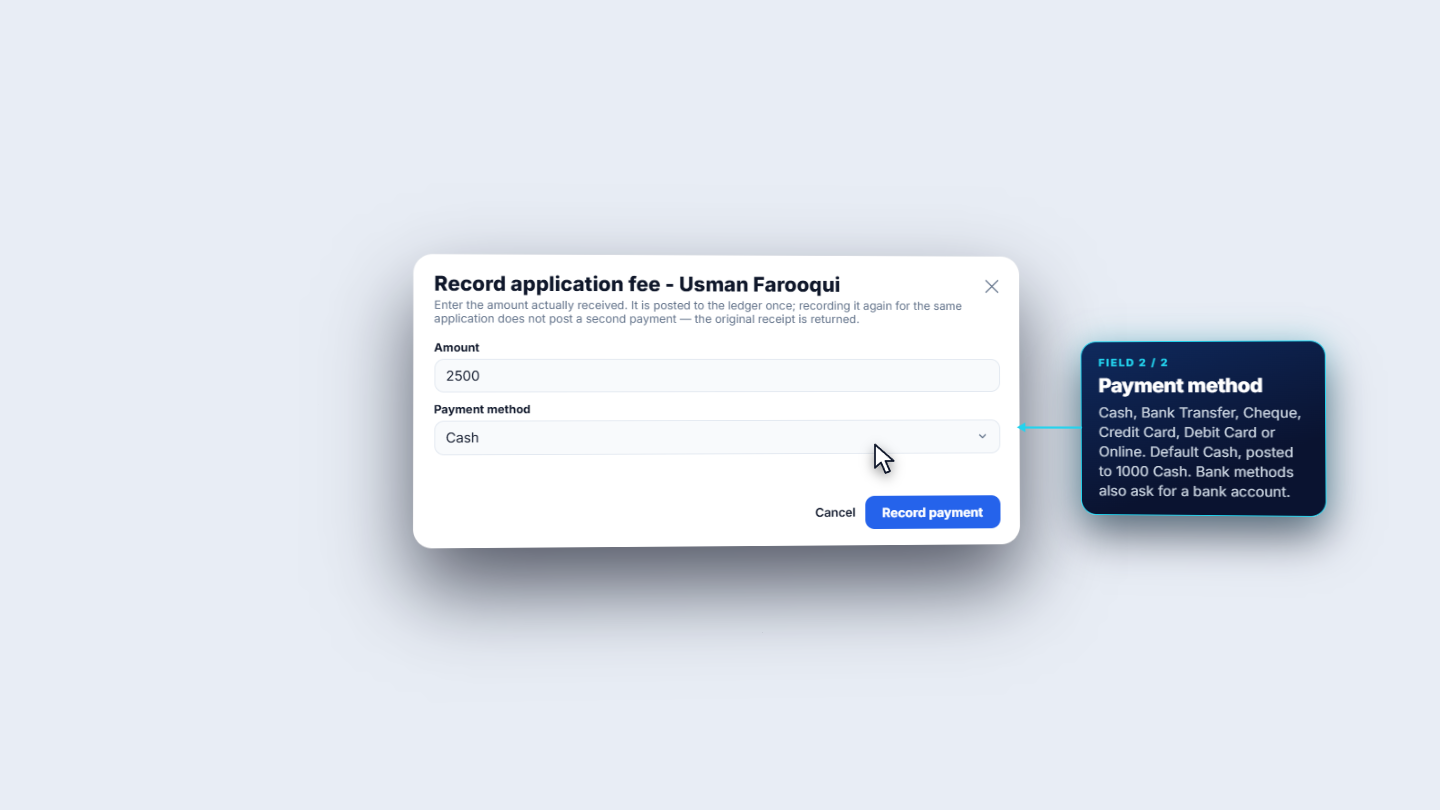
Press the wallet icon. The cashier types the Amount actually received, 2,500 rupees; the app never calculates it. Payment method has six choices: Cash, Bank Transfer, Cheque, Credit Card, Debit Card and Online. Cash is the default; the bank methods also ask for a bank account. The dialog then reads Application fee recorded: PKR 2,500, payment method Cash, a reference the app generates and the journal entry number, JE-202610-00038. In Review the Application fee box shows 2,500, Cash and that journal number, and the wallet is gone. Setting the status to Admitted shows a green Convert to Student button.
Record application fee dialog and receipt
3
Read the fee in the ledger
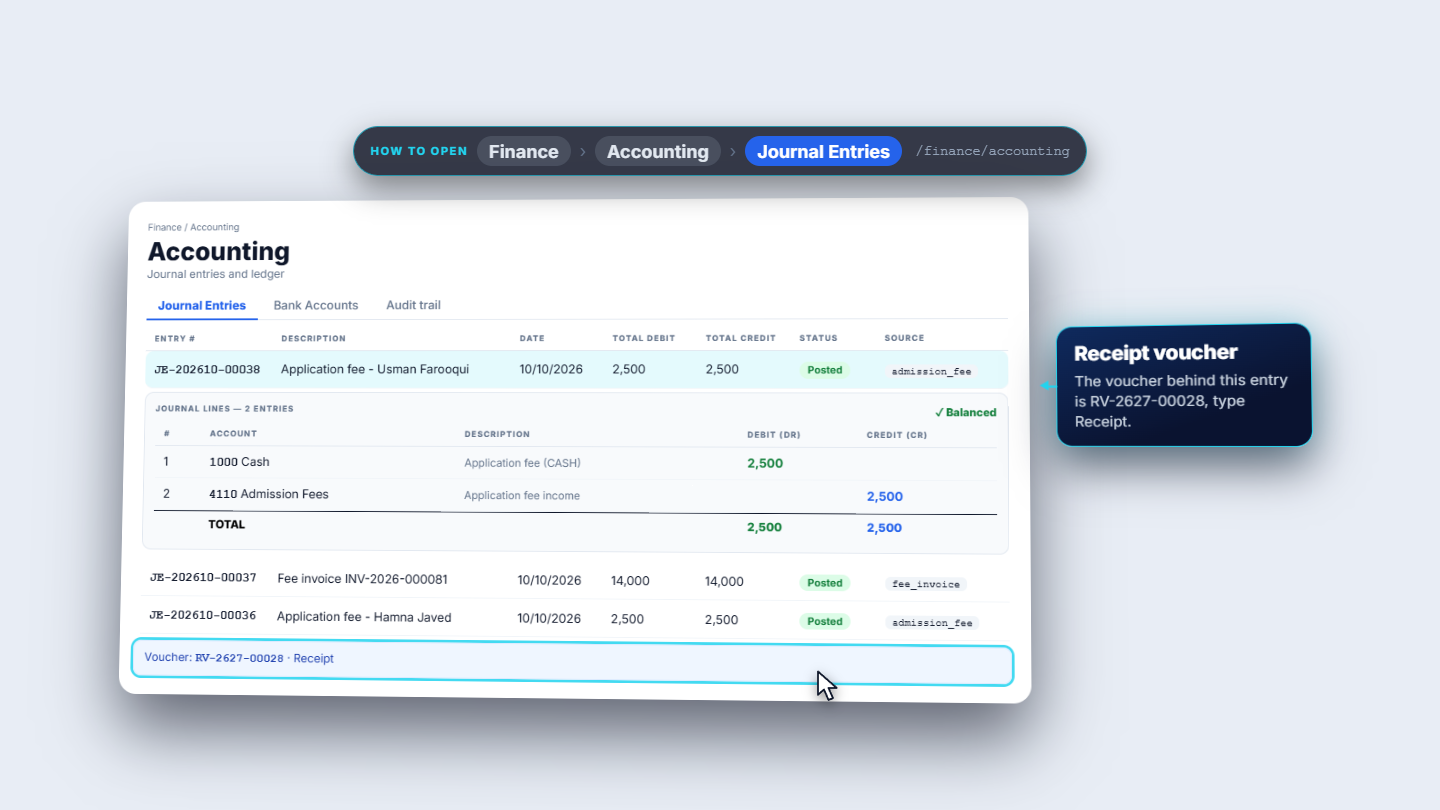
In Accounting › Journal Entries, JE-202610-00038 is listed as Application fee, Usman Farooqui, source admission fee, Posted. Expand it for two lines: Debit 1000 Cash 2,500 and Credit 4110 Admission Fees 2,500. Balanced. The document behind it is a Receipt voucher, RV-2627-00028.
Journal entry for the application fee with two balanced lines
4
Enrol and read the Finance tab
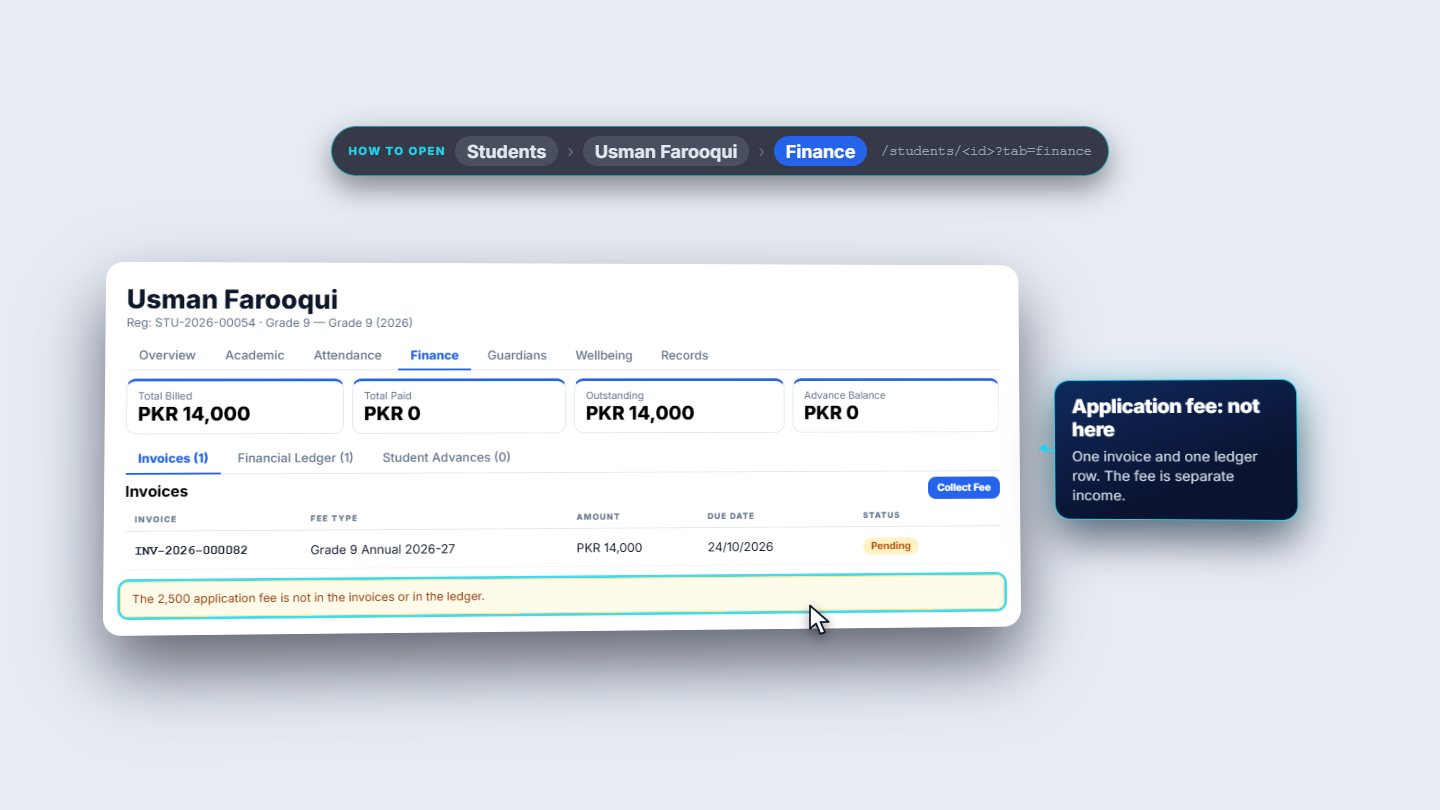
Convert to Student opens Enrol Usman Farooqui. The student, the batch enrollment and the guardian link are created together. Choose the session 2026-2027 and the batch Grade 9 2026 (16 of 60 seats); Section B has 7 of 30 seats. A new guardian is created from the application, Adeel Farooqui, or you can link a different one. Enrol student opens Student 360: STU-2026-00054, Enrolled, Section B, roll number 9B-08. On the Finance tab: total billed 14,000, total paid 0, outstanding 14,000, advance balance 0. One invoice, INV-2026-000082, Grade 9 Annual 2026-27, 14,000 rupees, due 24 October, Pending; the due date is enrolment plus fourteen days. The Financial Ledger has one row, an Invoice with debit 14,000.
Student 360 Finance tab with the first invoice
5
Where the invoice amounts come from, and its journal
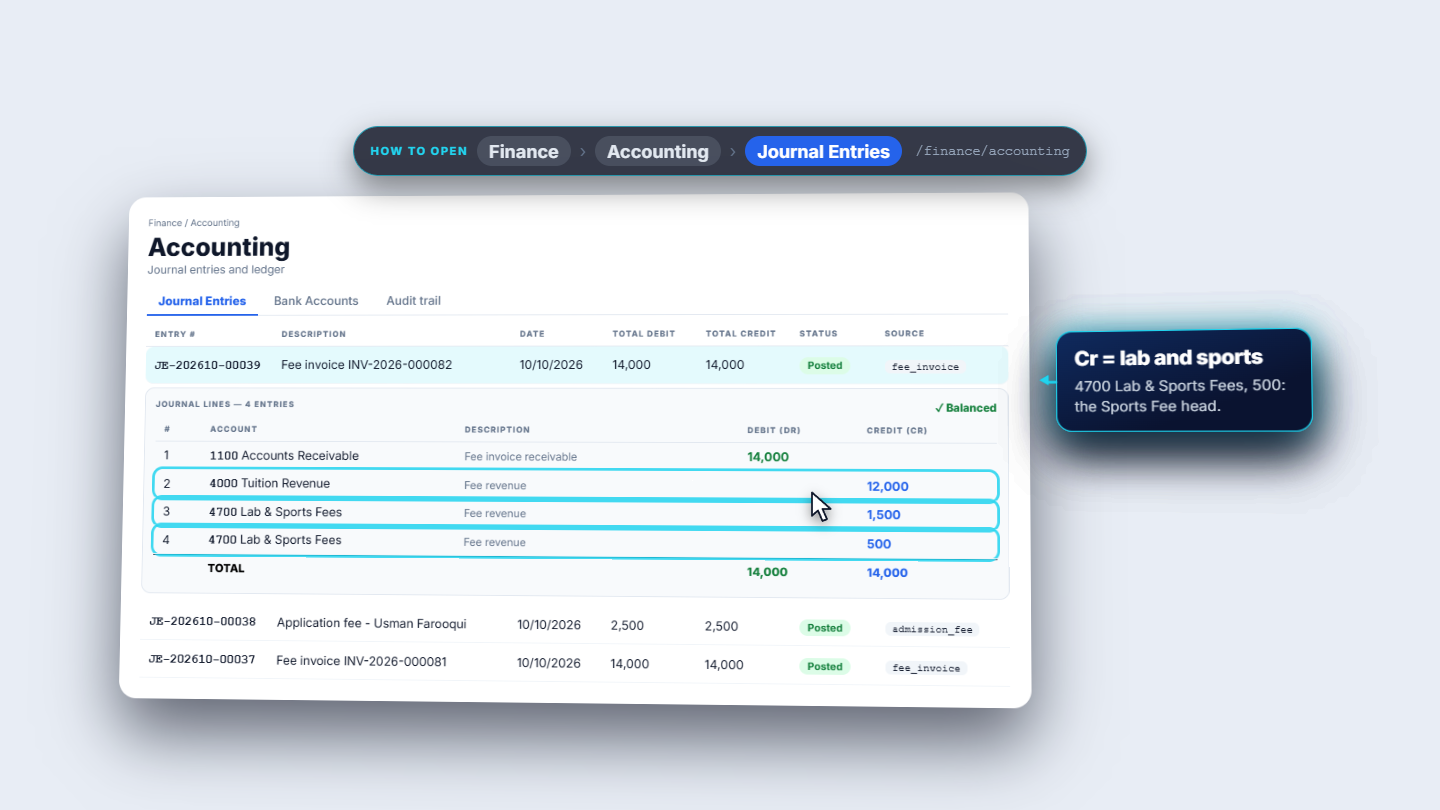
In Fee Management › Fee Profiles, the profile Grade 9 Annual 2026-27 has three fee heads: Tuition Fee 12,000, Lab Fee 1,500 and Sports Fee 500, 14,000 in total for the session 2026-2027. Enrolment also posted JE-202610-00039: Fee invoice INV-2026-000082. Debit 1100 Accounts Receivable 14,000 (what the family owes). Credit 4000 Tuition Revenue 12,000, and 4700 Lab and Sports Fees 1,500 and 500.
Journal entry for the fee invoice: receivable against revenue lines
6
Collect a part payment
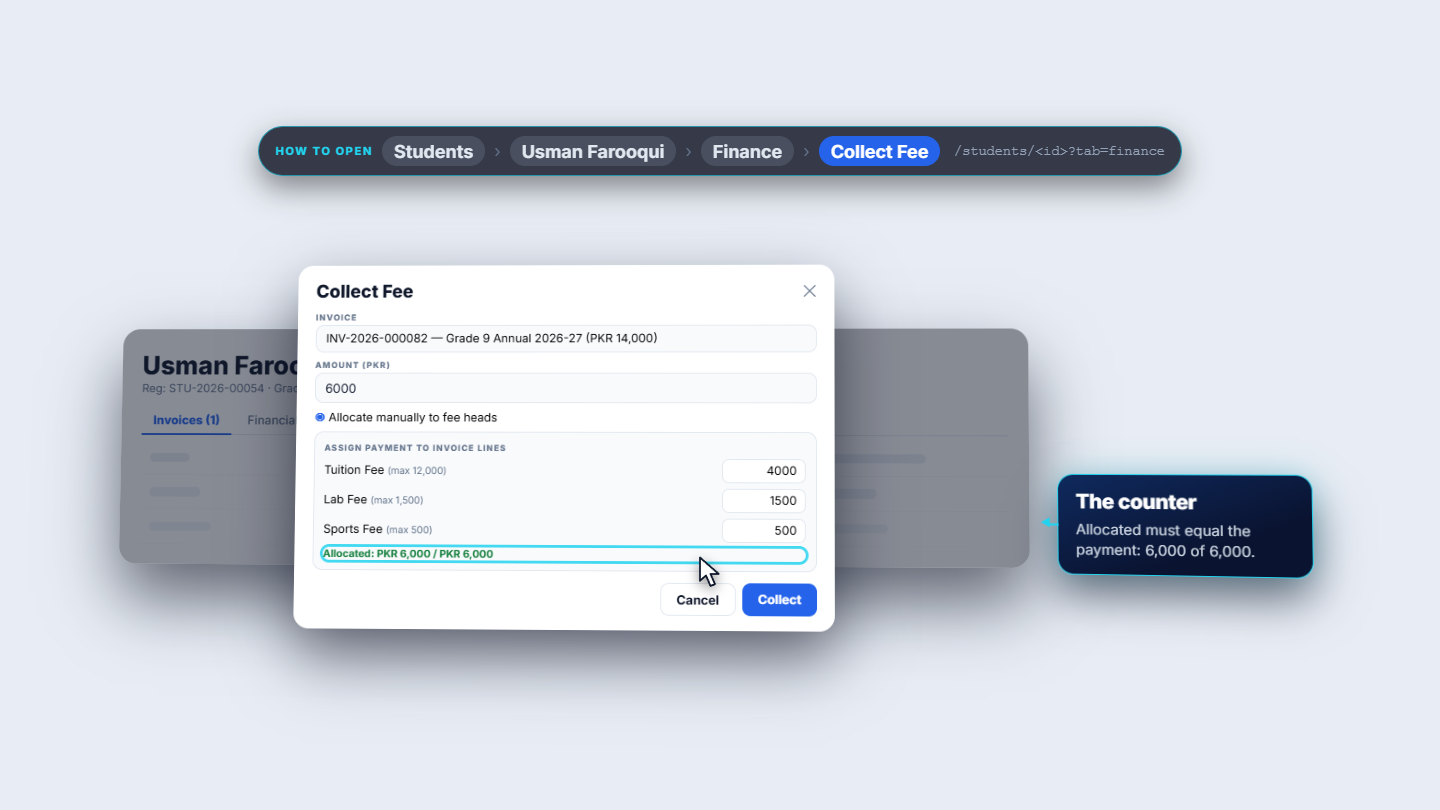
Press Collect Fee for invoice INV-2026-000082. The Amount (PKR) is prefilled with 14,000; type 6,000. Switch on Allocate manually to fee heads to choose which heads the payment pays: Tuition Fee 4,000, Lab Fee 1,500 and Sports Fee 500. The counter reads Allocated 6,000 of 6,000. Payment method Cash needs no bank account or reference. Press Collect.
Collect Fee dialog allocating 6,000 across the fee heads
7
Read the payment in the ledger
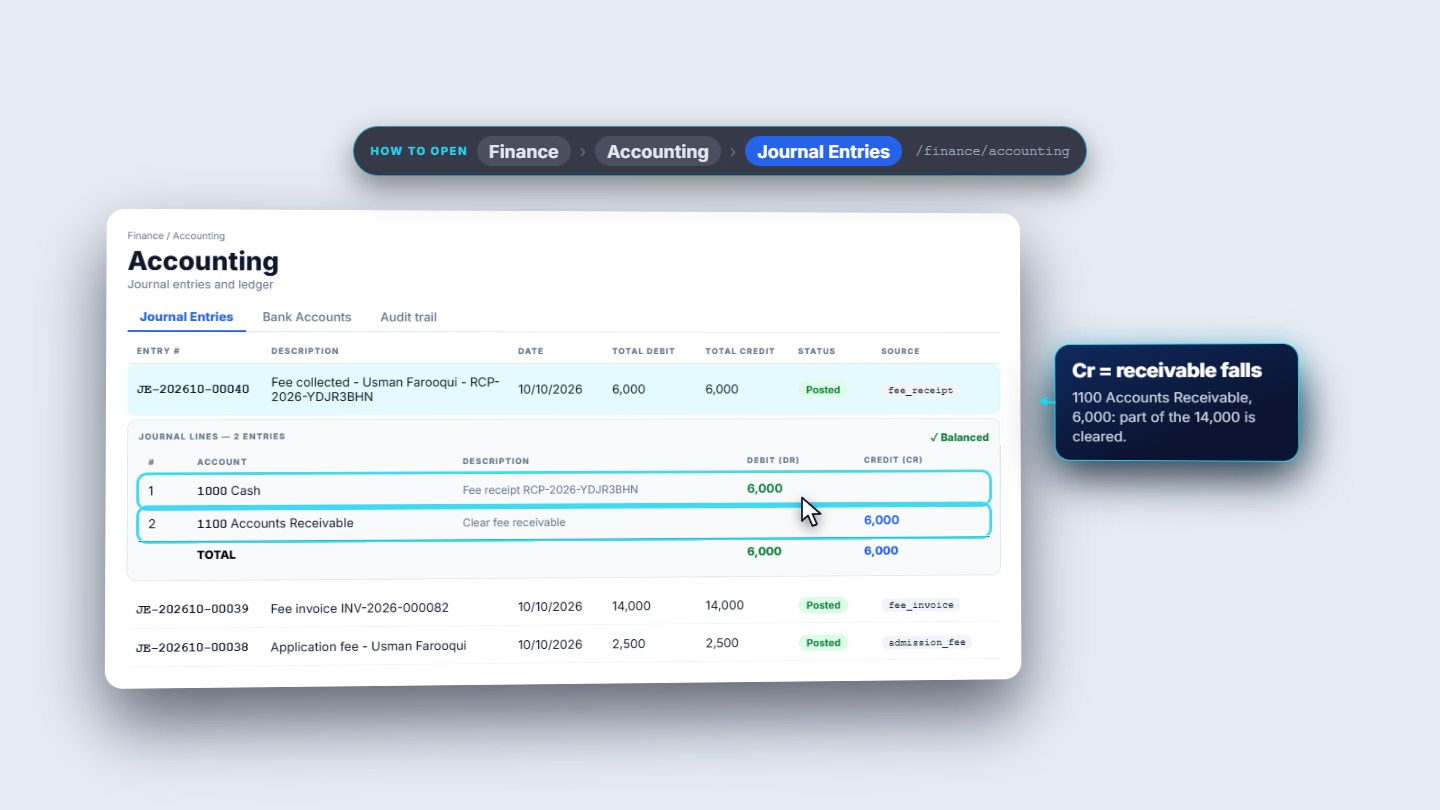
The toast reads Payment collected with the receipt RCP-2026-YDJR3BHN. The invoice is now Partial: total paid 6,000, outstanding 8,000. JE-202610-00040, Fee collected: Debit 1000 Cash 6,000 and Credit 1100 Accounts Receivable 6,000, which clears part of the 14,000. Finance › Vouchers lists the receipts: RV-2627-00028 for the fee and 00029 for the payment, each pointing to its journal entry.
Journal entry for the payment: cash against receivable
8
Prove it in the Trial Balance
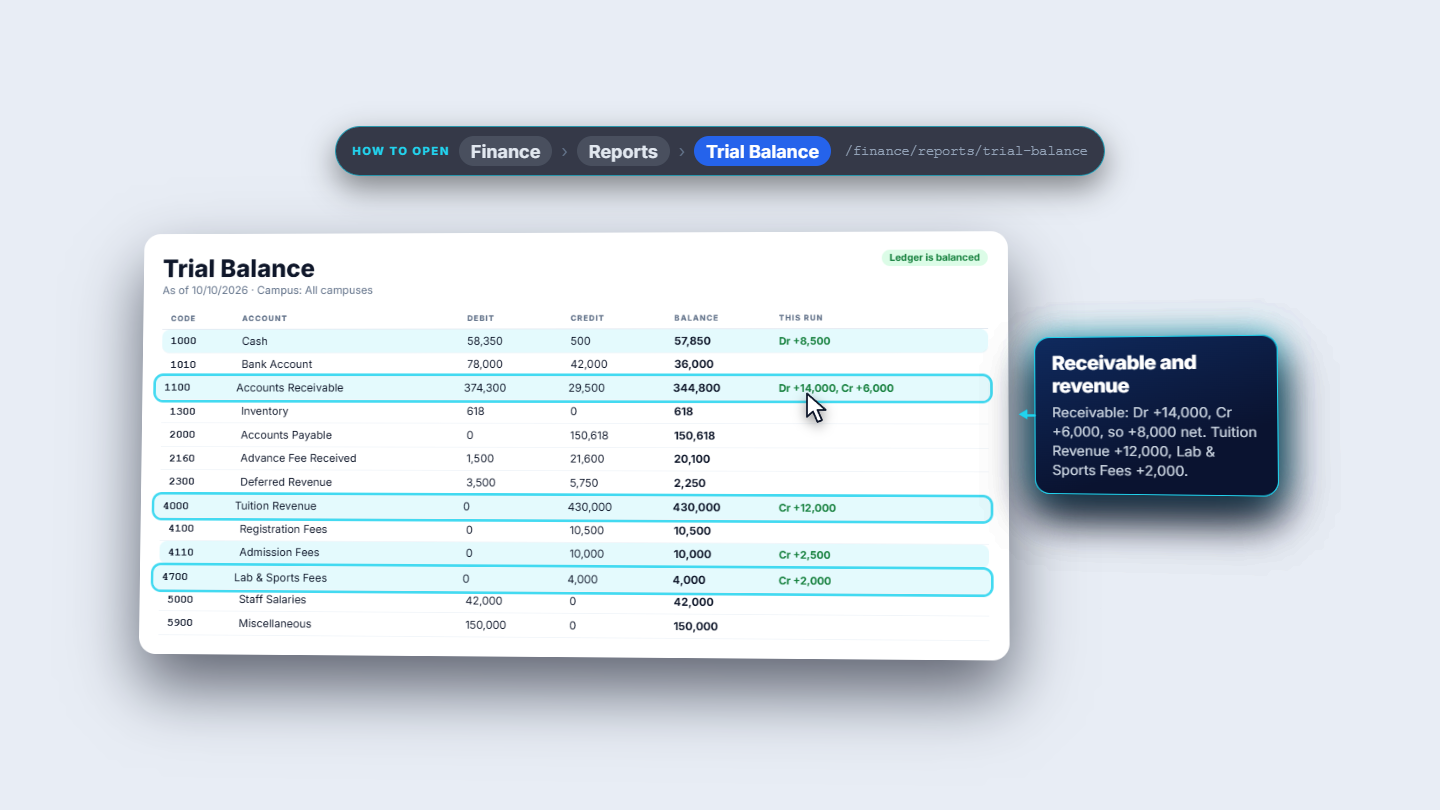
In Finance › Reports › Trial Balance the status reads Ledger is balanced. Cash rose by 8,500, the 2,500 fee plus the 6,000 payment. Admission Fees rose by 2,500. Receivable took 14,000 debit and 6,000 credit, so it rose by 8,000. Tuition Revenue rose by 12,000, and Lab and Sports Fees by 2,000.
Trial Balance showing Ledger is balanced and this run's movements
Check it worked
Three journal entries exist: JE-202610-00038 (fee), 00039 (invoice) and 00040 (payment), each balanced.
The student's Finance tab shows the invoice Partial, paid 6,000, outstanding 8,000.
The Trial Balance says Ledger is balanced.
Common mistakes
Mistake
What you see
Fix
Allocation lines not matching the payment
Manual allocations must sum to the payment amount.
Make the head amounts total the payment
Looking for the application fee on the student's Finance tab
It is not there
Check Accounting › Journal Entries and Vouchers
Expecting the app to suggest the fee amount
The amount is empty
The cashier types what was received
Quick reference
Item
Meaning / rule
Application fee
Dr 1000 Cash, Cr 4110 Admission Fees
Enrolment invoice
Dr 1100 Accounts Receivable, Cr 4000 Tuition Revenue and 4700 Lab and Sports Fees
Payment
Dr 1000 Cash, Cr 1100 Accounts Receivable
Due date
Enrolment date plus fourteen days
Frequently asked questions
Does the application fee show on the student's Finance tab? No. It is the school's own income, posted to Admission Fees, so look for it in Accounting › Journal Entries and in Finance › Vouchers.
Does the app suggest the application fee amount? No. The cashier types the Amount actually received. The Collect Fee dialog for an invoice, however, is prefilled with the invoice amount.
What happens if the manual allocation does not match the payment? The toast says Manual allocations must sum to the payment amount. Make the fee head amounts total the payment, then press Collect.