How to manage vendors: suppliers and subcontractor firms
Every company you buy from or subcontract to lives in one vendor list. This guide shows how to add a vendor with its credit terms and tax details, keep it up to date, retire it, and see how its terms become due dates on bills and in payables aging.
Who it is forAccountant or procurement officerTime20 minutesProductBuildFlowLevelBeginner
Before you start
Steps
1
Open the vendor list
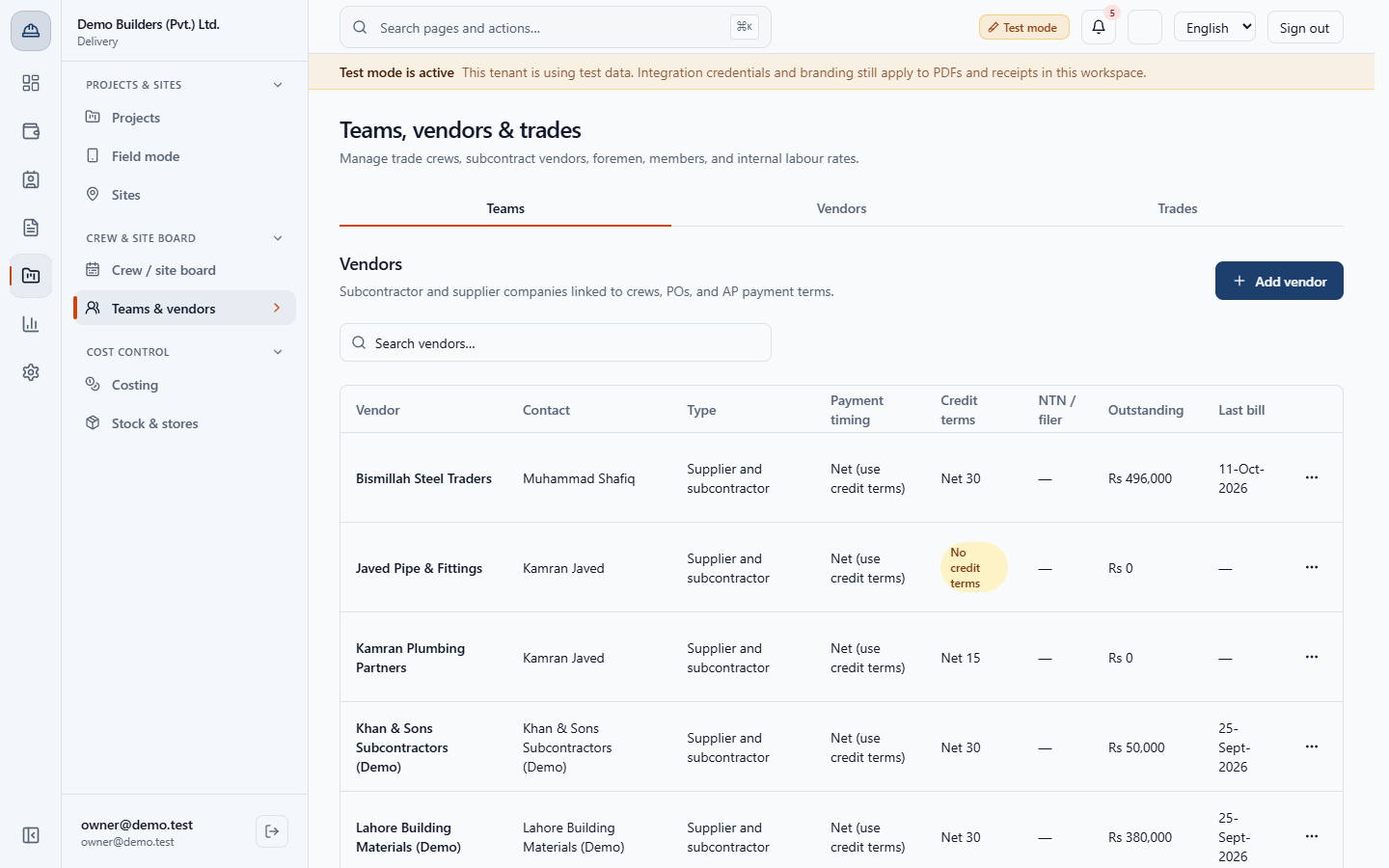
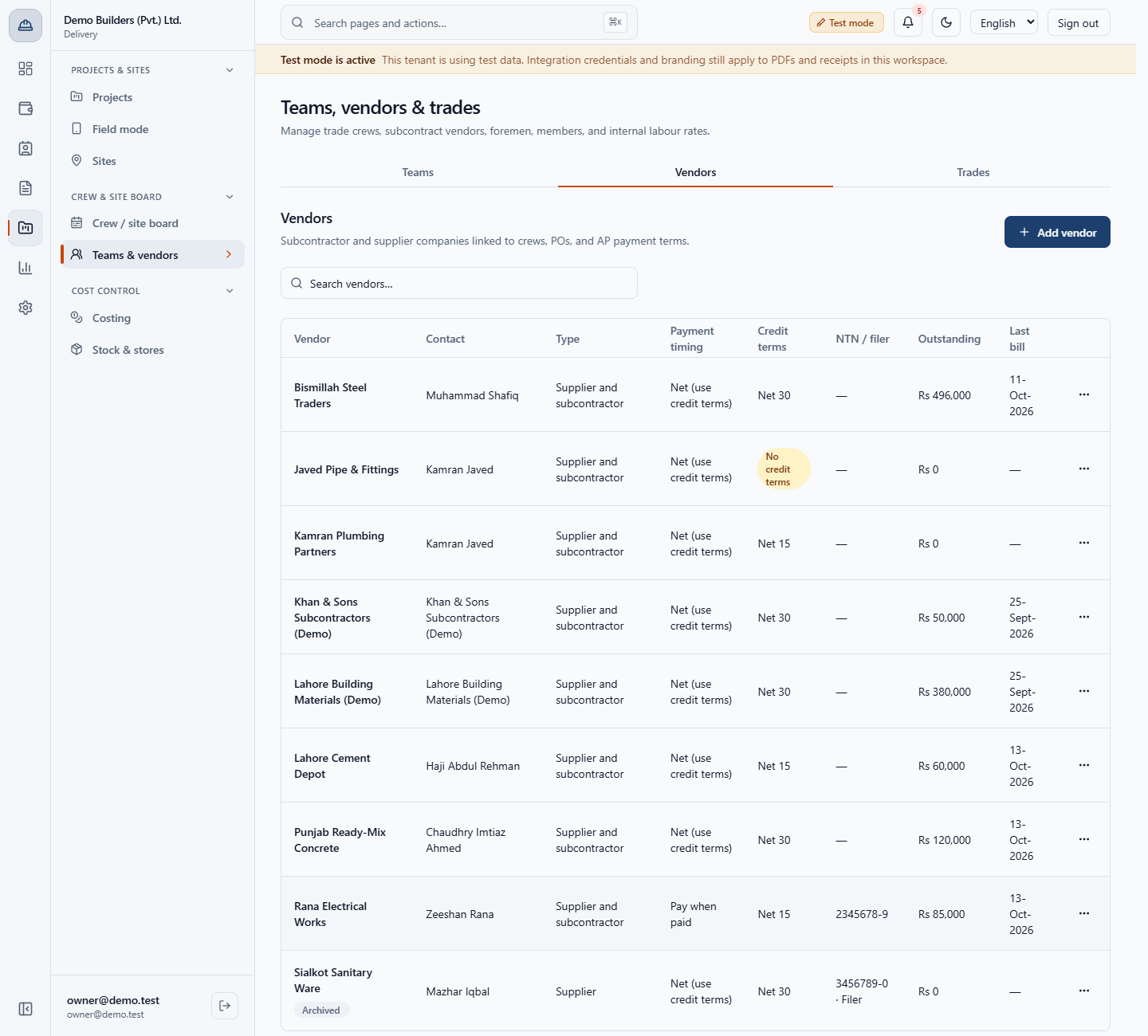
Open Delivery › Crew & site board › Teams & vendors (/app/teams) and click the Vendors tab. The list shows each vendor, its Contact, Type, Payment timing, Credit terms, NTN / filer, Outstanding (what you owe the firm) and Last bill. A badge No credit terms flags a vendor with none, like Javed Pipe & Fittings. Search finds a vendor by name: typing "steel" leaves only Bismillah Steel Traders. An unknown word says No matching vendors.
Vendors tab with columns for contact, type, payment timing, credit terms, outstanding and last bill
2
Add a vendor and choose credit terms and payment timing
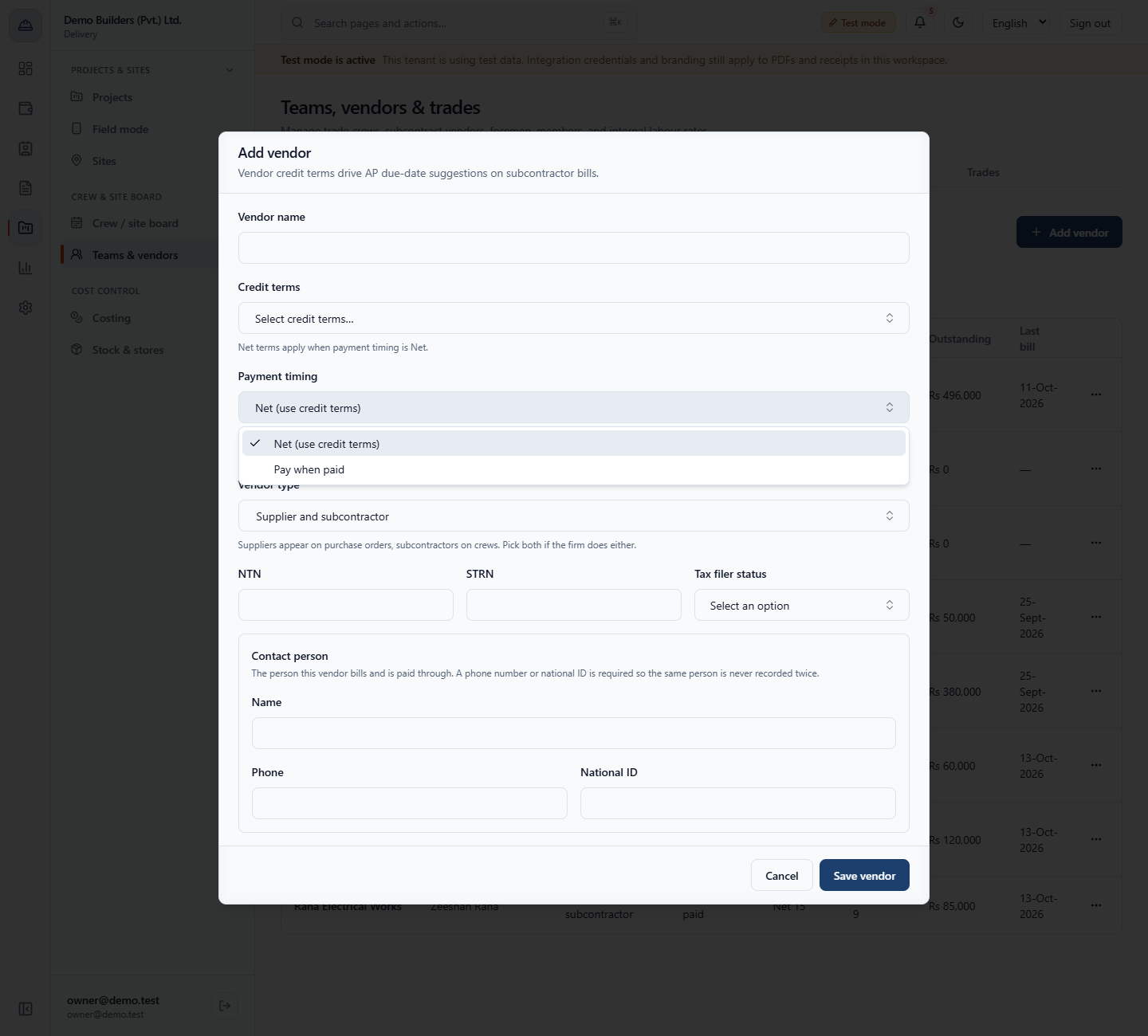
Click Add vendor. Save it empty and the form says This field is required. Type the Vendor name as it appears on the vendor's bill. Choose Credit terms from the list: Due on receipt, Net 15, Net 30, Net 45 or Net 60. Payment timing is Net (use credit terms), which follows the credit term, or Pay when paid, where you pay after your customer pays you. Choose Net with no credit term and the form warns: No credit terms are set, so no due date can be suggested for this vendor.
Payment timing choices Net and Pay when paid in the Add vendor dialog
3
Set the vendor type, tax details and contact
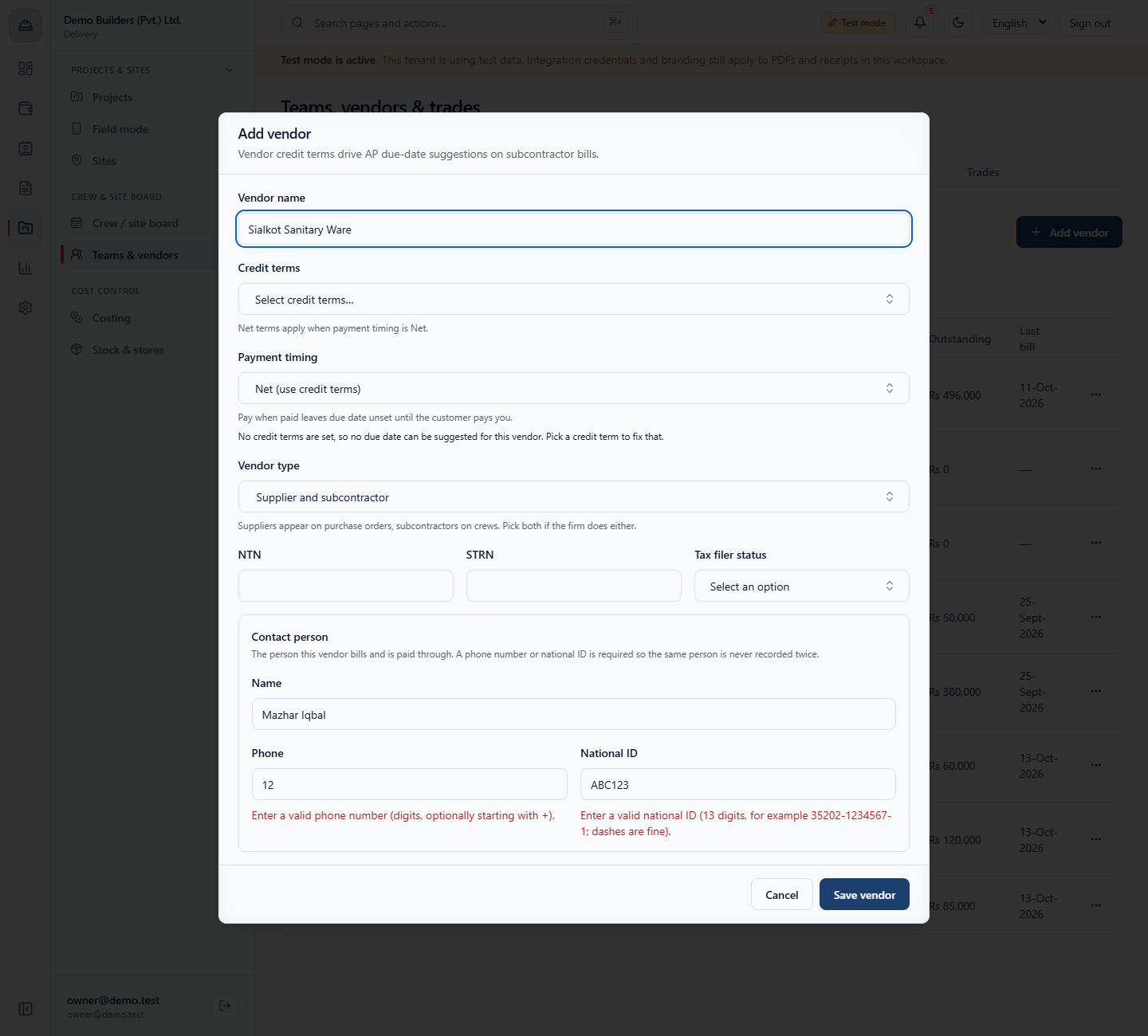
Vendor type is Supplier, Subcontractor or Supplier and subcontractor. Suppliers appear on purchase orders and subcontractors on crews, so pick both if the firm does either. Fill NTN, STRN and Tax filer status (Not recorded, Filer or Non-filer). Every vendor needs a Contact person with a phone number or a national ID. A bad phone number says Enter a valid phone number (digits, optionally starting with +). A national ID needs 13 digits, for example 35202-1234567-1, and dashes are fine.
Contact person fields showing validation messages for a bad phone and national ID
4
Complete the form and save
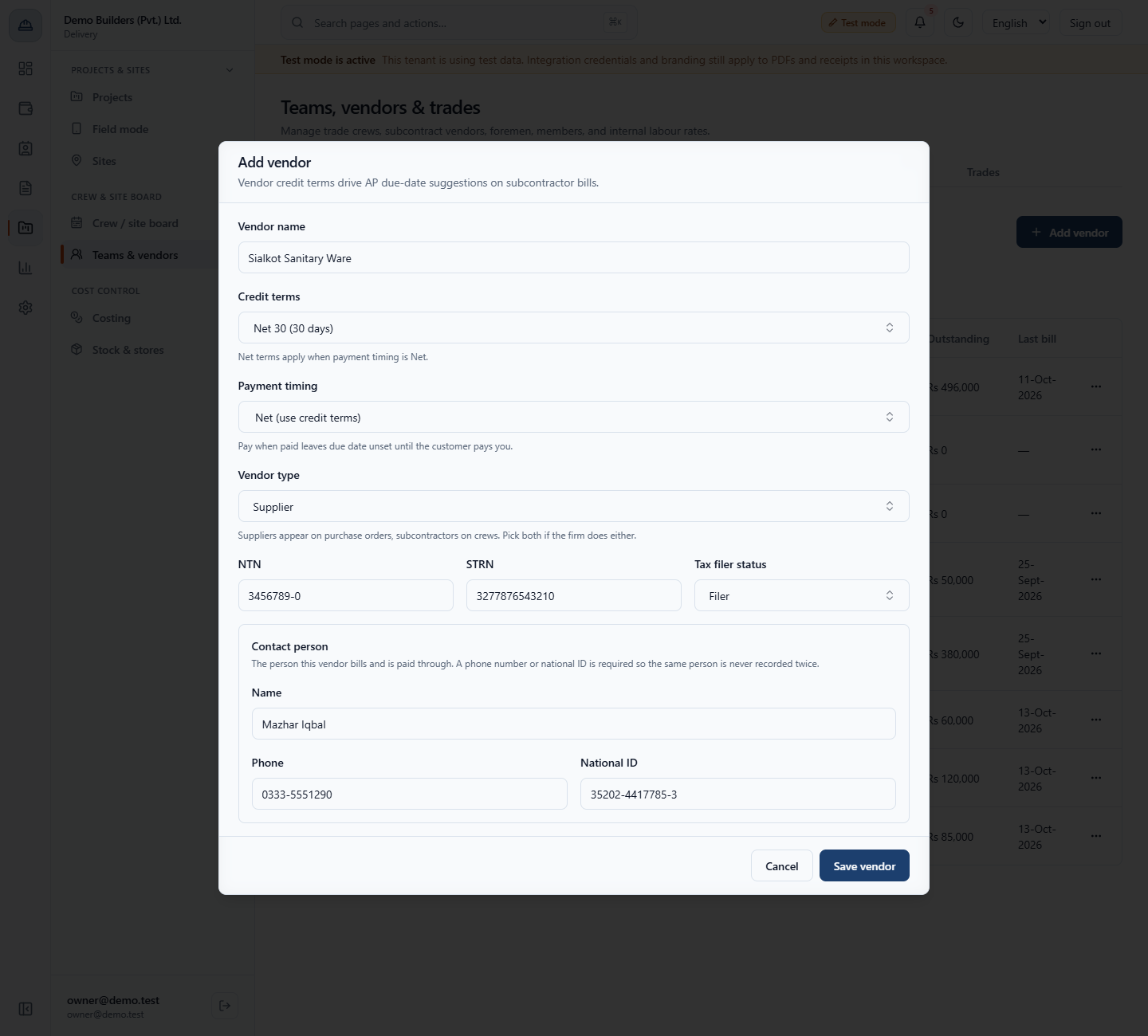
Example: Sialkot Sanitary Ware, Credit terms Net 30, Payment timing Net, Vendor type Supplier, NTN 3456789-0, STRN 3277876543210, Tax filer status Filer, and the contact Mazhar Iqbal with phone 0333-5551290 and national ID 35202-4417785-3. Click Save vendor. The toast says Vendor created.
Add vendor dialog filled in for Sialkot Sanitary Ware
5
View and edit a vendor
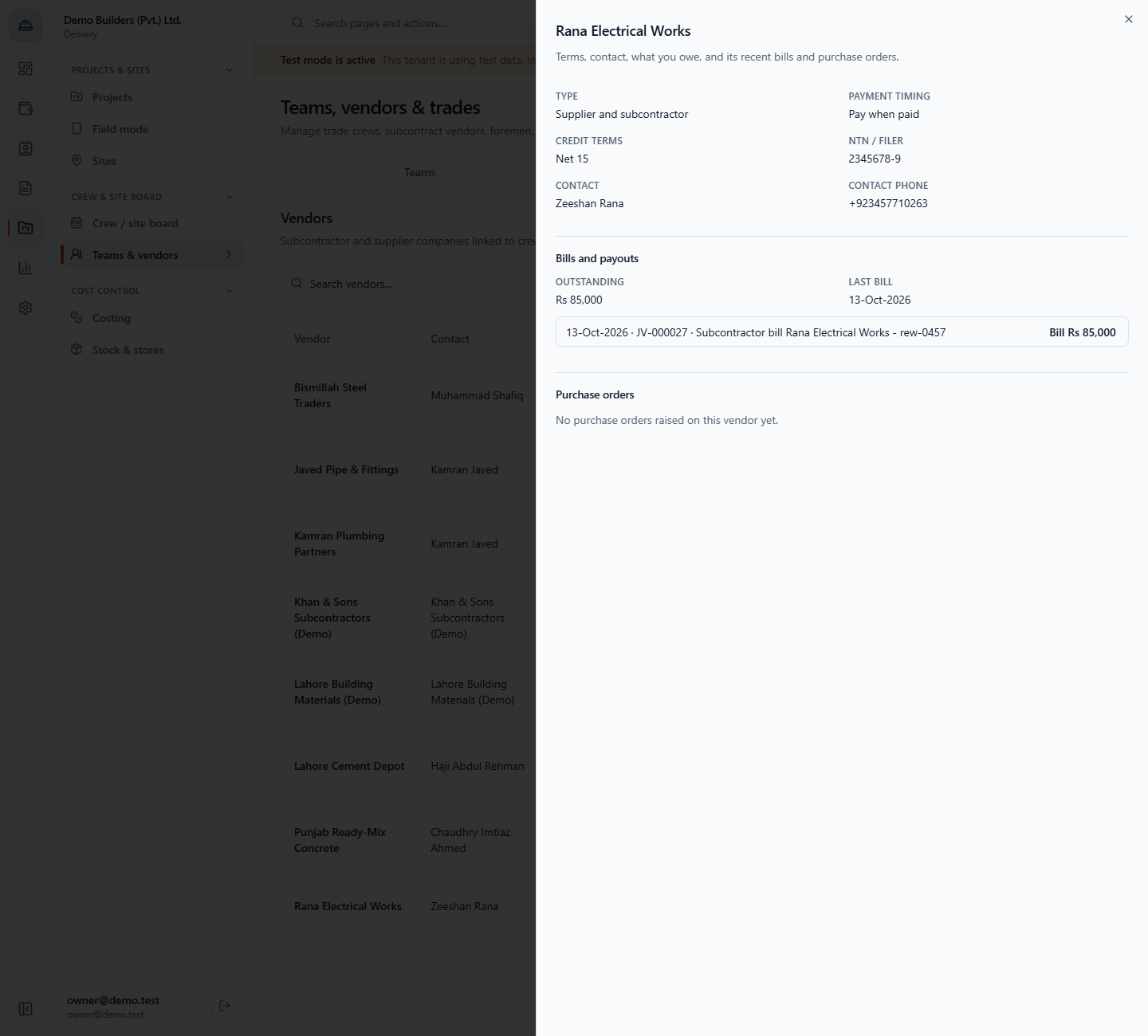
In the row menu choose View. The sheet shows the type, payment timing, credit terms, NTN / filer, contact and phone, Outstanding (Rs 85,000 for Rana Electrical Works), the Last bill (13-Oct-2026), recent bills and purchase orders. Choose Edit to correct a field. Here Rana Electrical Works gets its NTN 2345678-9. Leave phone and national ID blank to keep the stored contact as it is: it is corrected in place and never re-pointed at a different person. Save vendor shows Vendor updated.
Vendor detail sheet for Rana Electrical Works
6
Archive a vendor you stop using
Choose Archive in the row menu. The toast says Vendor archived. It is hidden from new bills, orders and crews. and the row carries an Archived badge. Its history stays. The same action reactivates it.
Vendors list with an Archived badge on Sialkot Sanitary Ware
7
Delete only a vendor that was never used
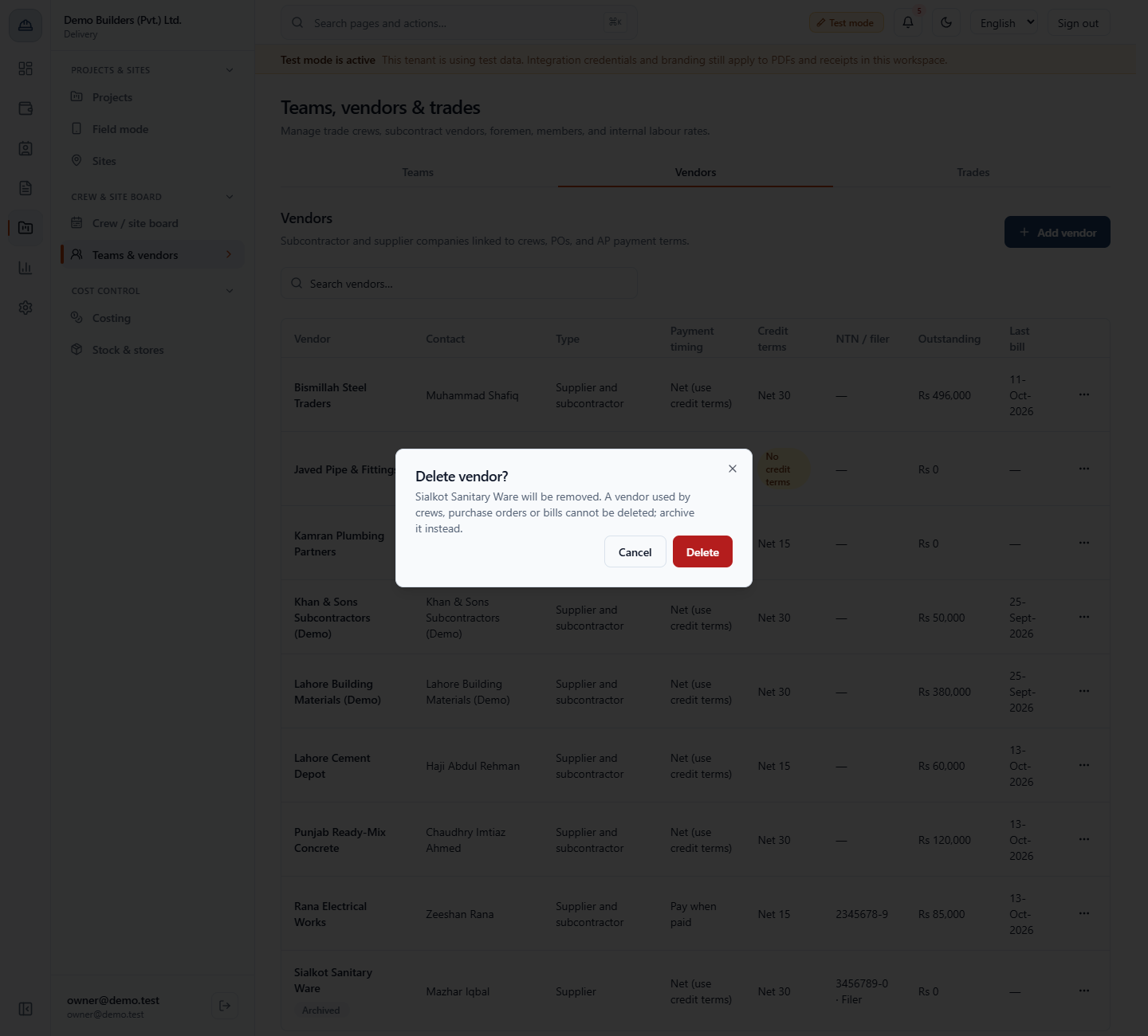
Choose Delete. The dialog says a vendor used by crews, purchase orders or bills cannot be deleted, and to archive it instead. Click Delete: the toast says Vendor deleted.
Delete vendor dialog for Sialkot Sanitary Ware
8
See the credit term become a due date
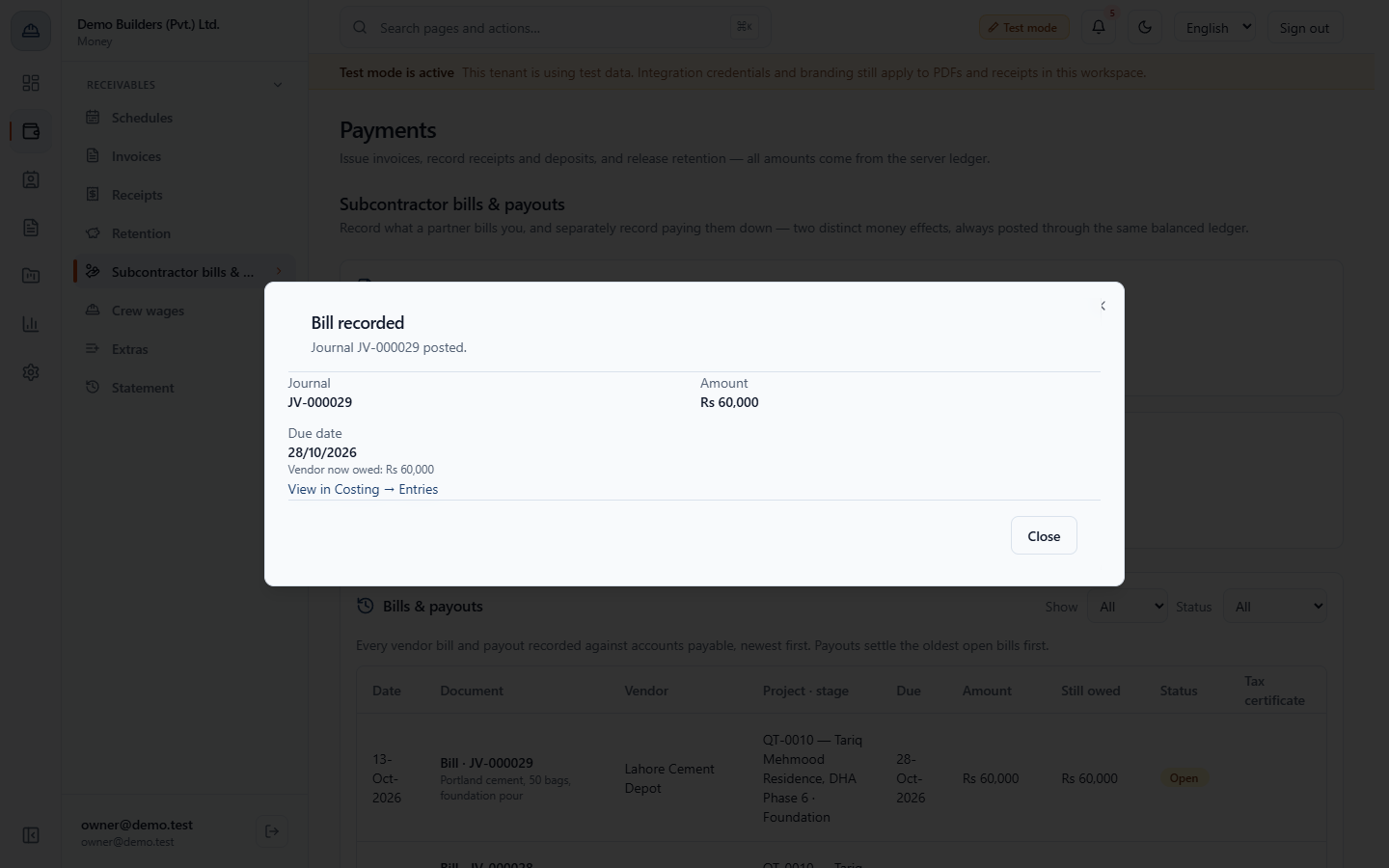
Open Money › Subcontractor bills & payouts and click Record bill. The vendor list here is the same vendor list, and a Cost code is required: without it the form says Enter the cost code this bill belongs to, so it counts against the stage budget line. Record bill LCD-3318 for Lahore Cement Depot, Rs 60,000, cost code PK-04, "Portland cement, 50 bags, foundation pour". On 13-Oct-2026 with Net 15 terms, the Bill recorded dialog shows journal JV-000029, Due date 28/10/2026 and Vendor now owed: Rs 60,000.
Bill recorded dialog with journal JV-000029, Rs 60,000 and due date 28/10/2026
9
Read due dates in the bills list
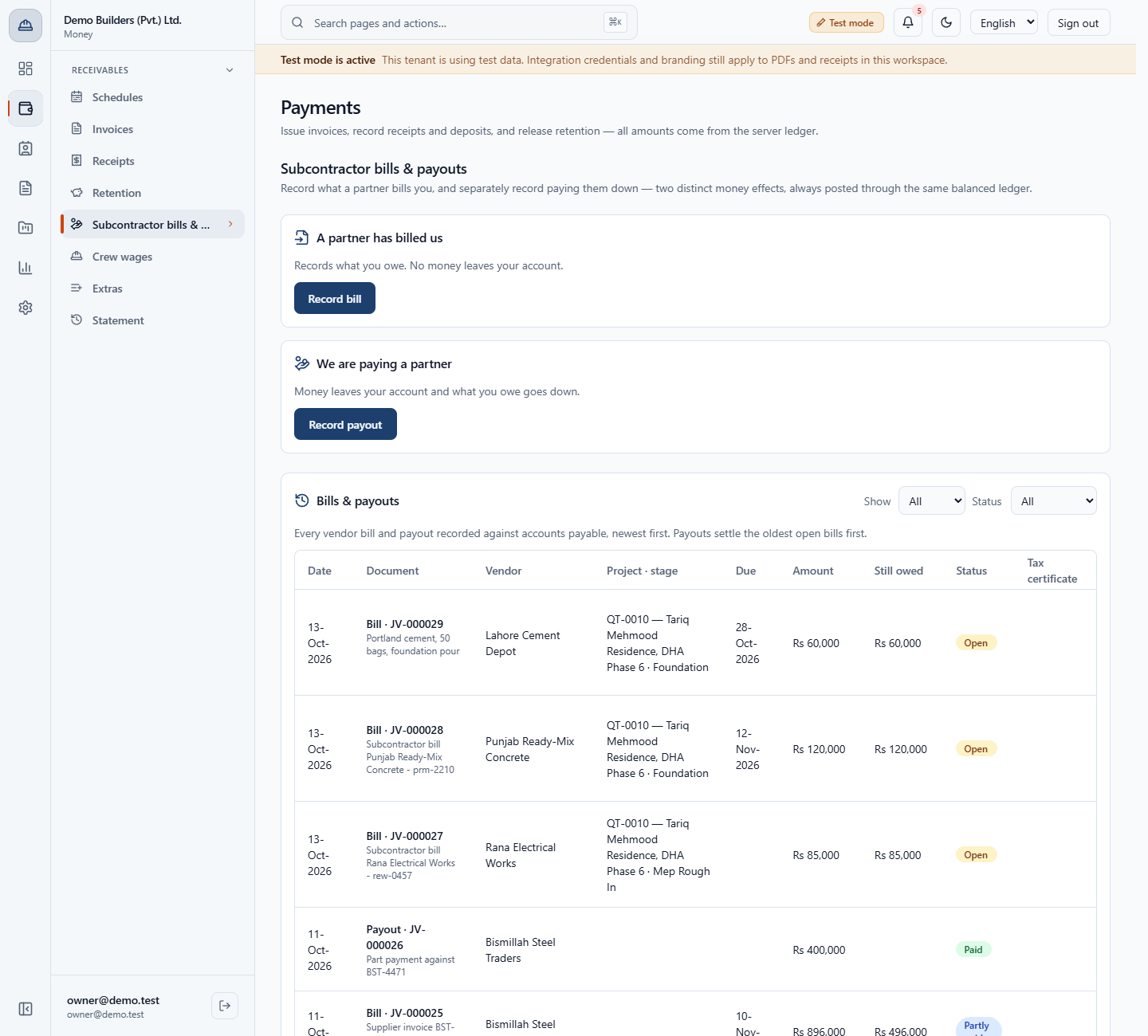
The Bills & payouts list shows each bill's Due date. JV-000029 for Lahore Cement Depot is due 28-Oct-2026, and JV-000028 for Punjab Ready-Mix Concrete (Net 30) is due 12-Nov-2026. JV-000027 for Rana Electrical Works, who is paid when paid, has no due date at all.
Bills and payouts list with due dates following each vendor's terms
10
Check what you owe in payables aging
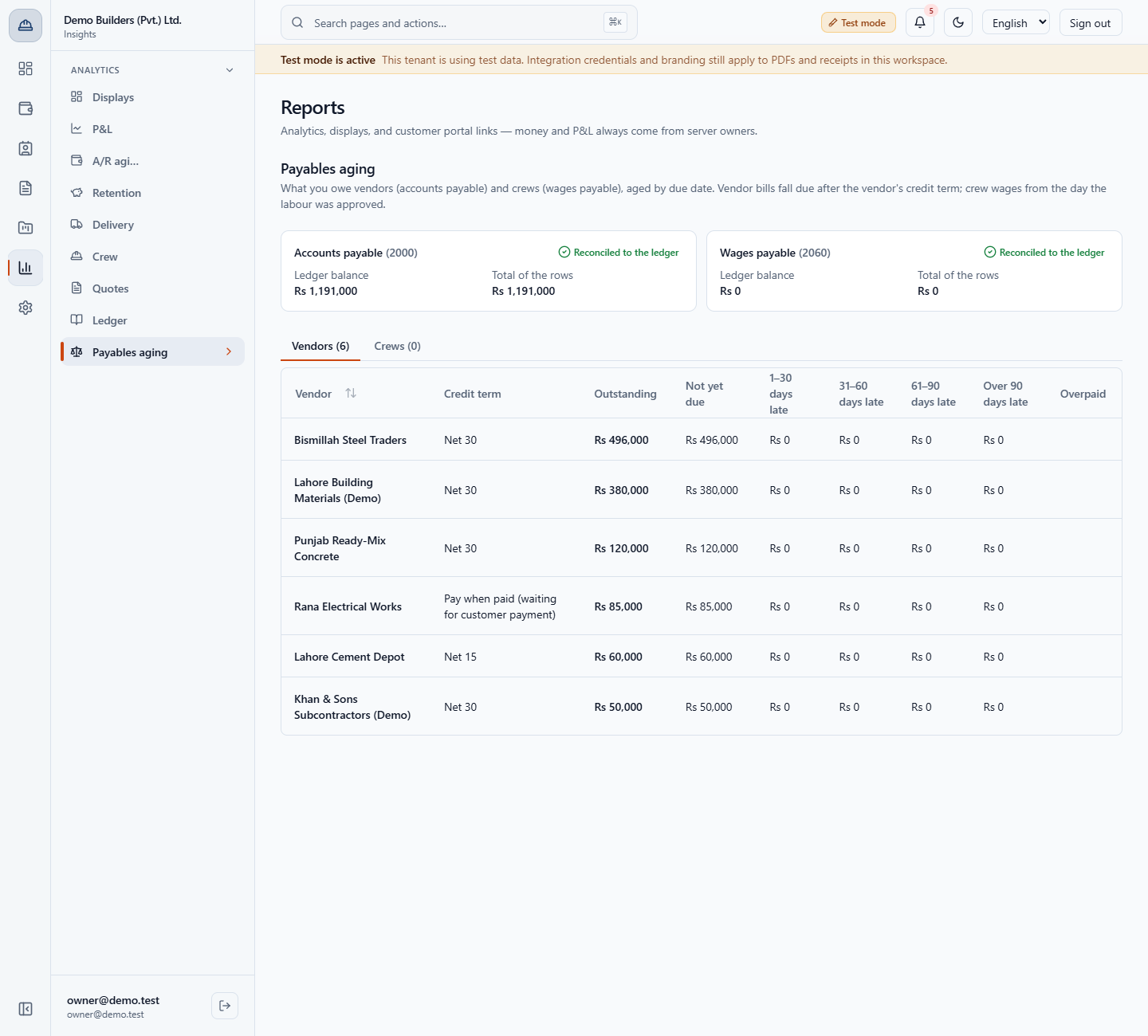
Open Insights › Analytics › Payables aging. Accounts payable (2000) shows Reconciled to the ledger at Rs 1,191,000, and the vendor rows add up to the same total. Each vendor shows its credit term and its amount by lateness (Not yet due up to Over 90 days late). Rana Electrical Works shows Pay when paid (waiting for customer payment) with Rs 85,000, and is never counted late.
Payables aging with vendors and the accounts payable balance reconciled to the ledger
Check it worked
The new vendor appears in the Vendors list with the terms and timing you chose.
A bill from a Net 15 vendor recorded on 13-Oct-2026 is due 28-Oct-2026.
Payables aging agrees with accounts payable in the ledger (Rs 1,191,000 in the example).
Common mistakes
Mistake
What you see
Fix
Choosing Net but no credit term
No credit terms are set, so no due date can be suggested for this vendor.
Pick a credit term
Contact without a phone or national ID
The form refuses to save
Enter a valid phone or a 13-digit national ID
Recording a bill without a cost code
Enter the cost code this bill belongs to...
Fill in the Cost code
Deleting a vendor that has bills
Delete is refused
Archive it instead
Quick reference
Item
Meaning / rule
Credit terms
Same list as customers; the term's days set the suggested due date
Net
Pay by the credit term's due date
Pay when paid
No due date until the customer pays you; shown as waiting in aging
Supplier / Subcontractor
Suppliers on purchase orders, subcontractors on crews
Archive
Hides the vendor from new bills, orders and crews, keeps history
Frequently asked questions
Why does a vendor show a No credit terms badge? The vendor is on Net payment timing but has no credit term, so the app cannot suggest a due date for its bills. Edit the vendor and pick a credit term such as Net 15 or Net 30.
Why does a Pay when paid vendor have no due date? Pay when paid leaves the due date empty until your customer pays you. In payables aging the vendor is shown as waiting for customer payment and is never counted late.
Can I delete a vendor that has bills, purchase orders or crews? No. A vendor used by crews, purchase orders or bills cannot be deleted. Archive it instead: it is hidden from new bills, orders and crews and its history stays.
Can two vendors share one contact person? Yes. The contact is matched by national ID, then phone, never by name, so two firms with the same contact share one person record, as Javed Pipe & Fittings and Kamran Plumbing Partners do.