How to reschedule or cancel a booking and settle the money
Customers move dates and sometimes cancel. This guide shows how to move a booking to a new date, how to cancel one with or without money received, how to settle the money (fee kept, refund or credit), and how to undo a settlement.
Who it is forVenue manager / sales coordinatorTime15 minutesProductMMSLevelIntermediate
Before you start
Steps
1
Open Bookings and find the booking
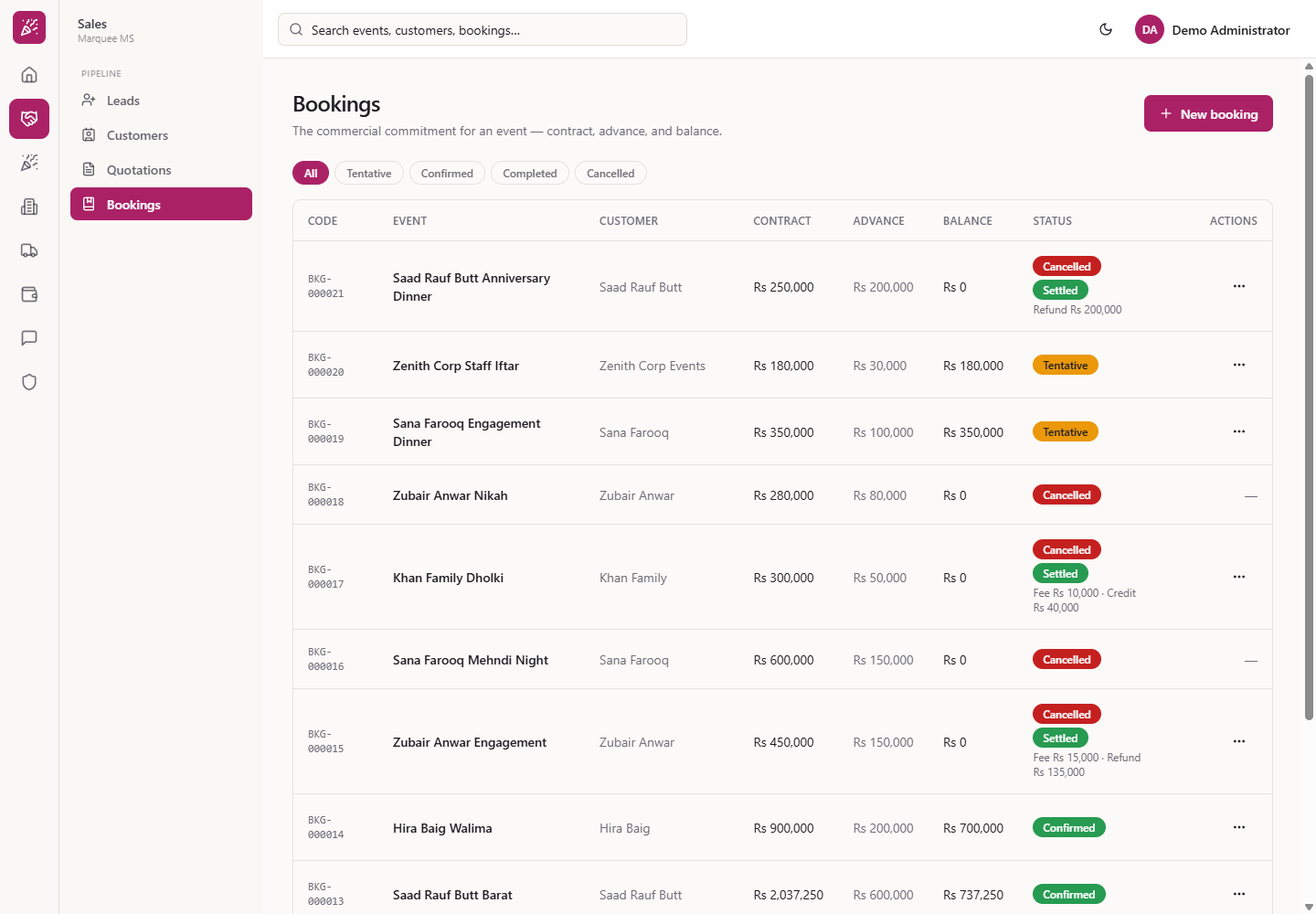
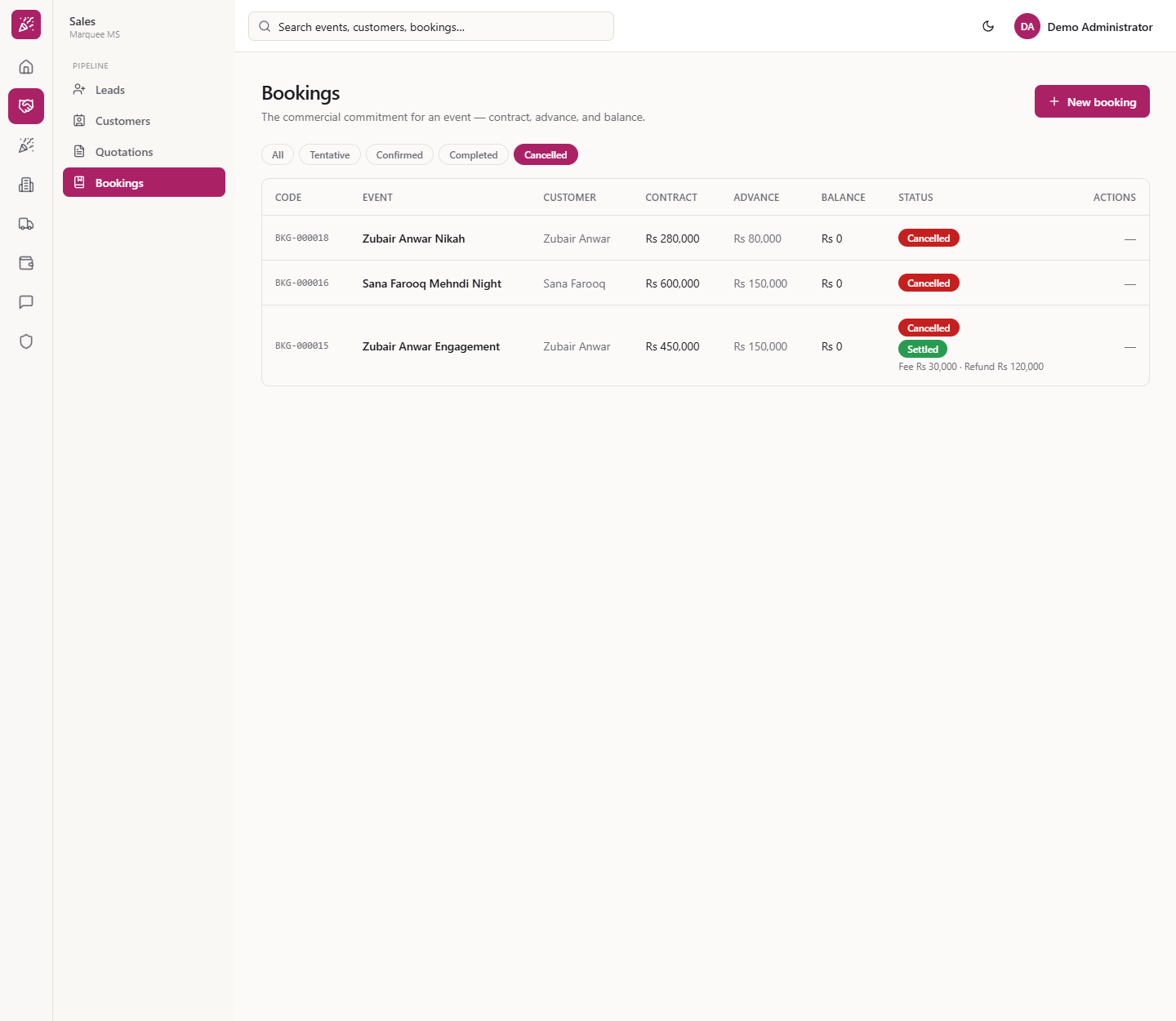
Click Sales › Pipeline › Bookings (/bookings). Chips filter by All, Tentative, Confirmed, Completed, Cancelled. A cancelled booking shows Balance Rs 0 and, when money was received, a chip such as "Unsettled — Rs 150,000 held" or "Settled" with the fee and refund or credit.
Bookings list with status chips and settlement chips
2
Open the row menu
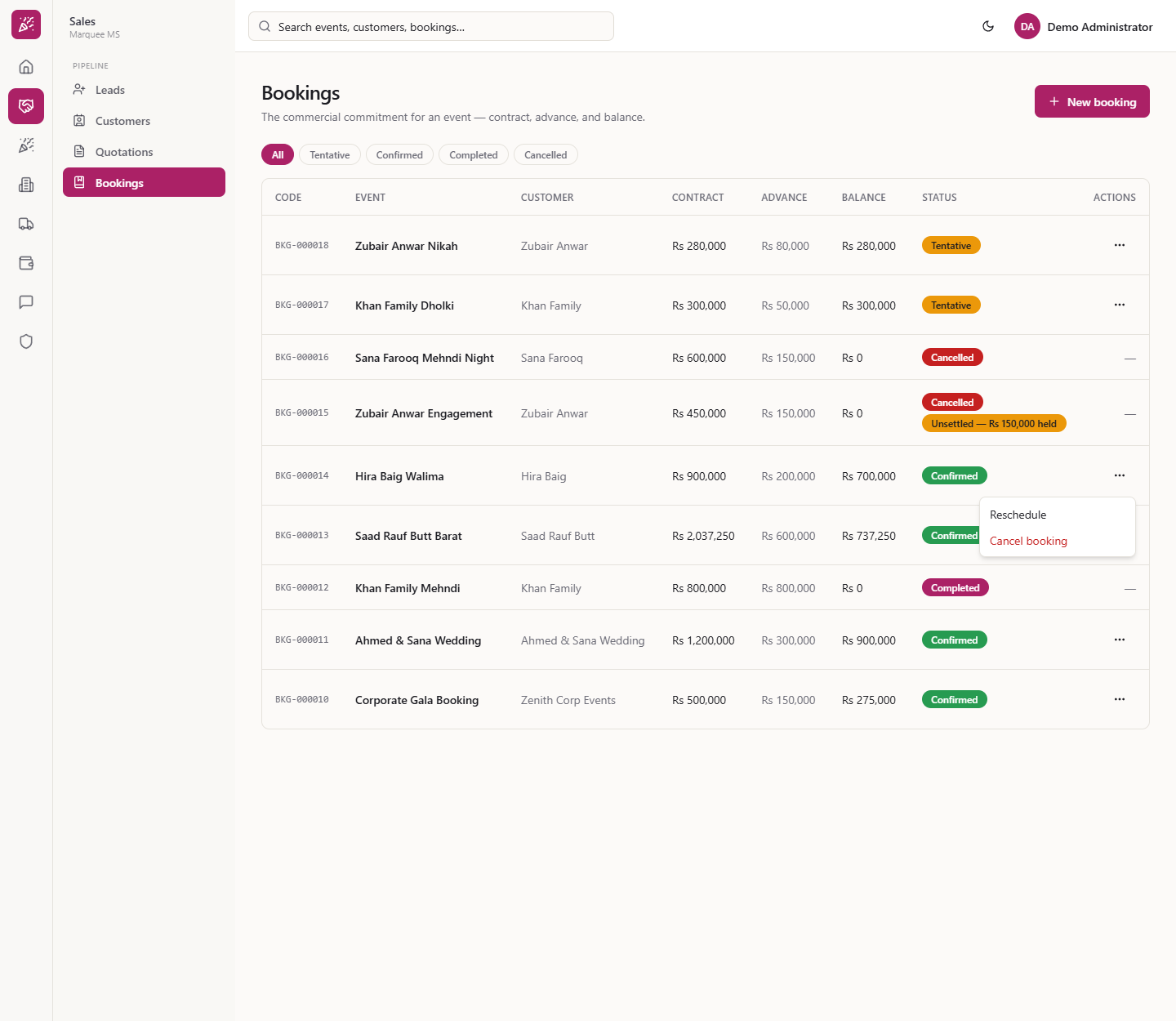
Open Actions (the three dots) on the row. A Tentative booking offers Confirm, Reschedule and Cancel booking (in red). A Confirmed one offers Reschedule and Cancel booking. Completed and Cancelled bookings show a dash, except a cancelled booking with money held or settled.
A booking's Actions menu
3
Reschedule to a new date
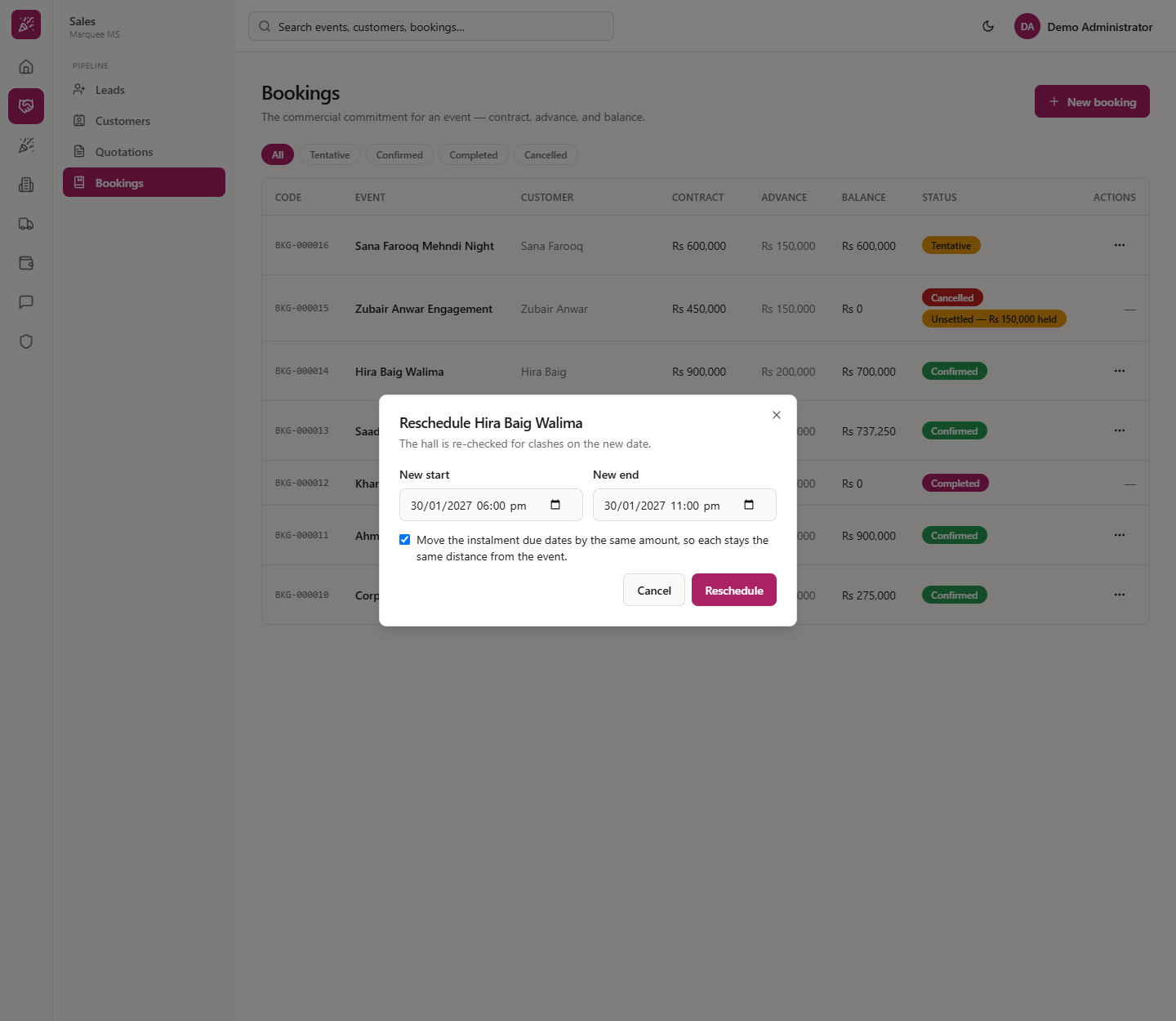
Choose Reschedule on Hira Baig Walima (BKG-000014, contract Rs 900,000, Main Hall). The dialog says "The hall is re-checked for clashes on the new date." Set New start and New end: here 6 February 2027, 6:00 pm to 11:00 pm. Leave the tick box "Move the instalment due dates by the same amount" ticked. The instalments then shift by the same 7 days, from 16-Dec-2026 and 09-Jan-2027 to 23-Dec-2026 and 16-Jan-2027. Press Reschedule.
Reschedule Hira Baig Walima dialog
4
If the hall is taken
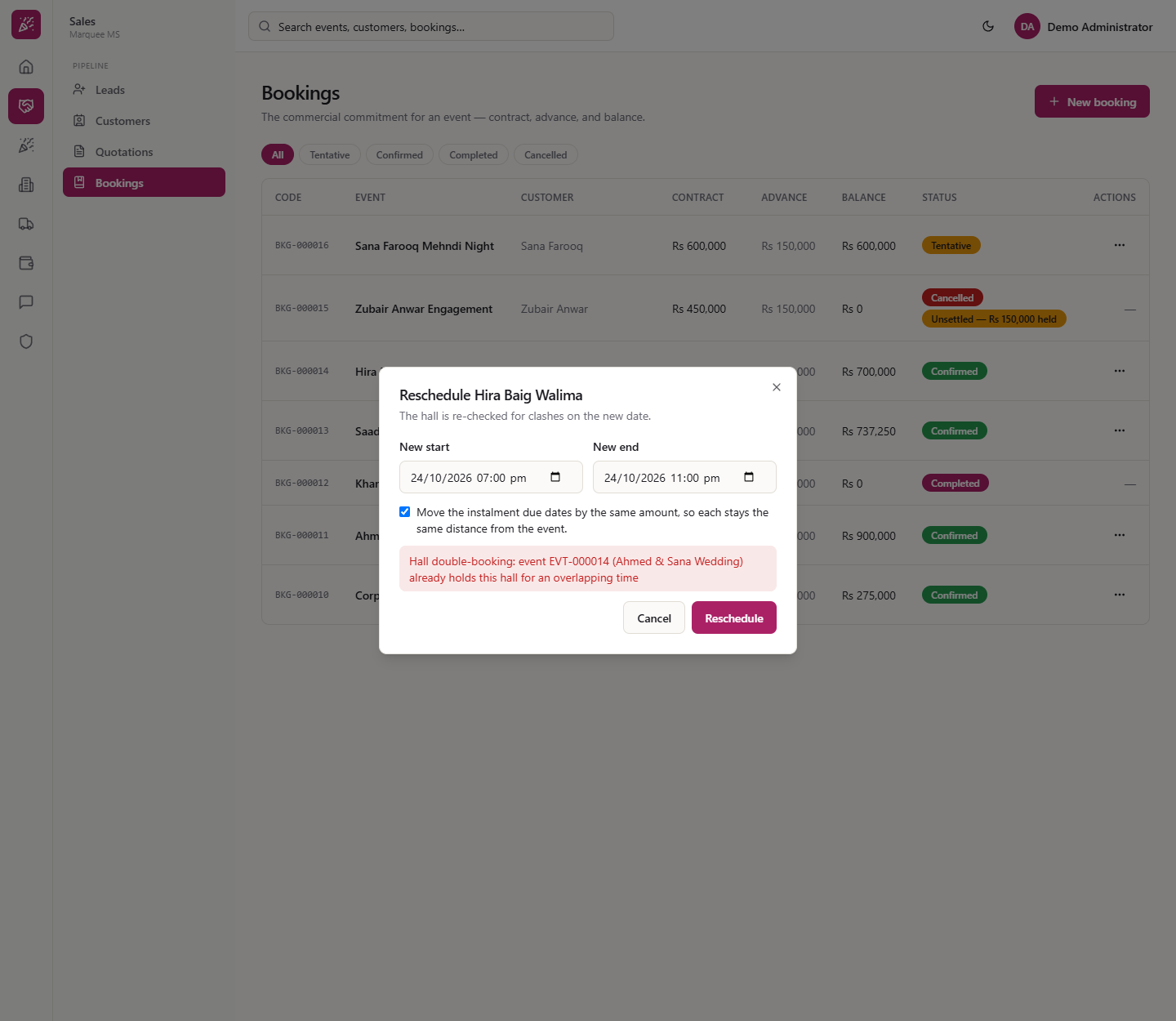
If another event already holds the hall for that time, a red box says "Hall double-booking: event EVT-000014 (Ahmed & Sana Wedding) already holds this hall for an overlapping time". Nothing is saved. If the end is earlier than the start you see "The end time must be after the start time".
Hall double-booking message in the dialog
5
Check the event followed
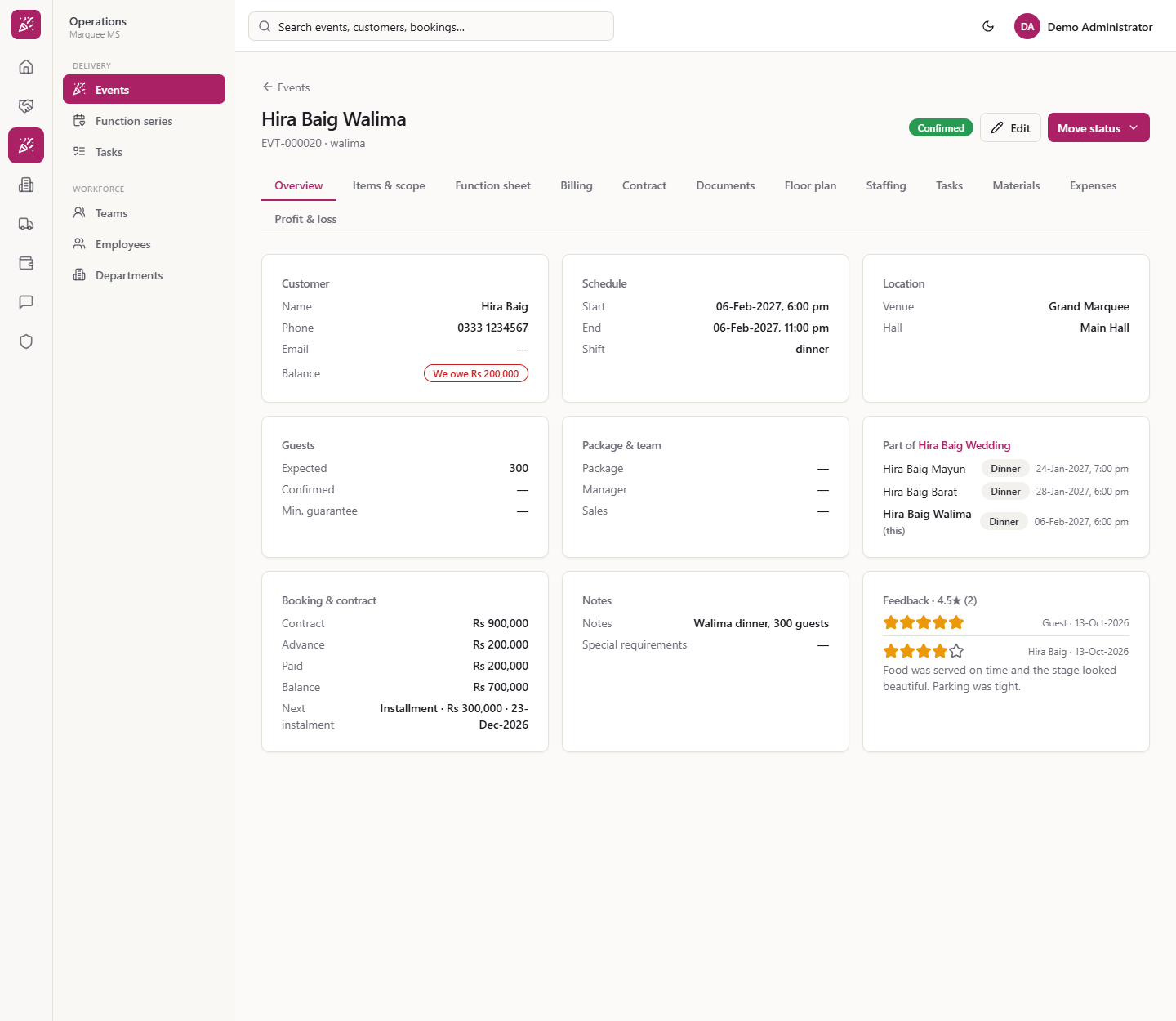
Open the event. Schedule now reads 06-Feb-2027, 6:00 pm to 11:00 pm and Next instalment reads "Installment · Rs 300,000 · 23-Dec-2026". There is no message and no journal: a reschedule posts no money.
Event page showing the new date and next instalment
6
Cancel a booking, with the reason
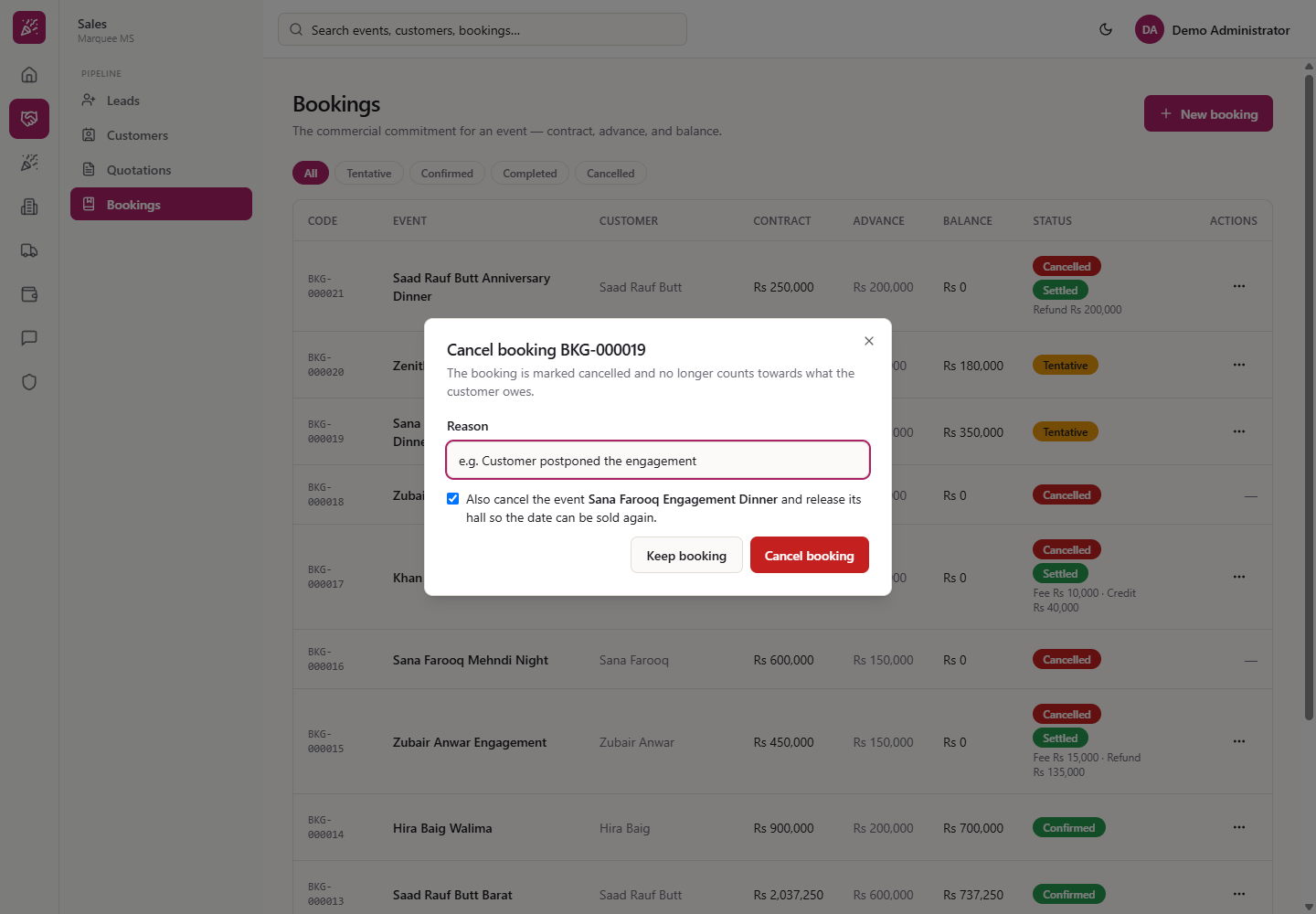
Choose Cancel booking. With no money received the dialog says the booking "no longer counts towards what the customer owes". Enter the Reason (required; empty gives "A reason is required"). Leave "Also cancel the event ... and release its hall so the date can be sold again" ticked if the event is off too. Press Cancel booking (or Keep booking to back out).
Cancel booking dialog for a booking with no money
7
Cancel a booking with money received
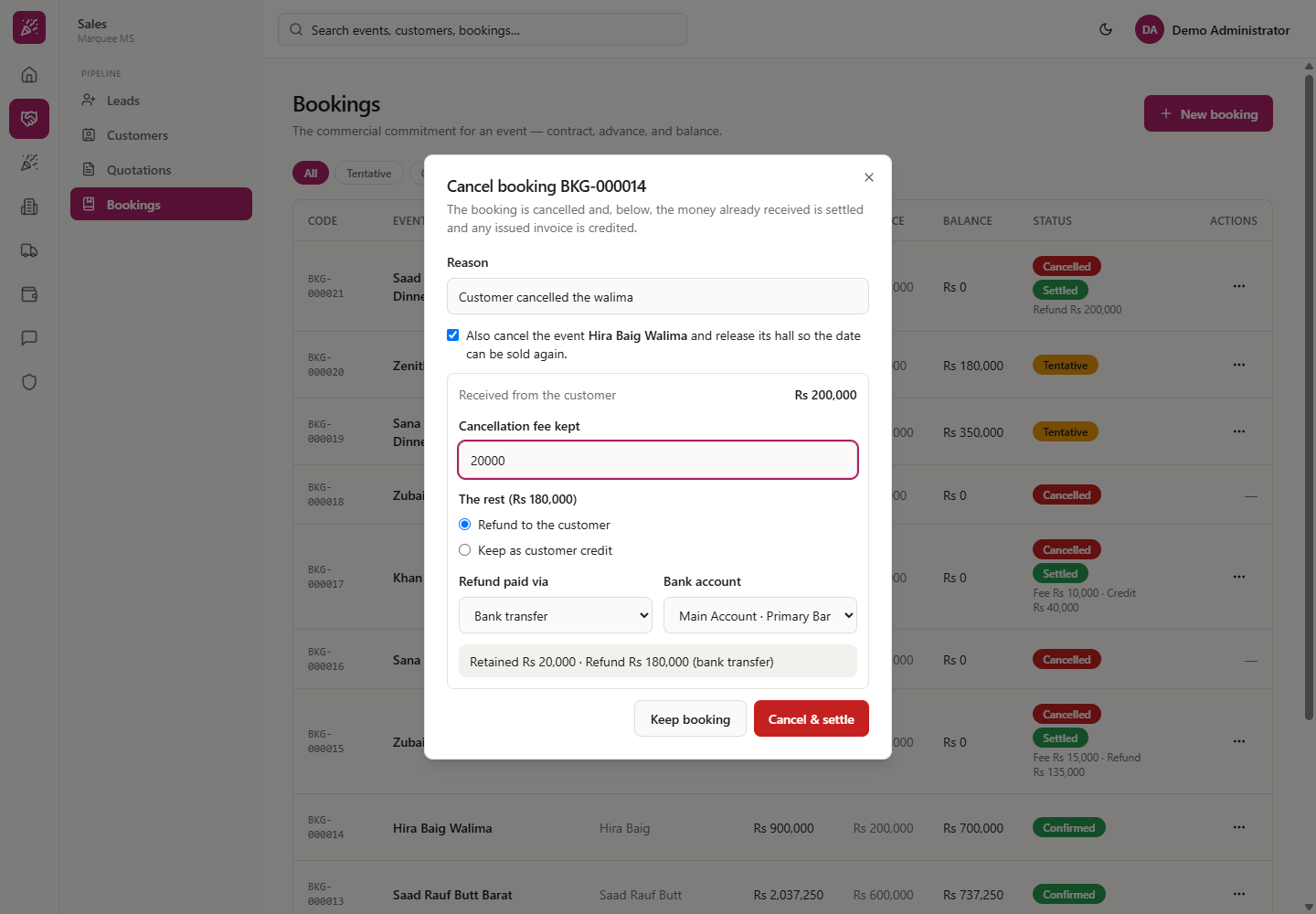
When money has come in, the dialog shows Received from the customer Rs 200,000. Type Cancellation fee kept, for example 20,000. The rest is Rs 180,000: choose Refund to the customer or Keep as customer credit. For a refund choose Refund paid via (Cash, Bank transfer, Online / gateway); it starts the way the money came in. A bank refund also asks for the Bank account. A line sums it up: "Retained Rs 20,000 · Refund Rs 180,000 (bank transfer)". Press Cancel & settle.
Cancel dialog with fee, refund and bank account
8
A cash refund needs the cash
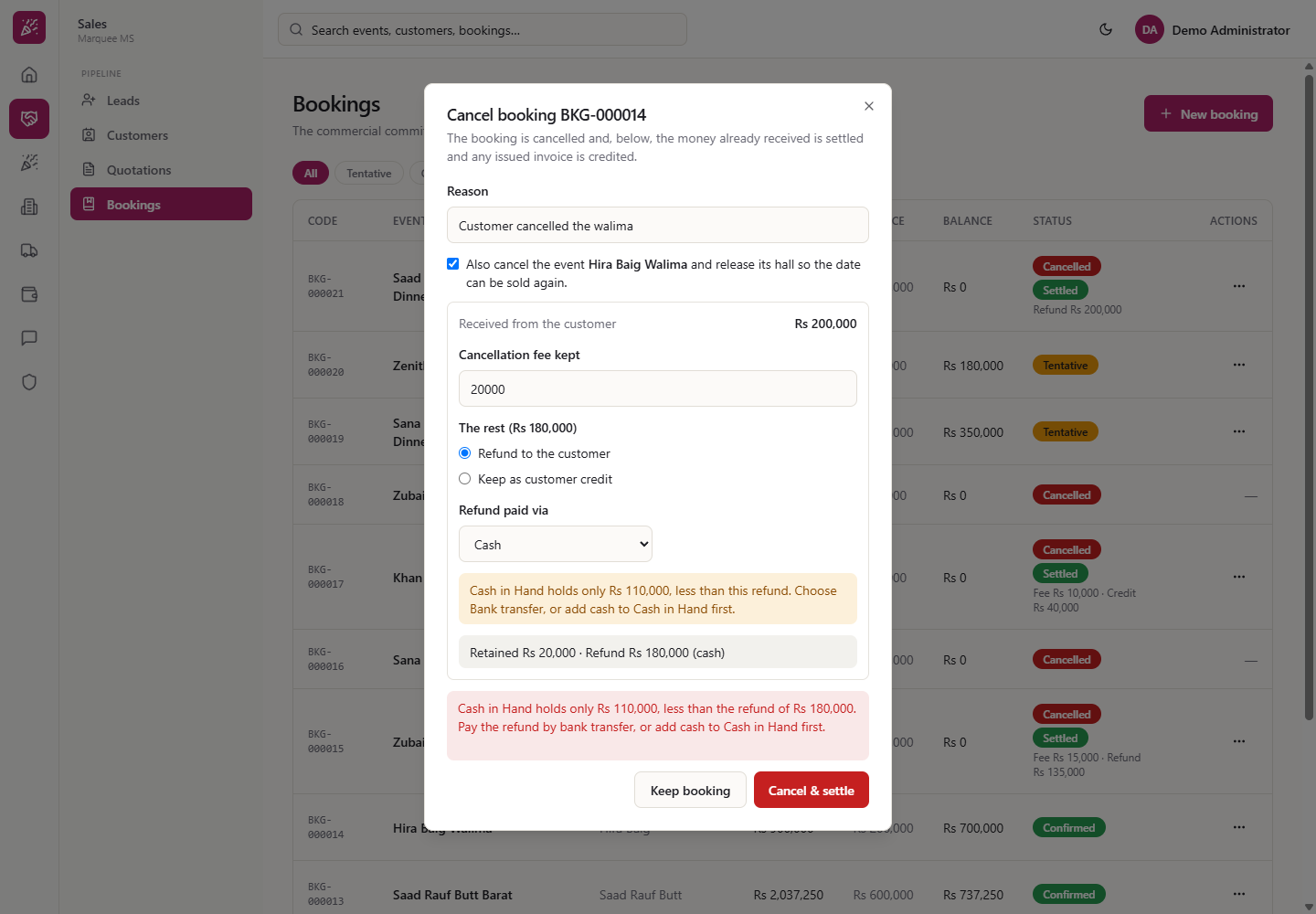
If you choose a Cash refund larger than Cash in Hand, an amber line warns you and Cancel & settle is refused: pay the refund by bank transfer or add cash first. The booking stays as it was.
Cash refund refused when Cash in Hand is short
9
See the result in the list and on the event
Under the Cancelled chip each row shows Balance Rs 0 and, when settled, "Fee Rs 15,000 · Refund Rs 135,000" or "Fee Rs 10,000 · Credit Rs 40,000". On the event, the badge reads Cancelled, with the reason and "Nothing is due on it."
Cancelled chip with settled bookings
10
Fix a wrong settlement: reverse and settle again
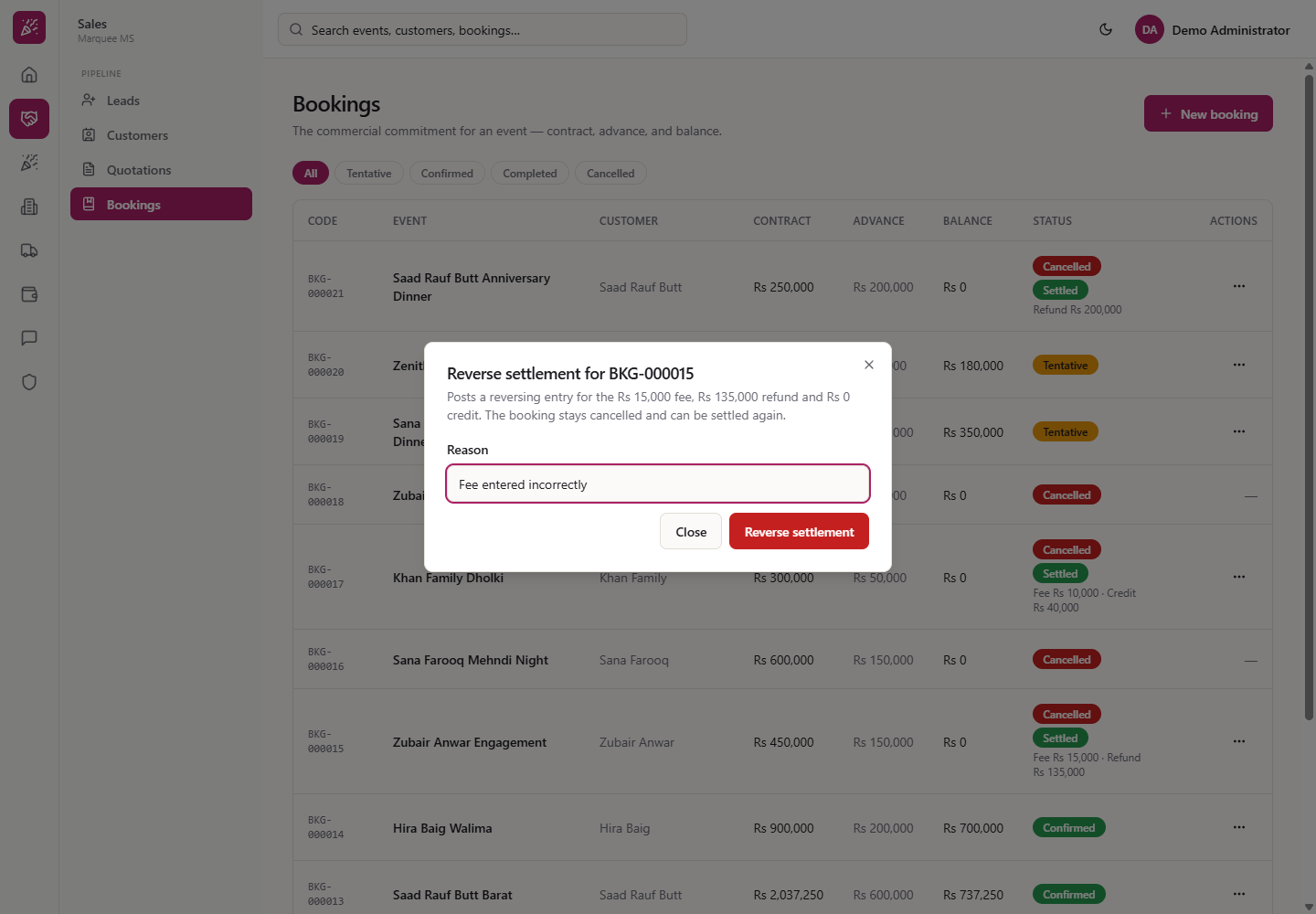
On a settled cancelled booking choose Reverse settlement, type a Reason (for example "Fee entered incorrectly") and press Reverse settlement. The chip returns to "Unsettled — Rs 150,000 held", and the refund shows Reversed in Finance › Payments. Then Settle on the same booking and enter the right fee and refund (here fee Rs 15,000, refund Rs 135,000 by bank transfer).
Reverse settlement dialog with a reason
11
Follow the money
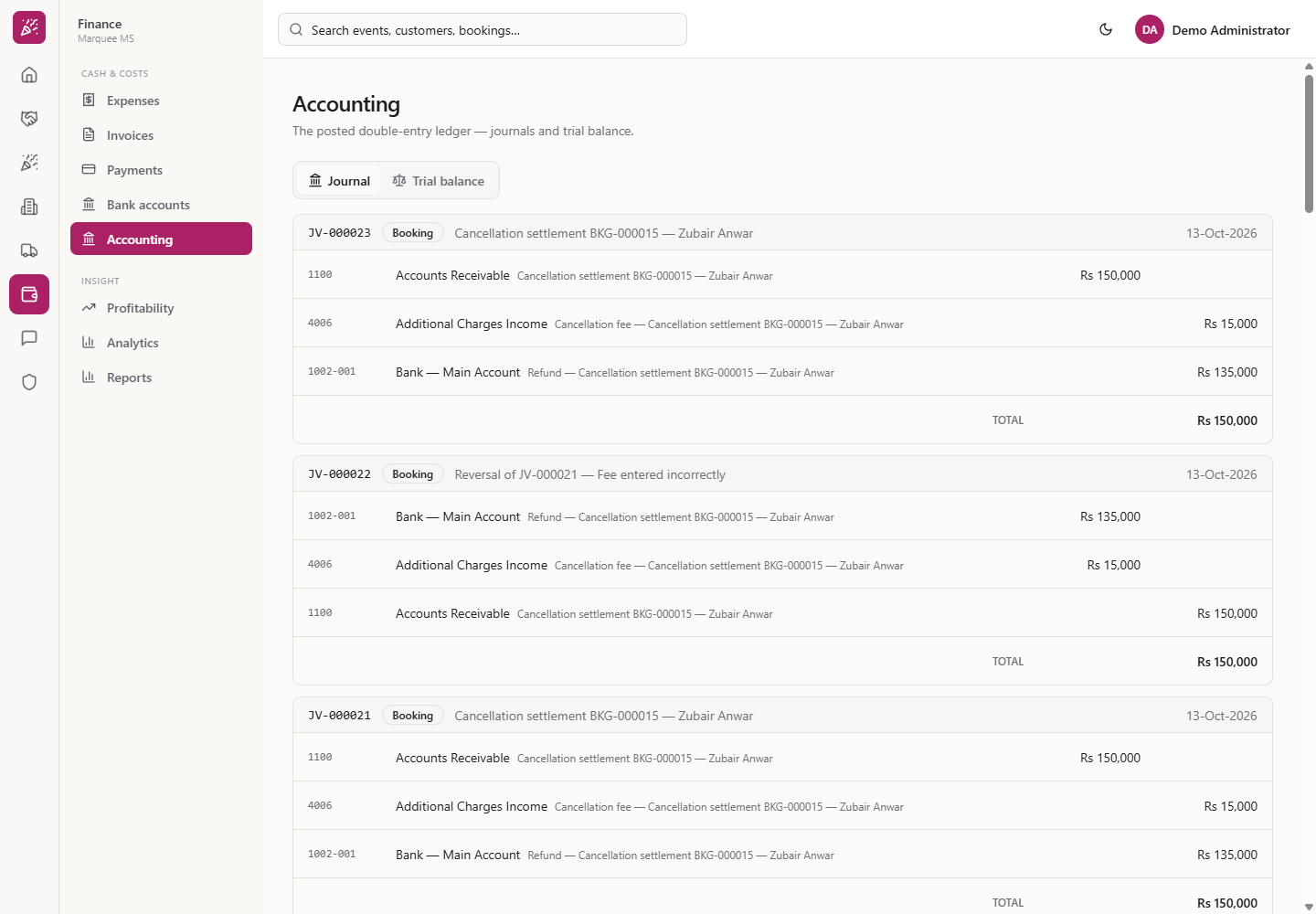
A settlement posts one voucher: debit Accounts Receivable for what was received, credit Additional Charges Income for the fee, and credit Cash in Hand, Bank or Customer Advances (credit) for the rest. A reversal posts the mirror voucher with your reason.
Journal vouchers for the settlements and reversals
Check it worked
The rescheduled booking's event shows the new date and shifted instalments.
Cancelled bookings show Balance Rs 0 and a Settled chip with the right fee and refund or credit.
Finance › Accounting shows In balance after every settlement or reversal.
Common mistakes
Mistake
What you see
Fix
Moving to a slot another event holds
"Hall double-booking"
Pick a free slot
Cancelling without a reason
"A reason is required"
Type the reason
Cash refund above Cash in Hand
Amber warning, Cancel & settle refused
Refund by bank transfer, or add cash first
Wrong fee typed
Settled chip shows the wrong split
Reverse settlement, then Settle again
Quick reference
Item
Meaning / rule
Reschedule
Moves the event; hall re-checked; instalment dates shift if ticked
Cancel & settle
Cancels the booking and settles the money received
Fee kept
Income for the venue
Customer credit
Held for the customer (Customer Advances)
Reverse settlement
Posts the mirror entry; the booking stays cancelled
Frequently asked questions
What happens to the instalments when I reschedule a booking? If you leave "Move the instalment due dates by the same amount" ticked, each instalment shifts by the same number of days as the event. A reschedule posts no money.
Can I keep a cancellation fee? Yes. When money has been received, type the Cancellation fee kept; it cannot exceed the amount received. The rest is refunded or kept as customer credit.
What if I settled a cancelled booking with the wrong fee? Use Reverse settlement with a reason, then Settle again with the right fee and refund. The books keep both entries.