How to buy steel for a job, from the vendor to the payment
You will add a steel supplier, raise a requisition and a purchase order, receive the first truck, match the supplier's bill and pay part of it. Use it every time you order materials for a project and need to see what you promised, received and owe.
Who it is forPurchasing officer and accounts officerTime20 minutesProductBuildFlowLevelIntermediate
Before you start
Steps
1
Add the vendor
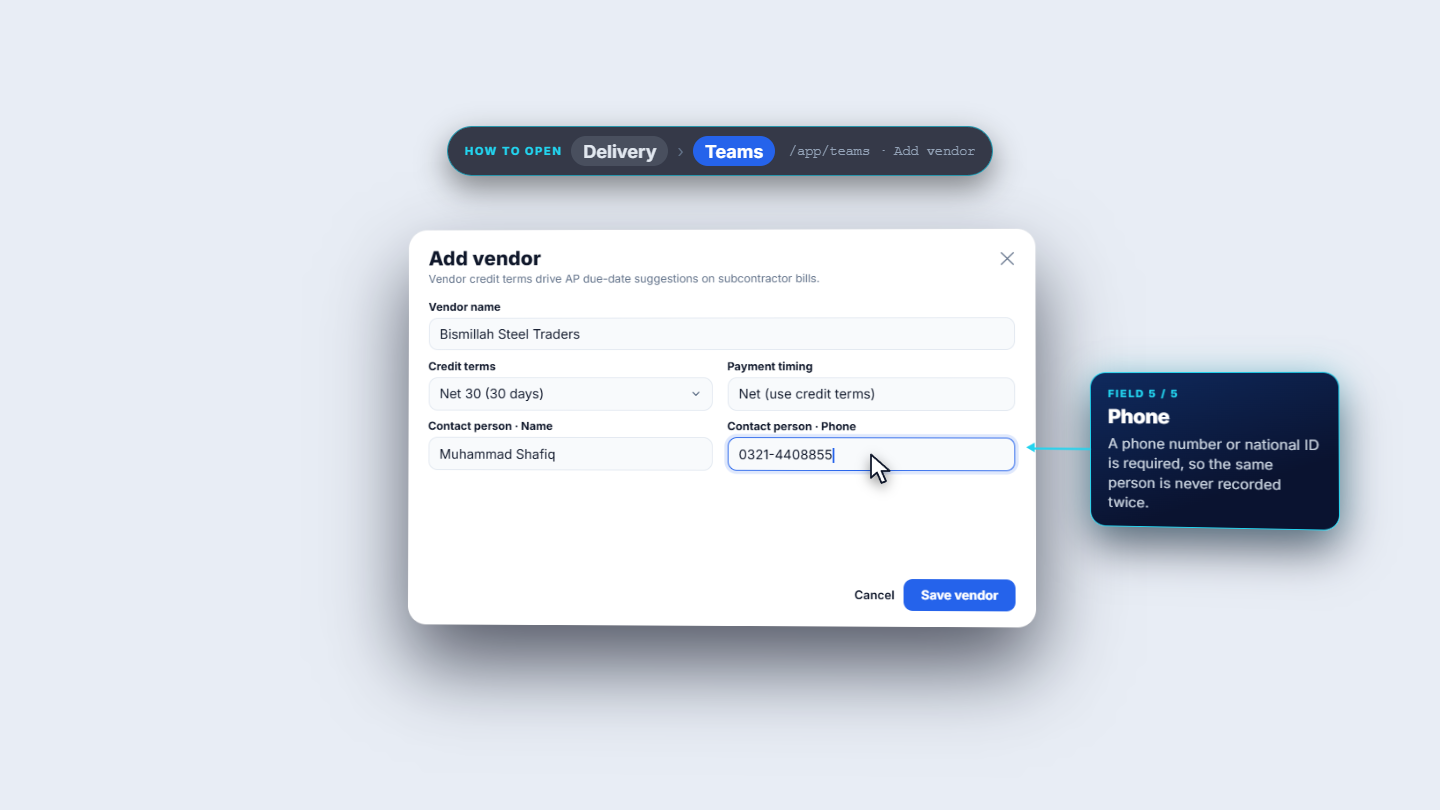
Open Teams › Vendors and click Add vendor. Enter the Vendor name (Bismillah Steel Traders). Pick Credit terms from Due on receipt, Net 15, Net 30, Net 45 or Net 60; choose Net 30. Set Payment timing to "Net (use credit terms)". Enter the Contact person (Muhammad Shafiq) and a phone (0321-4408855). Save the vendor: the toast reads "Vendor created."
Add vendor form for Bismillah Steel Traders with credit terms Net 30
2
Raise and approve the requisition
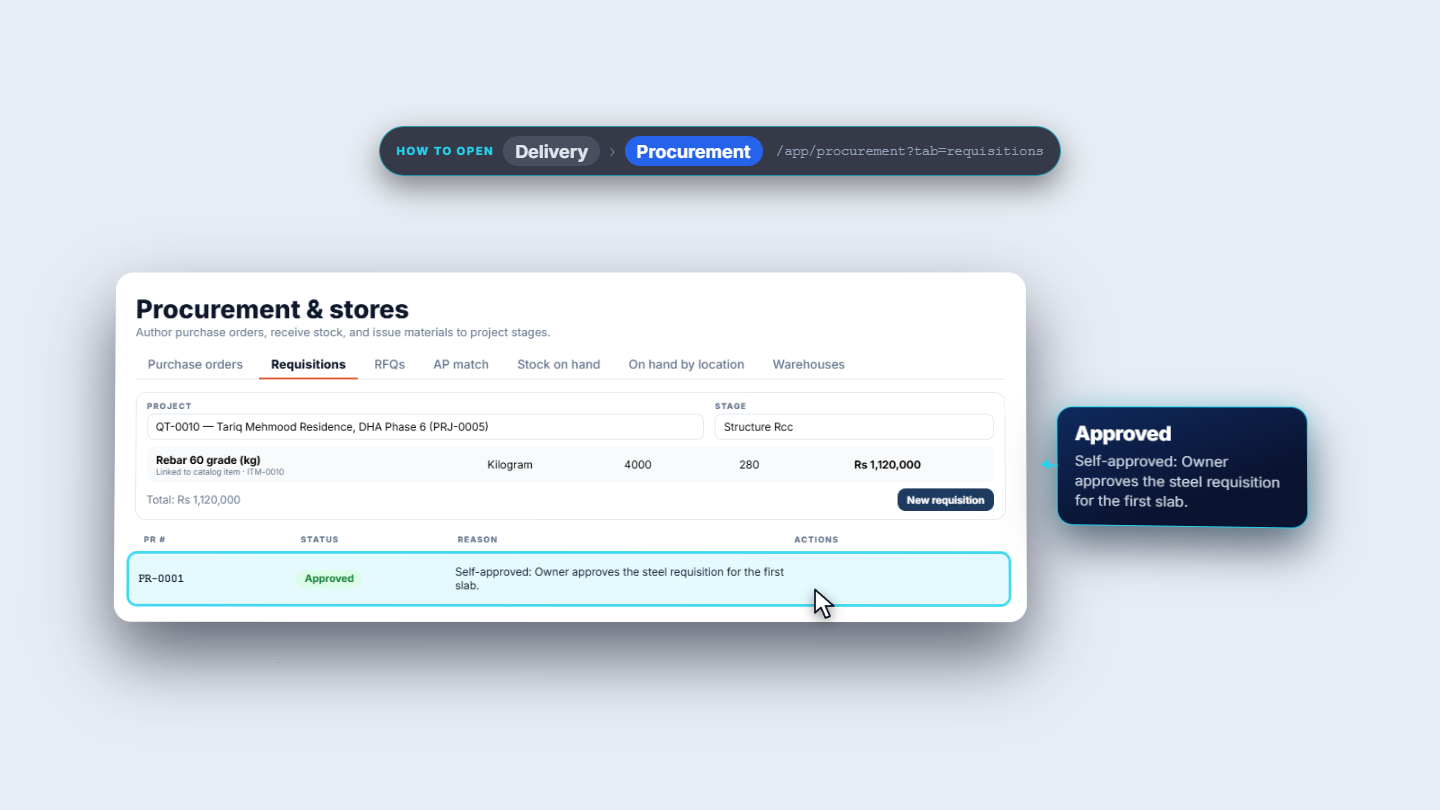
Open Delivery › Procurement and the Requisitions tab. Choose the Project (PRJ-0005) and the Stage (Structure Rcc). Click Pick from catalog, choose ITM-0010 Rebar 60 grade (kg), unit Kilogram, Qty 4000, Estimated rate 280: the amount is Rs 1,120,000. Create the requisition: PR-0001 is a Draft. Click Submit, then Approve with reason. When no other user can approve your own document, give a reason of at least 10 characters. PR-0001 reads Approved with "Self-approved: Owner approves the steel requisition for the first slab."
Requisition PR-0001 for the rebar line, approved with a reason
3
Create, approve and issue the purchase order
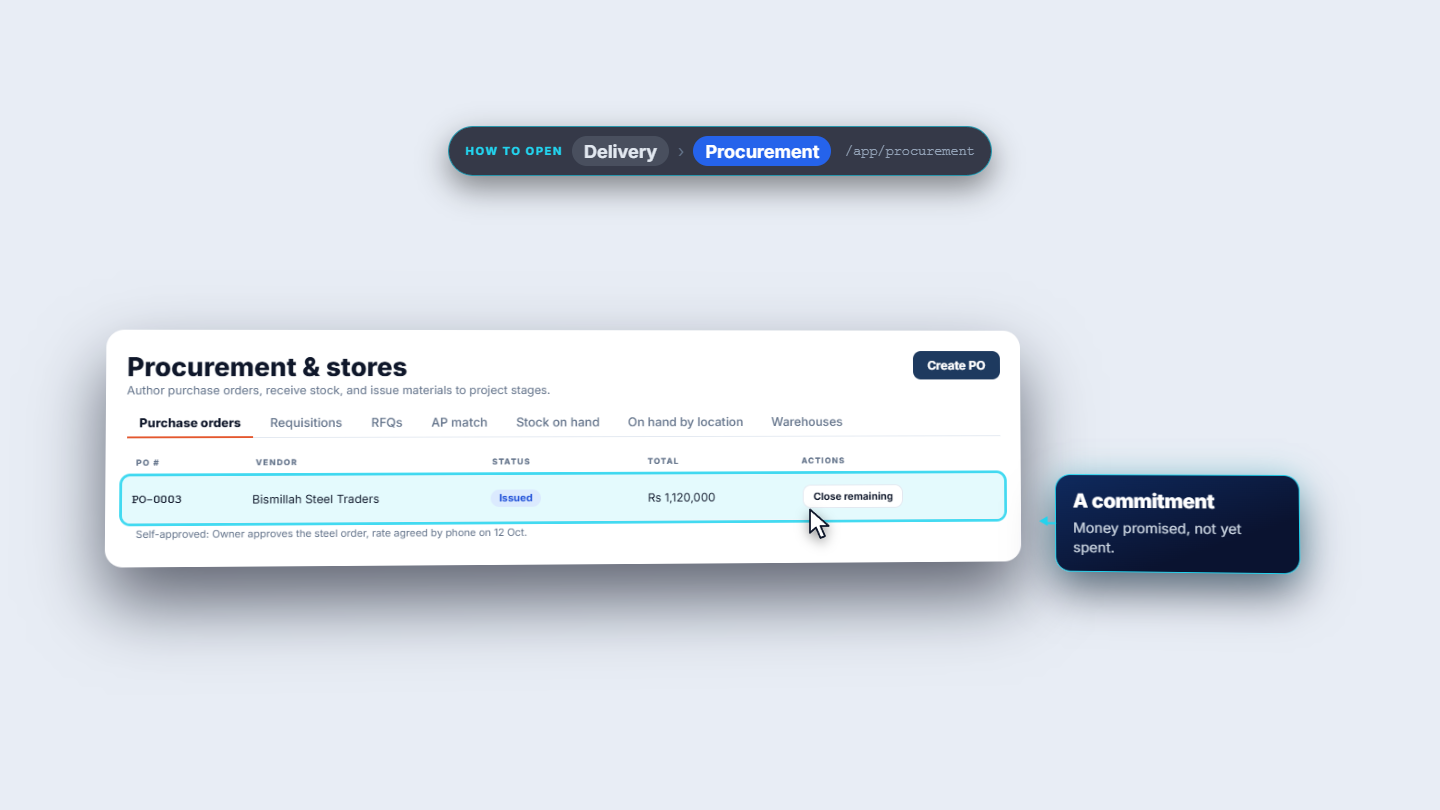
On the Purchase orders tab click Create PO. Choose the Vendor (Bismillah Steel Traders), the Project (PRJ-0005) and the Stage (Structure Rcc). Add the Notes (Rebar for the first slab. Delivery to site by 16 Oct.). Pick ITM-0010 from the catalog, Kilogram, Qty 4000, Rate 280: the line is Rs 1,120,000. Click Save draft: PO-0003 is a Draft. Click Submit (Pending approval), then Approve with reason ("Owner approves the steel order, rate agreed by phone on 12 Oct."), then issue it. The order reads Issued and the row offers Close remaining.
Purchase order PO-0003 moving from Draft to Issued for Bismillah Steel Traders
4
Receive the first truck
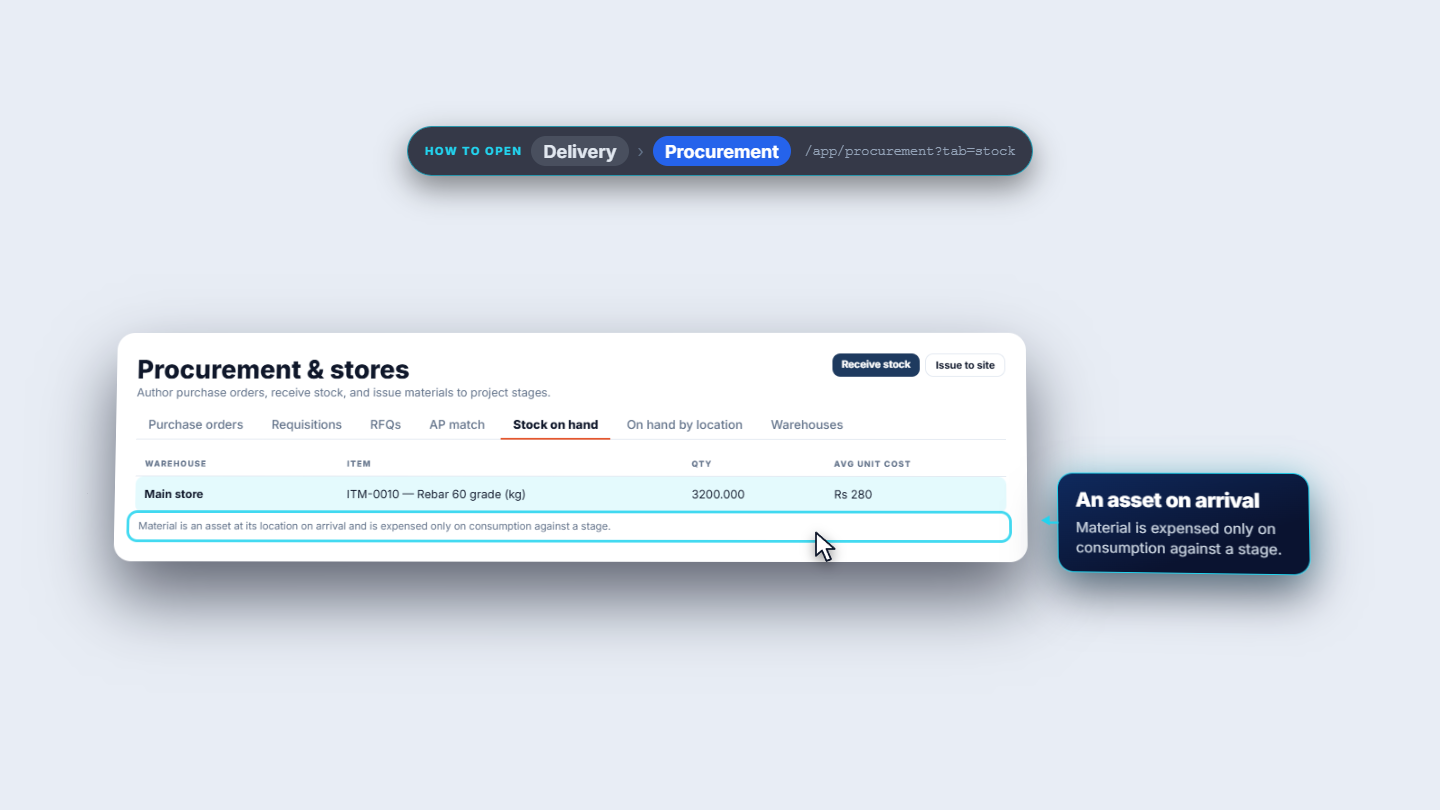
Open Stock on hand and click Receive stock. Pick the Purchase order (PO-0003) and the Warehouse (Main store); leave the warehouse empty and pick a project and stage to hold the stock at a site instead. The line shows Ordered 4000.000, Received 0.000, Remaining 4000.000 at Rs 280. Type Receive now 3,200. The receipt value is quantity times the order rate, Rs 896,000. Add a Note (Truck LEA-4417, Bismillah challan 2231) and post. The toast reads "Partial receipt posted. The order stays open and its commitment was relieved by Rs 896,000." Main store now lists ITM-0010 Rebar 60 grade (kg), 3200.000 at Rs 280.
Receive stock dialog for PO-0003 and the Main store stock line
5
Match the supplier bill
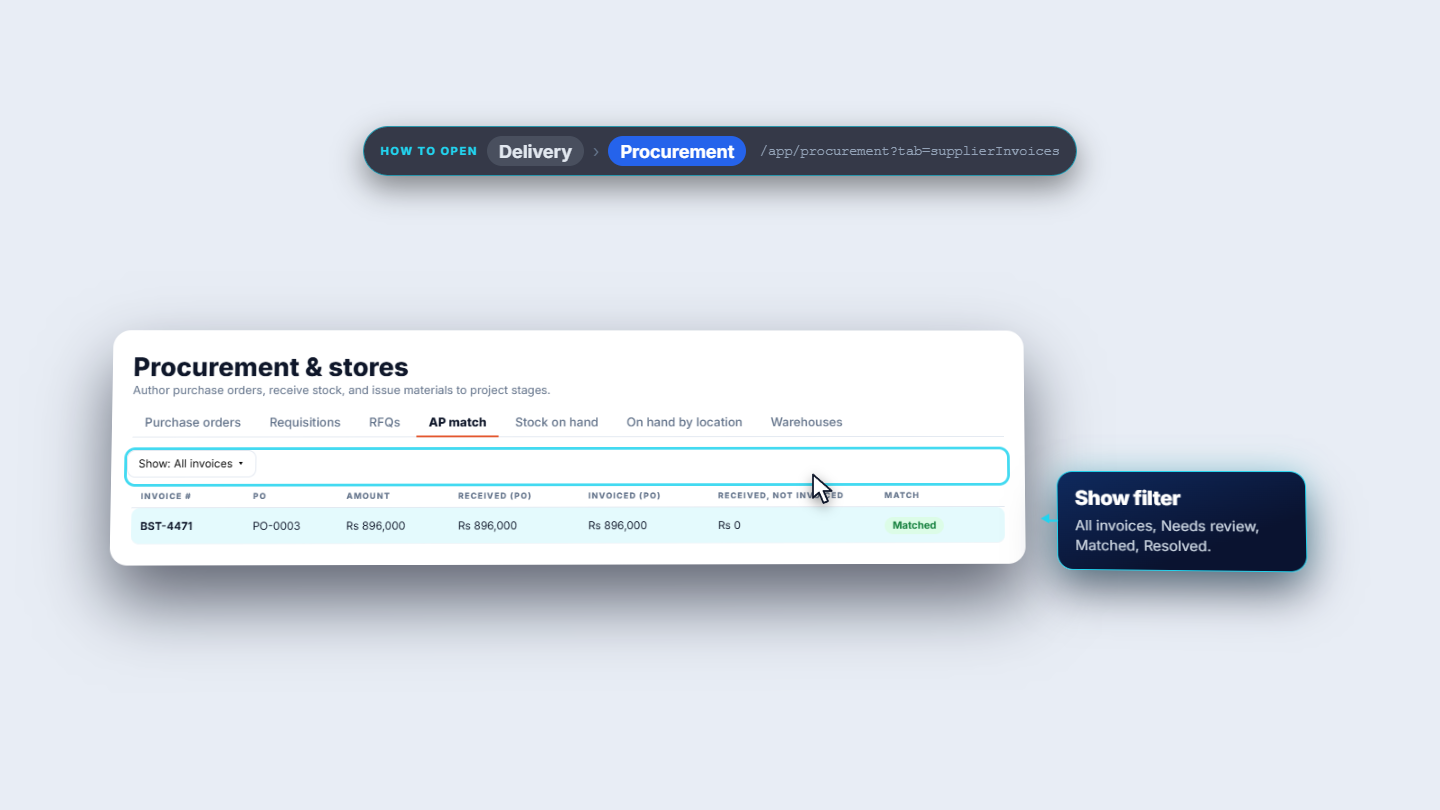
Open AP match and click Record supplier invoice. Pick the Purchase order (PO-0003), enter the Invoice number (BST-4471), the Invoice amount (896000) and the Invoice date (11 Oct 2026). The invoice is matched against the goods received on the order. The row reads BST-4471, PO-0003, Rs 896,000, Received (PO) Rs 896,000, Invoiced (PO) Rs 896,000, Received not invoiced Rs 0, Matched. The dialog says "Matched. The received value is now in Accounts Payable."
AP match row for supplier invoice BST-4471 showing Matched
6
Pay part of the bill
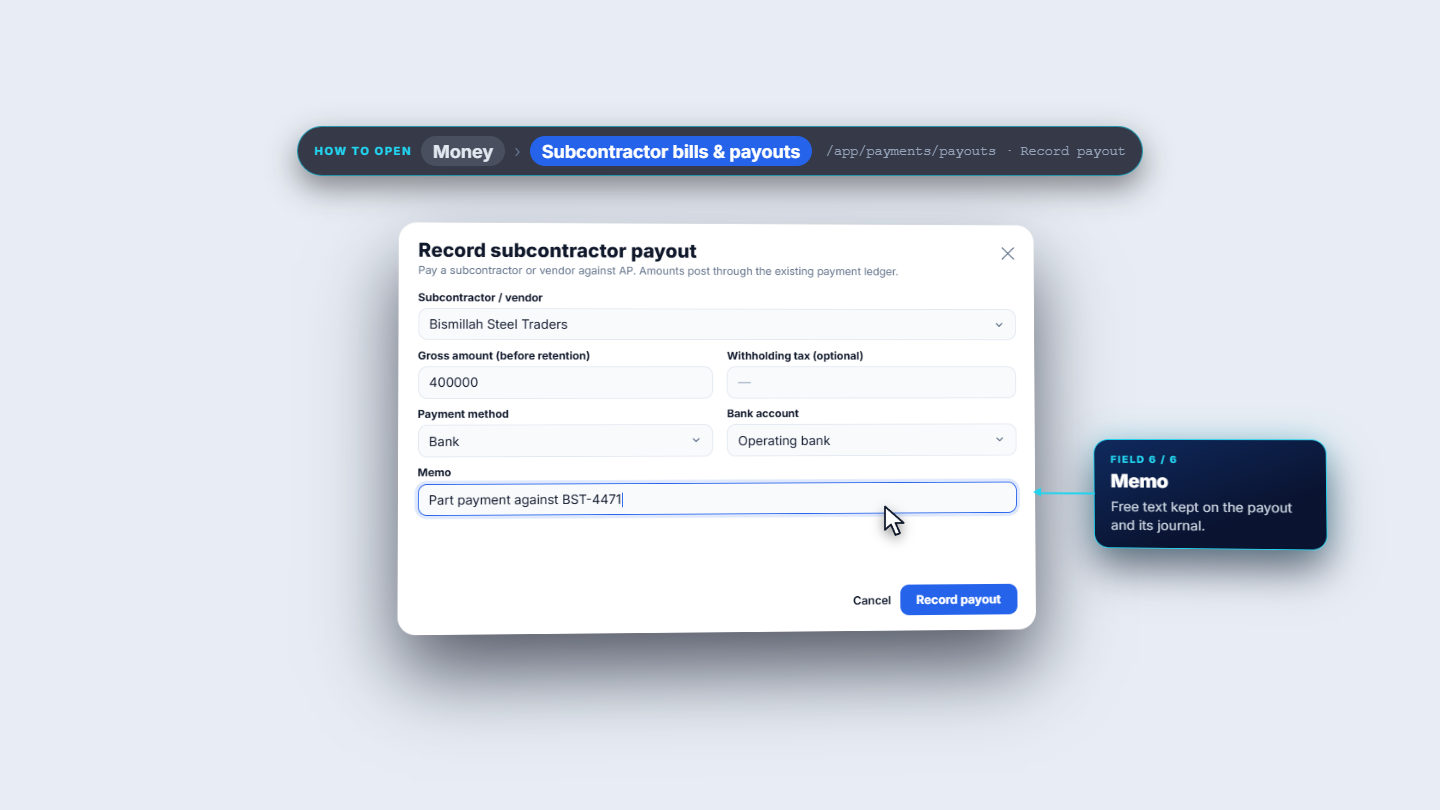
Open Money › Subcontractor bills & payouts. The bill row shows "Supplier invoice BST-4471 matched to PO-0003", due 10-Nov-2026, Rs 896,000, still owed Rs 896,000, Open. Click Record payout and pick the vendor: the dialog shows "Amount owed: Rs 896,000". Enter Gross amount 400000. Leave Retention held and Withholding tax empty (the dialog only suggests Rs 28,000, 7%). Choose Payment method Bank (Cash, Bank, Online and Credit are offered), Bank account Operating bank, and Memo "Part payment against BST-4471". Save: "Payout recorded — Journal JV-000026 posted. Net paid Rs 400,000. Retention held Rs 0."
Record payout dialog showing amount owed and the part payment to Bismillah
7
Read the journals and the project cost
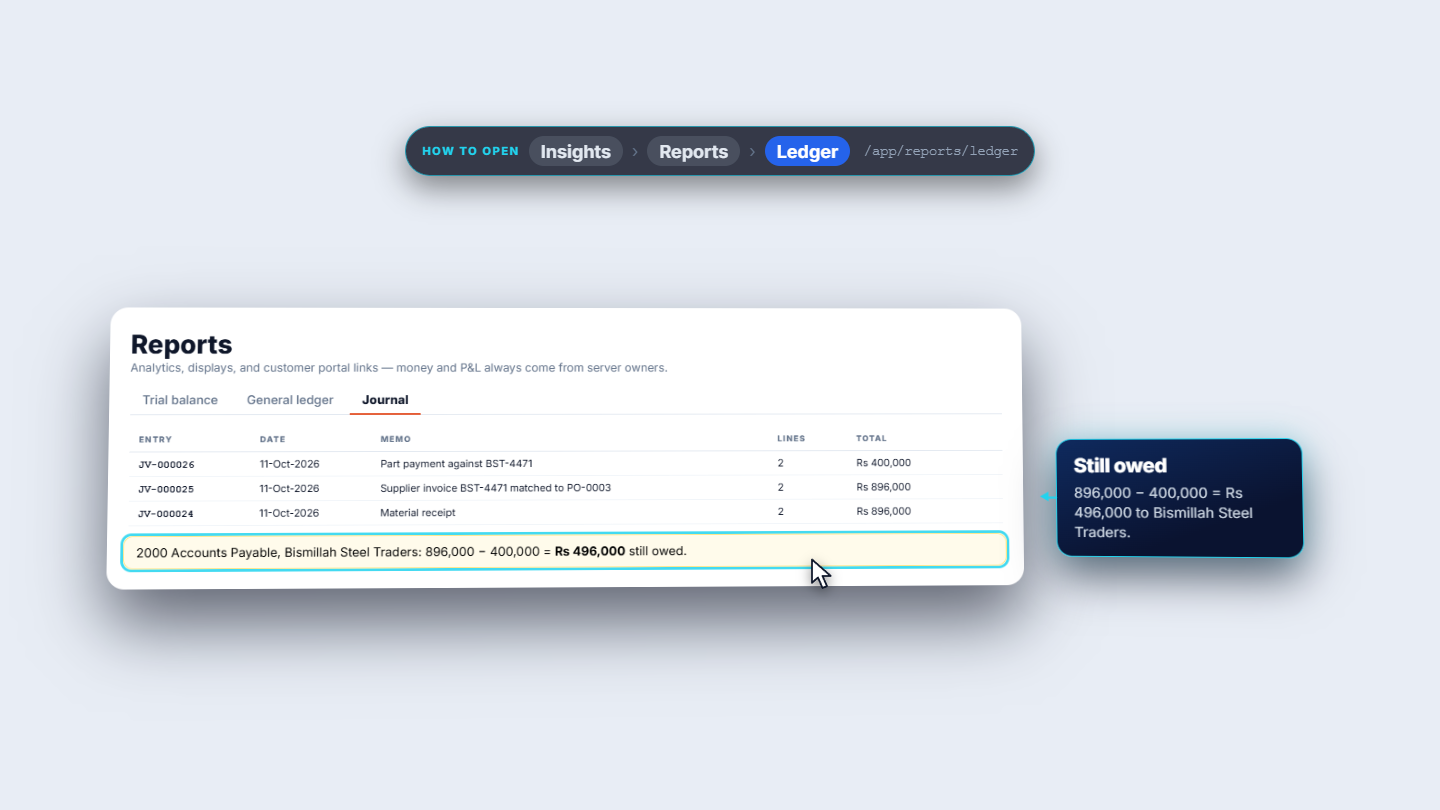
Open Reports › Ledger › Journal. Three entries belong to this order. JV-000024, the receipt, debits 1250 Materials Stock Rs 896,000 and credits 2050 Goods Received Not Invoiced Rs 896,000. JV-000025, the match, debits 2050 and credits 2000 Accounts Payable, Rs 896,000 each. JV-000026, the payment, debits 2000 Accounts Payable Rs 400,000 and credits 1001 Bank Rs 400,000. Rs 496,000 is still owed to Bismillah. Then open PRJ-0005 › The money › Cost › Budget vs actual. Budgeted cost is Rs 9,874,646, Actual cost Rs 0, and Committed (not yet incurred) Rs 224,000, which is the Rs 1,120,000 ordered less the Rs 896,000 received.
Journal list showing JV-000024, JV-000025 and JV-000026 for the steel order
Check it worked
PR-0001 is Approved and PO-0003 is Issued for Rs 1,120,000, with the order still open for the remaining 800 kg.
Main store shows 3200.000 of ITM-0010 Rebar 60 grade (kg) at Rs 280.
The AP match row BST-4471 reads Matched with Received not invoiced Rs 0.
The bill shows still owed Rs 496,000 to Bismillah Steel Traders, due 10-Nov-2026.
The project Cost tab shows Actual cost Rs 0 and Committed Rs 224,000.
Common mistakes
Mistake
What you see
Fix
Waiting for the requisition to become the order
No purchase order appears after PR-0001 is approved
Use Create PO on the Purchase orders tab
Saving a vendor without a contact number
A phone or national ID is required
Enter the phone or national ID of the contact person
Expecting stock to count as project cost
Actual cost stays Rs 0
The material is stock until it is used on a stage
Approving your own document with no reason
The app asks for a reason
Give at least 10 characters; it is recorded in the audit log
Quick reference
Item
Meaning / rule
Issued purchase order
A commitment: money promised, not yet spent
Receipt value
Quantity received times the purchase-order rate
Goods Received Not Invoiced (2050)
Holds the received value until the supplier bill is matched
Matched supplier bill
Moves the received value to Accounts Payable (2000)
Withholding tax and retention
Optional on a payout; the dialog only suggests an amount
Committed (not yet incurred)
Open order value, excluded from actual cost, variance and margin
Frequently asked questions
Does an approved requisition become the purchase order? No. Here PR-0001 was approved and PO-0003 was created by hand with Create PO for the same line.
What happens to the order when only part of it arrives? The receipt reads "Partial receipt posted", the order stays open and its commitment is relieved by the value received, Rs 896,000 for 3,200 kg.
Why is the project's actual cost still zero after the delivery? The steel is stock at Main store, an asset. It becomes cost only when it is used on a stage.
What does the supplier bill match against? The goods received on the purchase order. When the amounts agree the row reads Matched and the value moves to Accounts Payable; anything that does not match is held for review.