How to record the insurer's decision and payment on a claim
You will record what the insurer decided, post their payment with any write-off, handle a rejection or denial, and read the Claim Register report. Use it every time an insurer answers or pays a submitted claim.
Who it is forInsurance desk officer and accountantTime15 minutesProductHMSLevelIntermediate
Before you start
Steps
1
Open the claims register
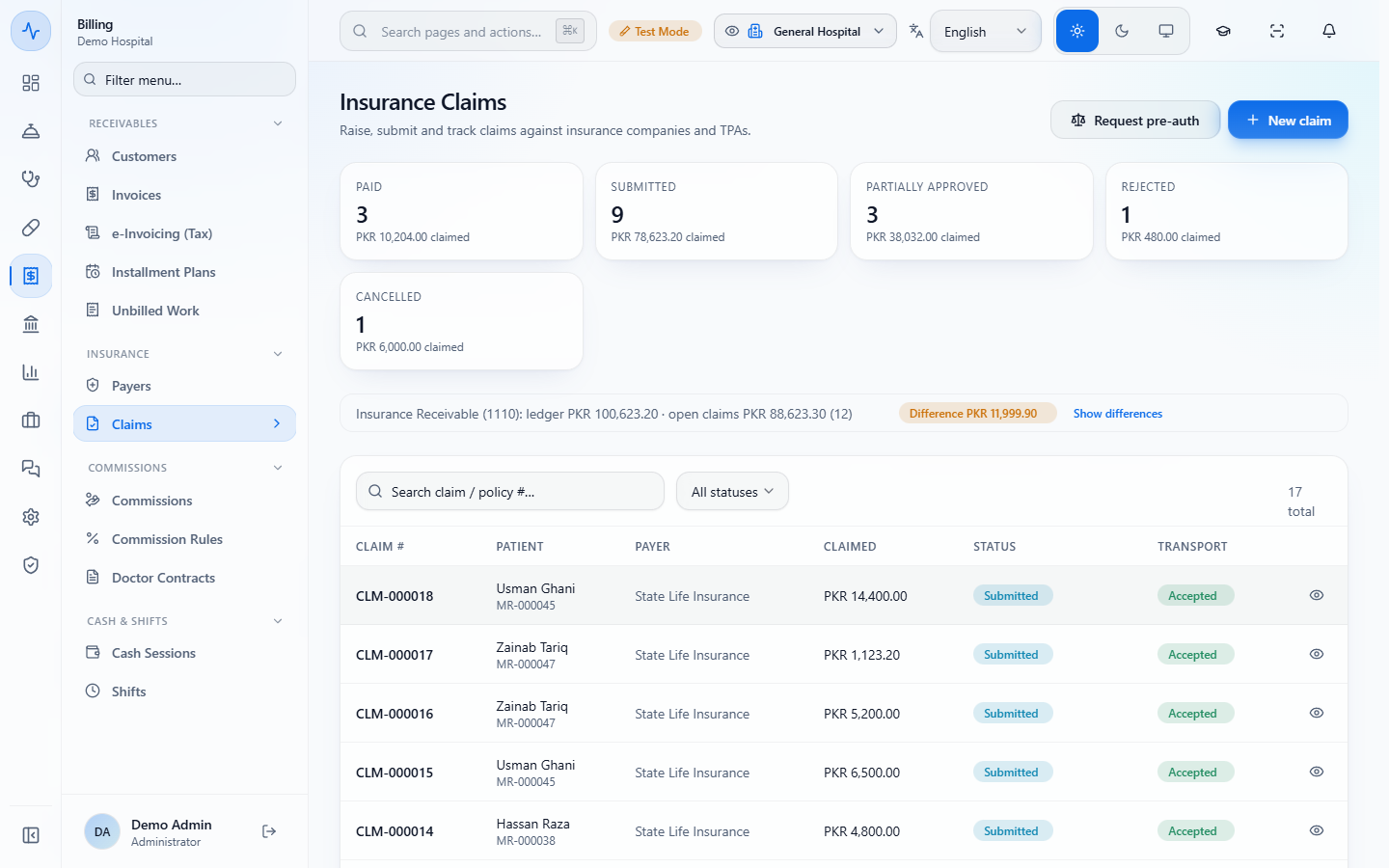
Open Billing › Insurance › Claims. The tiles count claims by status with the amount claimed, and the list shows each claim with its patient and MR number, payer, claimed amount, status and transport status (Accepted once the clearinghouse has it). The line "Insurance Receivable (1110)" compares the ledger with the open claims: it shows Reconciled when they are equal, or a Difference badge with Show differences, which lists the claims whose ledger entries differ from their status. Use the search box ("Search claim / policy #...") or the status filter to find one claim.
Claims register with status tiles and the list of claims
2
Open the claim
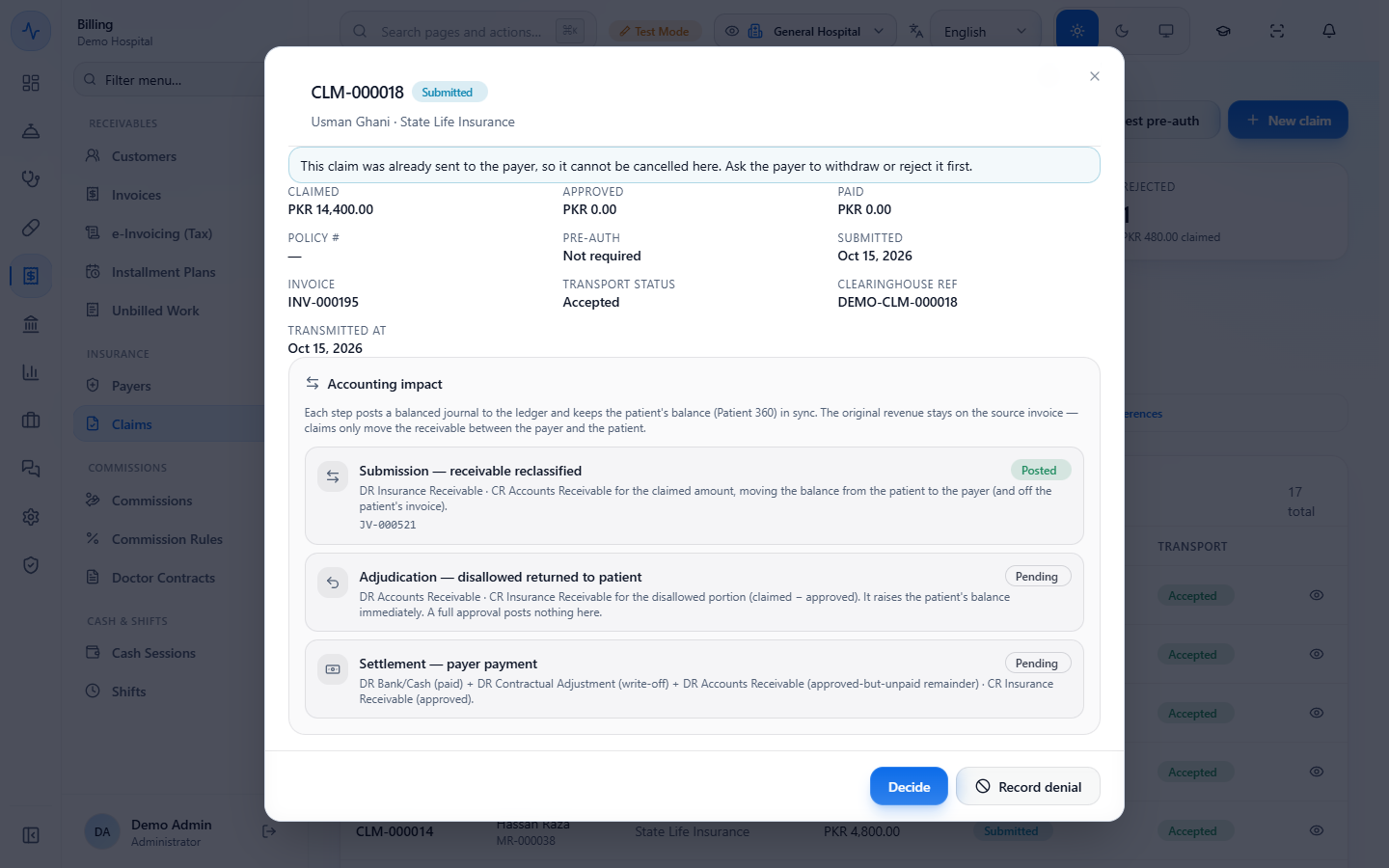
Click View claim. You see the claimed, approved and paid amounts, the policy and pre-auth numbers, the invoice (INV-000195), the transport status and three accounting steps in "Accounting impact": Submission (Posted, JV-000521), Adjudication and Settlement (both Pending).
Submitted claim CLM-000018 with amounts, transport status and accounting impact
3
Record the insurer's decision
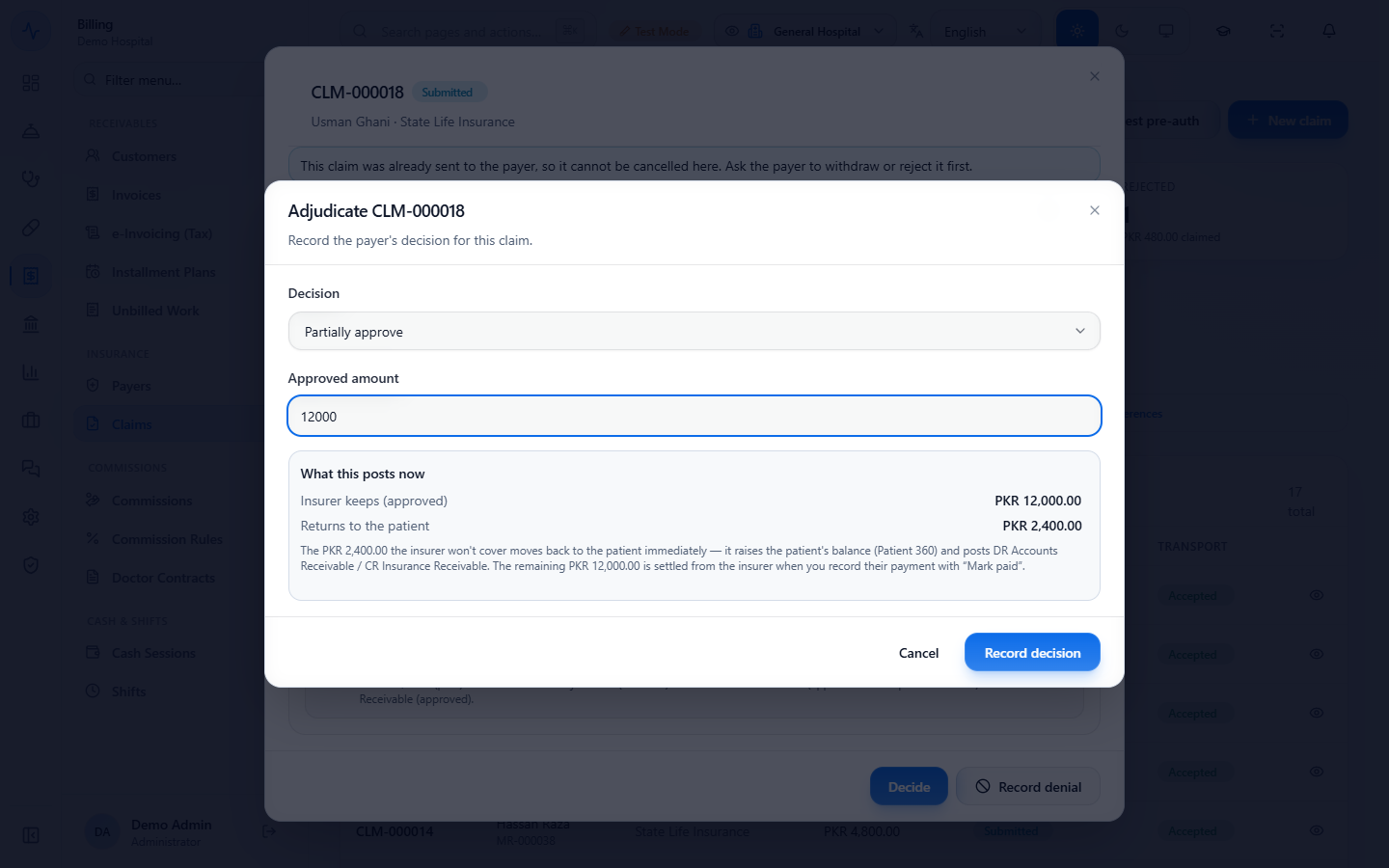
Click Decide. Choose Approve in full, Partially approve or Reject. For a partial approval type the Approved amount, here 12000. The box "What this posts now" shows what the insurer keeps (approved) PKR 12,000.00 and what returns to the patient PKR 2,400.00. Click Record decision; a toast says "Decision recorded", the claim is Partially approved and its Adjudication step posts voucher JV-000534, with Mark paid and Import remittance now available.
Adjudicate dialog with Partially approve and an approved amount of 12000
4
Check the patient's balance
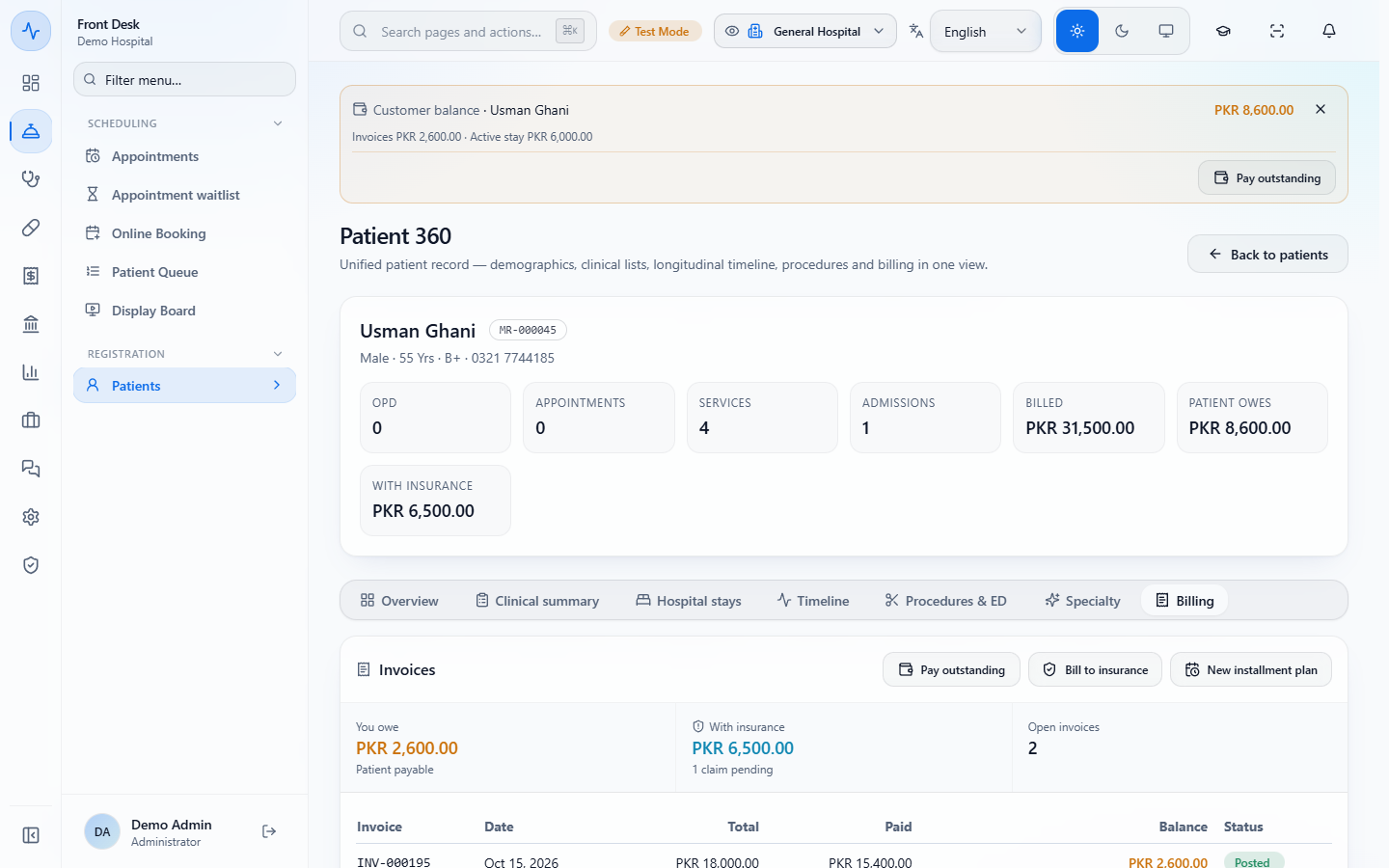
The amount the insurer will not cover goes back to the patient immediately. In Patient 360 › Billing, You owe now includes it, and the invoice shows the balance still to collect.
Patient 360 billing showing the patient payable of PKR 2,600.00
5
Record the insurer's payment
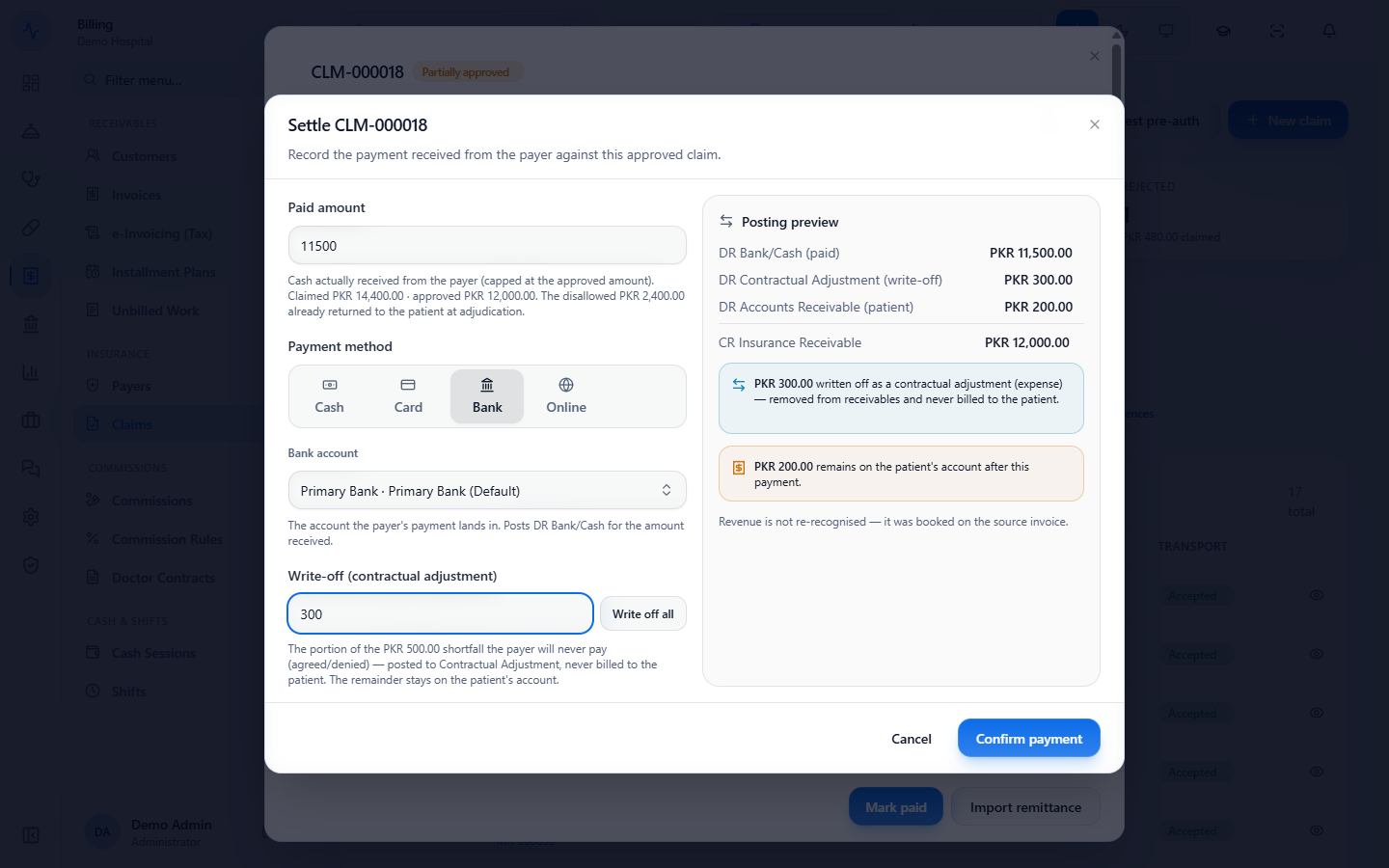
When the money arrives click Mark paid. Type the Paid amount (11500), choose the Payment method (Cash, Card, Bank or Online; Bank is preselected) and the Bank account ("Primary Bank"), and enter a Write-off (contractual adjustment) of 300 for the part the insurer will never pay. The Posting preview shows debits for the bank (PKR 11,500.00), the contractual adjustment (PKR 300.00) and the patient's remainder (PKR 200.00) against Insurance Receivable PKR 12,000.00. Click Confirm payment.
Settle claim dialog with paid amount 11500, Bank, write-off 300 and the posting preview
6
Print the voucher and collect the rest
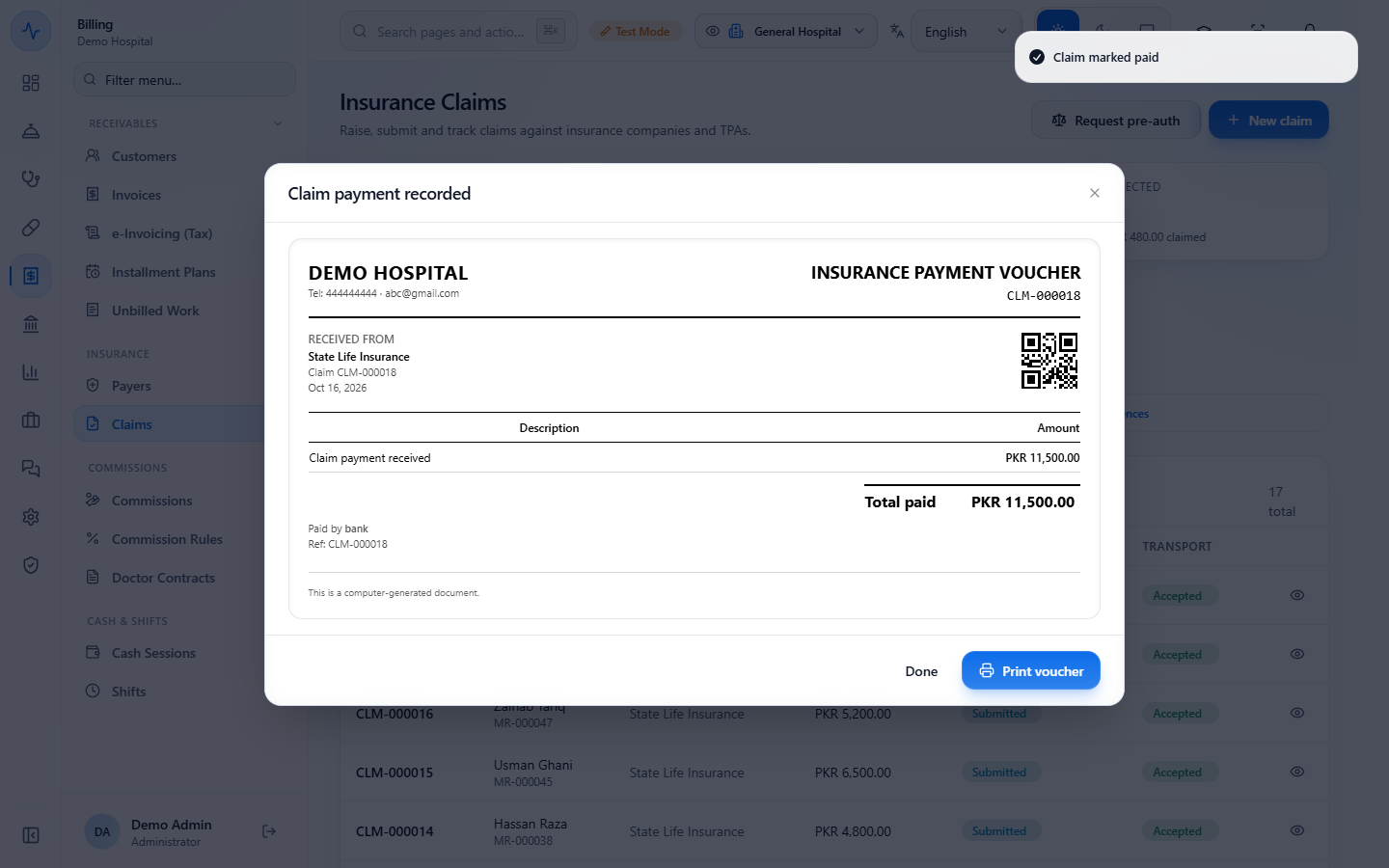
A toast says "Claim marked paid" and an Insurance payment voucher (Total paid PKR 11,500.00, paid by bank) is ready to Print voucher. The claim is now Paid (Settlement JV-000535) and says PKR 2,600.00 now sits in the patient's accounts receivable: collect it with Pay outstanding in Patient 360.
Insurance payment voucher for PKR 11,500.00 paid by bank
7
Import the insurer's remittance
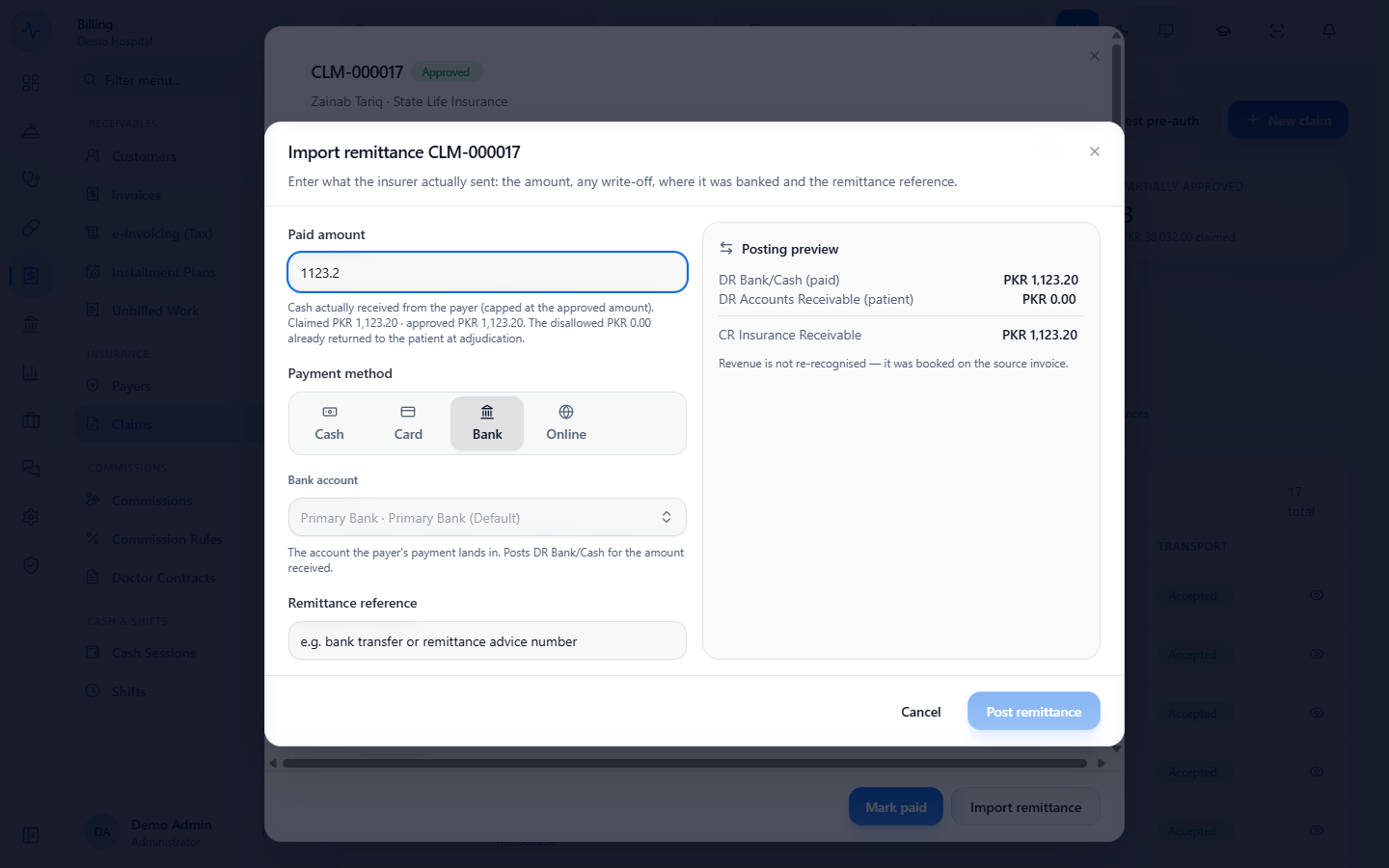
For an approved claim the insurer pays in full, open it and click Import remittance. The Paid amount is filled in, capped at the approved amount; choose the Payment method and Bank account, and type the Remittance reference, for example RA-2026-1016-0042. Post remittance stays disabled until the reference is typed. A toast says "Remittance posted" and the voucher shows the reference.
Import remittance dialog with the paid amount, bank account and remittance reference
8
Record a denial and send an appeal
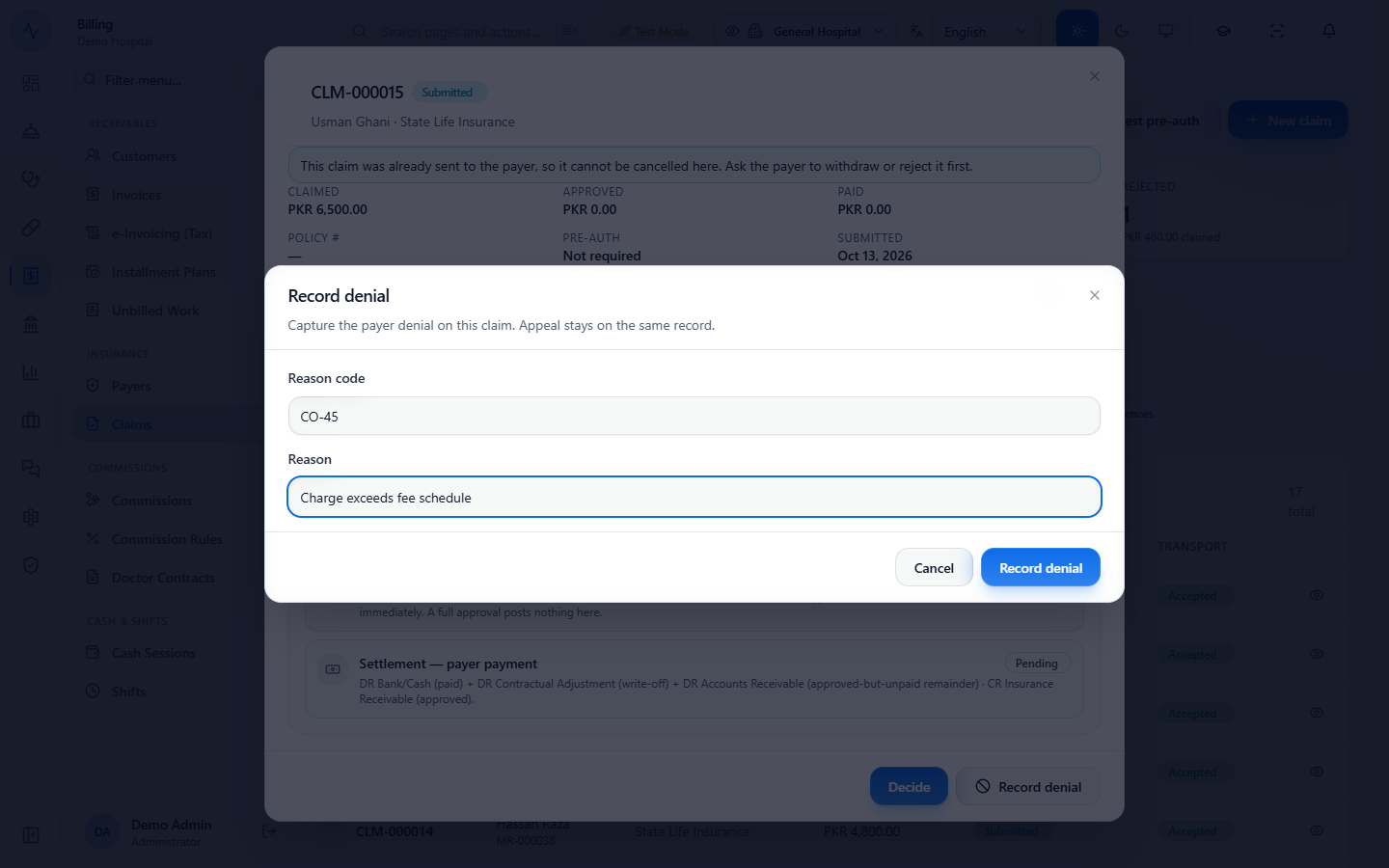
On a submitted claim click Record denial, type the Reason code and Reason, and save: "Denial recorded". Then type an Appeal note and click Appeal denial: "Appeal sent". A denial is only a note; it does not change the status or the accounts.
Record denial dialog with reason code CO-45 and a reason
9
Reject a claim
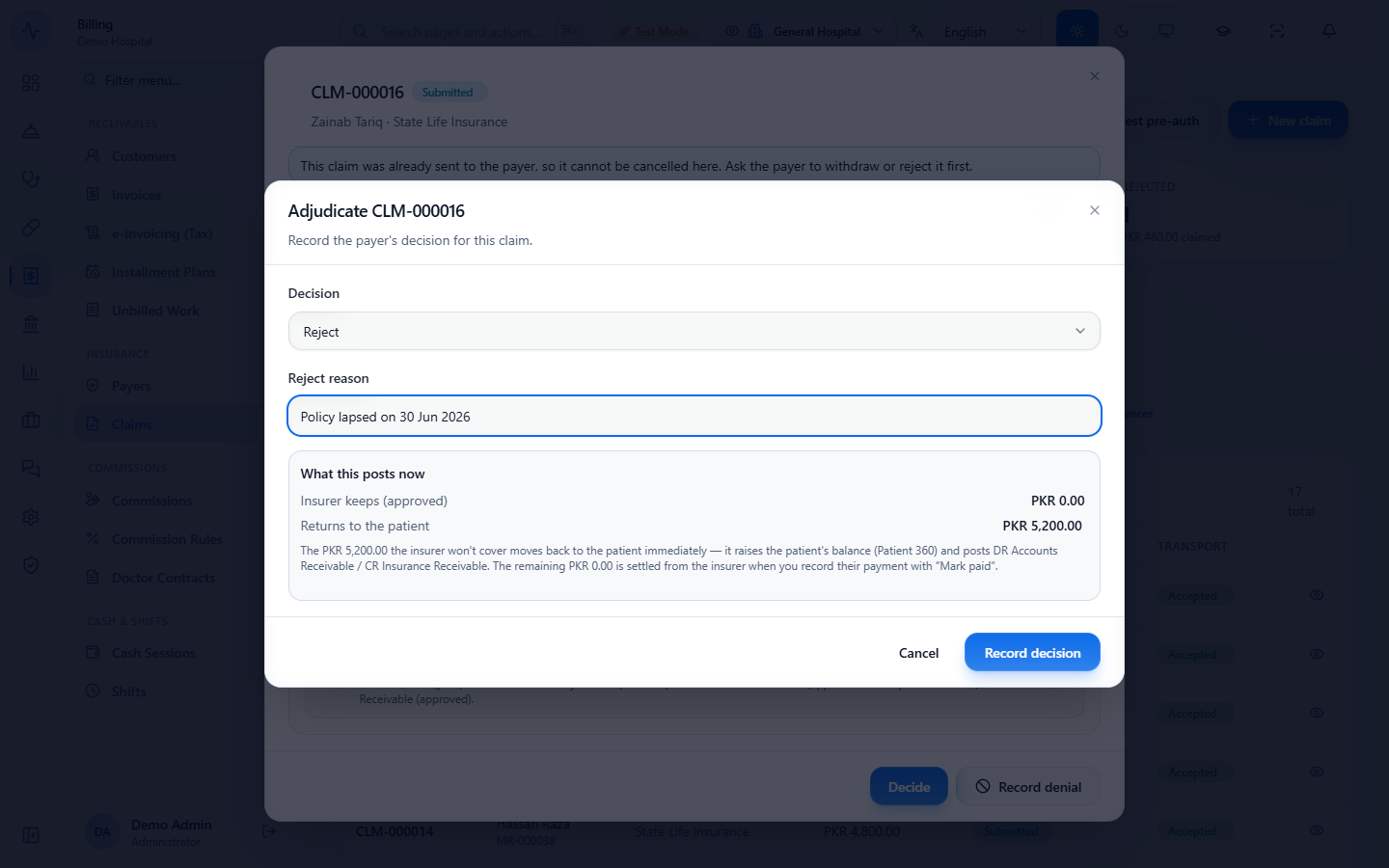
In Decide choose Reject and type the Reject reason. The whole claimed amount returns to the patient's account and the claim shows Rejected.
Adjudicate dialog with Reject and the reject reason policy lapsed
10
Cancel a claim the payer is not holding
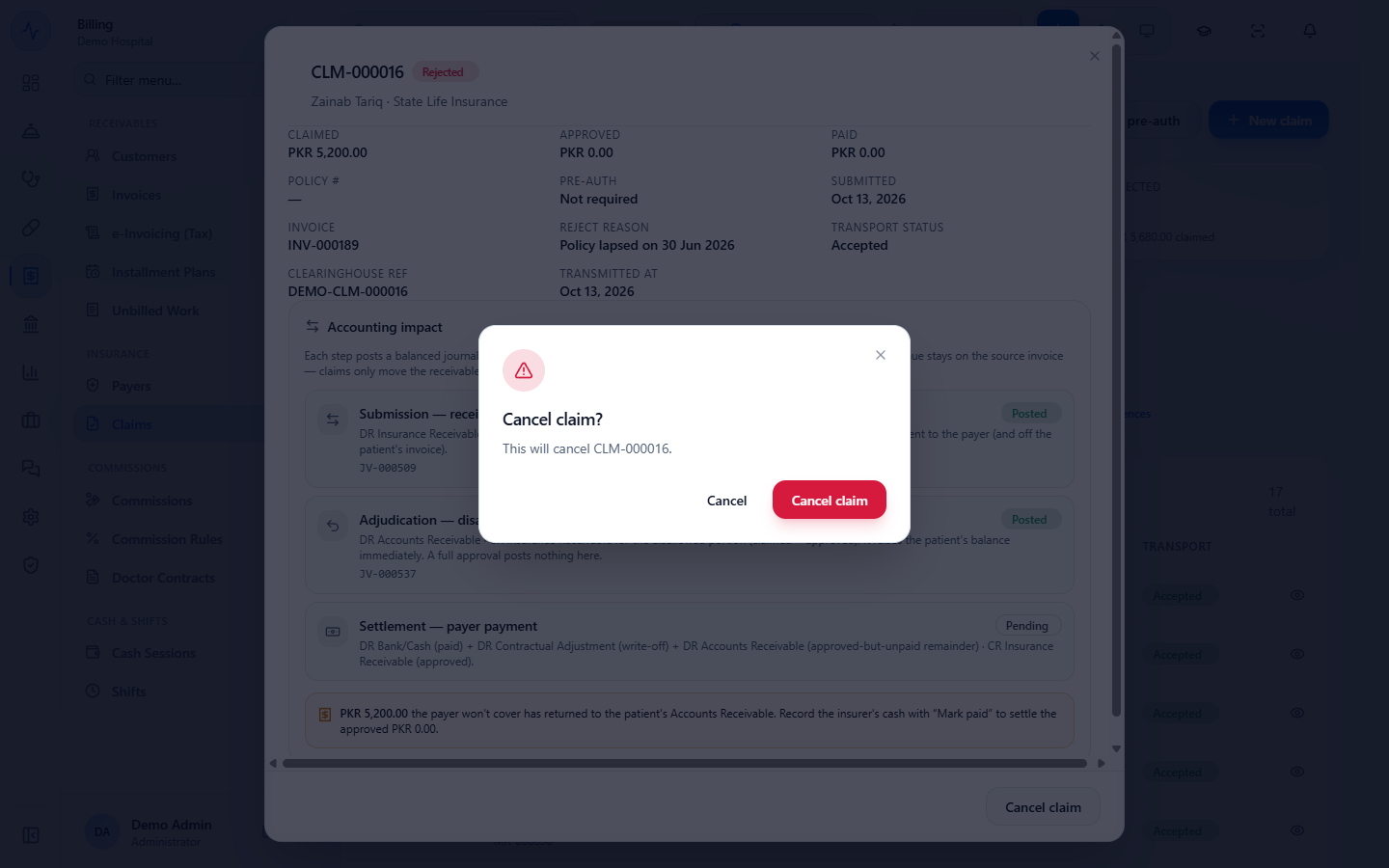
Click Cancel claim and confirm. A toast says "Claim cancelled" and the claim shows Cancelled. Only a claim the payer is not holding can be cancelled, for example one you have just rejected.
Confirmation asking to cancel claim CLM-000016
11
Read the claims register report
Open Reports & Analytics › Insurance › Claim Register and click Run. Pick the dates (or This month, Last 30 days) first. Each row shows the date, claim, payer, patient, status and the covered, paid and outstanding amounts; cancelled and fully paid claims show no outstanding balance, and the total row shows what is still due (for 1 to 16 October: 7 claims, PKR 22,100.00 outstanding). The panel "Reconciles to Insurance Receivable (1110)" shows whether the report ties to the ledger.
Insurance Claim Register with claim rows and totals
Check it worked
Claim CLM-000018: Paid, approved PKR 12,000.00, paid PKR 11,500.00.
Account Ledger: vouchers for the disallowed PKR 2,400.00, the settlement of PKR 12,000.00 (bank 11,500.00, contractual adjustment 300.00, patient 200.00) and the patient's PKR 2,600.00 payment.
Claim Register: CLM-000017 and CLM-000018 are Paid, CLM-000016 is Cancelled, and they show no outstanding balance.
Common mistakes
Mistake
What you see
Fix
Cancelling a claim that was sent to the payer
"This claim was already sent to the payer, so it cannot be cancelled here."
Ask the payer to withdraw or reject it, then record the rejection
Forgetting the patient's share after payment
The claim says PKR 2,600.00 sits in the patient's receivable
Collect it from the patient in Patient 360
Treating a denial as a rejection
The claim status and the patient's balance do not change
Use Decide and Reject when the insurer refuses the claim
Quick reference
Item
Meaning / rule
Disallowed amount
Claimed minus approved; returns to the patient at once
Write-off
The part the insurer will never pay; posted as an expense, never billed to the patient
Mark paid
Posts the bank receipt, the write-off and the patient's remainder in one voucher
Denial
A note only, no change to status or accounts
Frequently asked questions
What happens to the part the insurer does not cover? It returns to the patient's receivable the moment you record the decision, so the patient's balance rises and you collect it as usual.
What is a write-off on a claim? It is the portion the insurer will never pay by agreement. It is posted to contractual adjustment and is not billed to the patient.
Can I cancel a claim after it was sent to the insurer? Not from the clinic. Ask the insurer to withdraw or reject it first, then record that decision.
Does recording a denial change the money? No. A denial and an appeal are notes. Only a rejection through Decide returns the amount to the patient.