How to run an OPD consultation session, from findings to completion
A consultation session is one window for the whole visit: findings, prescription, orders, charges and sign-off. This guide follows one visit from opening the session to completing it, so that the chart, the prescription and the bill stay in one record.
Who it is forDoctorTime20 minutesProductHMSLevelIntermediate
Before you start
Steps
1
Open the session window
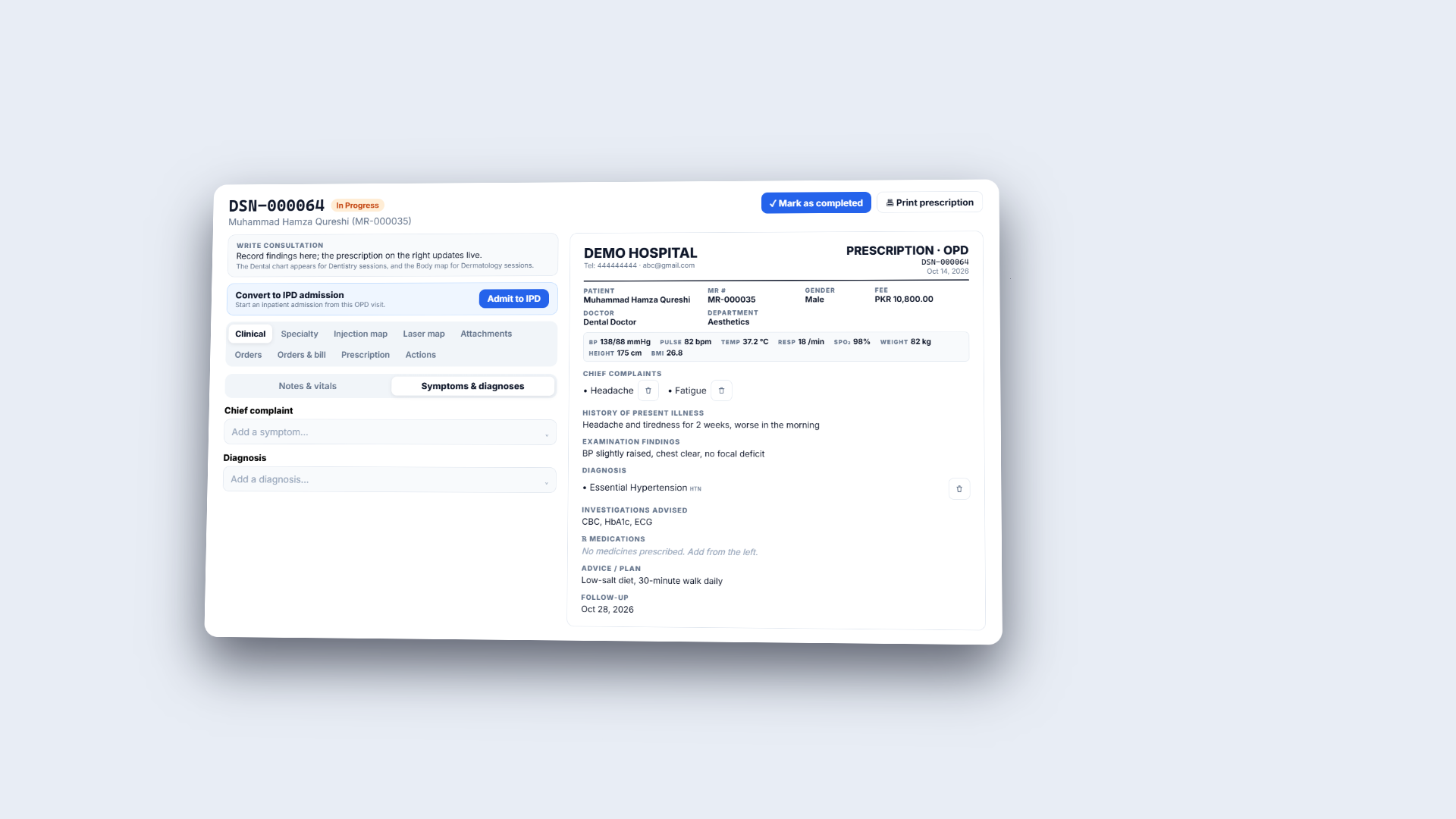
Click Clinical › Patient Care › Consultation. The page lists every OPD consultation with its own session number (DSN). Search by DSN number, patient or MR number, and filter by status. Each row shows the session number, the patient with MR number and date, the doctor, the rate and the status, with View session and, while it is open, Mark session as completed. Open DSN-000064. The window shows the session number, an In Progress badge and the patient. You write findings on the left; the prescription sheet on the right updates as you go and shows the session fee, PKR 10,800.00 (the doctor's PKR 12,000.00 less this patient's 10% discount, as the New session dialog showed under To collect). The tabs are Clinical, Specialty, Injection map, Laser map, Attachments, Orders, Orders & bill, Prescription and Actions. A strip below the header shows allergies (Penicillin, Sulfa drugs), the department, active medicines and the outstanding balance.
Session DSN-000064 with the findings on the left and the prescription sheet on the right
2
Write the vitals, notes, symptoms and diagnosis
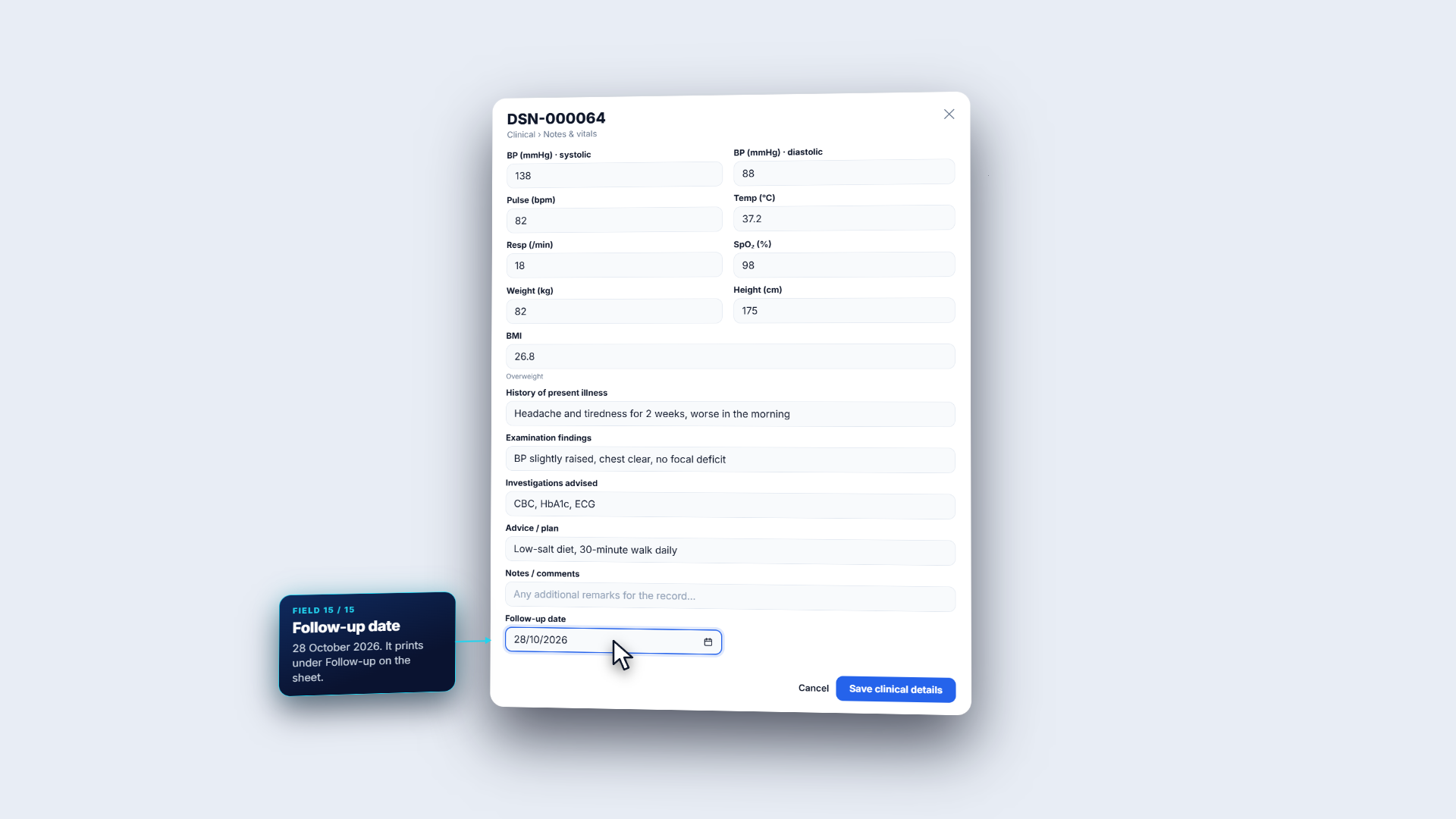
Under Clinical › Notes & vitals enter BP (mmHg) 138 over 88, Pulse 82, Temp 37.2, Resp 18, SpO₂ 98, Weight 82 and Height 175. BMI works itself out: 26.8, Overweight. Then write History of present illness (headache and tiredness for 2 weeks, worse in the morning), Examination findings, Investigations advised (CBC, HbA1c, ECG), Advice / plan and the Follow-up date (26/10/2026). Press Save clinical details: Clinical details saved. On Symptoms & diagnoses search Chief complaint (Headache, Fatigue) and Diagnosis (Essential Hypertension). Each pick lands on the sheet at once, and every entry has a remove button.
Notes and vitals form with BP 138/88, BMI 26.8 and a follow-up date
3
Prescribe and read the safety alert
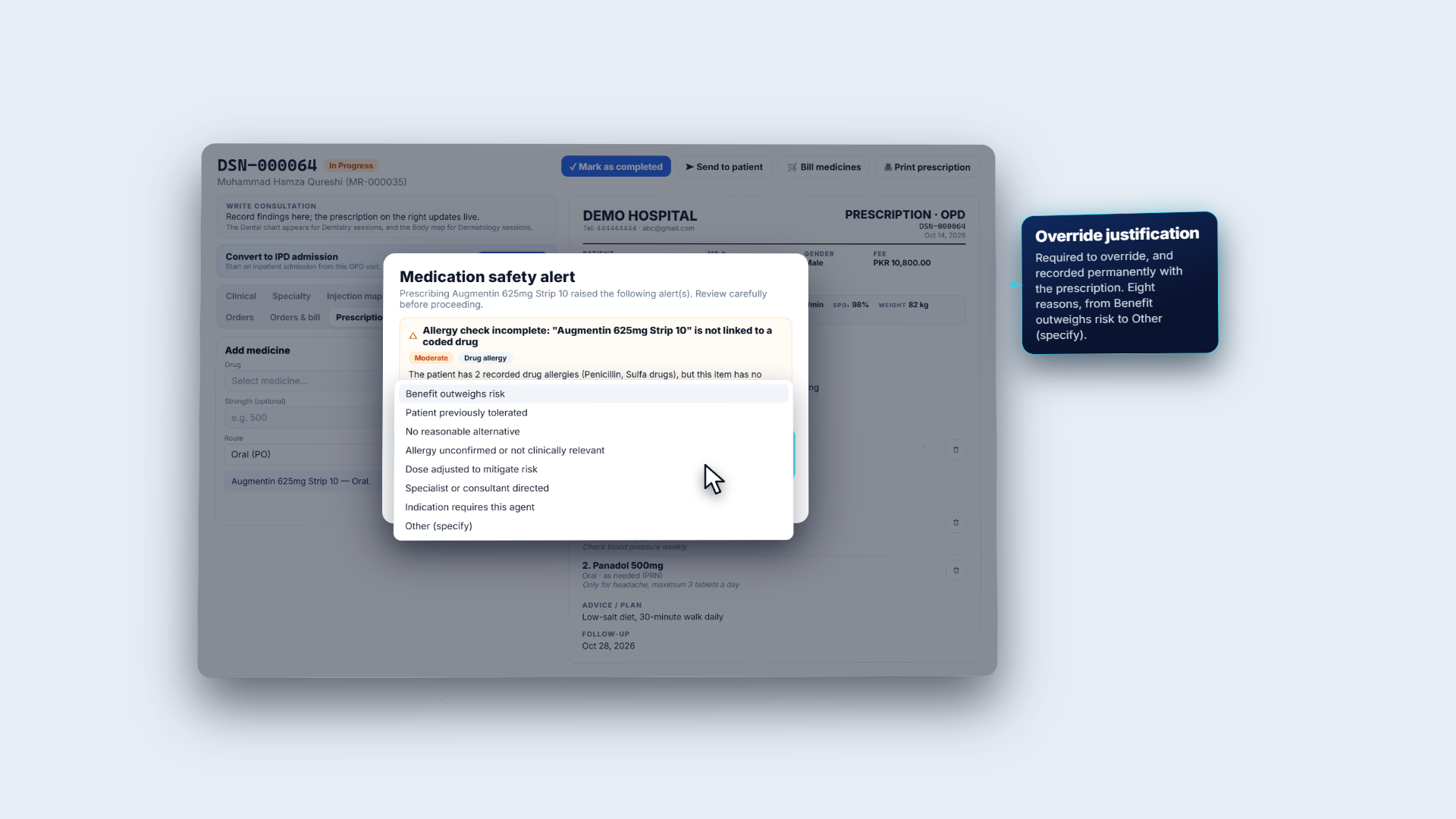
Open Prescription. Pick the Drug from stock medicines or the clinical catalogue (Amlodipine 5mg Strip 14), then set Unit, Route (Oral is the default), Duration (days) (30), When to take (Morning), With food (After food) and Instructions (Check blood pressure weekly). Tick PRN (as needed) for a medicine like Panadol 500. Press Add to prescription: a safety check runs first (here it asks for an override reason, and then the sheet lists the medicine with its dose code). For Augmentin 625mg Strip 10 the Medication safety alert appears: the patient has two recorded drug allergies (Penicillin, Sulfa drugs), but this item is not linked to a coded drug, so it could not be screened. The alert is Moderate, Drug allergy, with a suggested action. Overriding needs an Override justification; Cancel keeps Augmentin off the prescription.
Medication safety alert for Augmentin 625mg Strip 10 with an override reason
4
Place an order
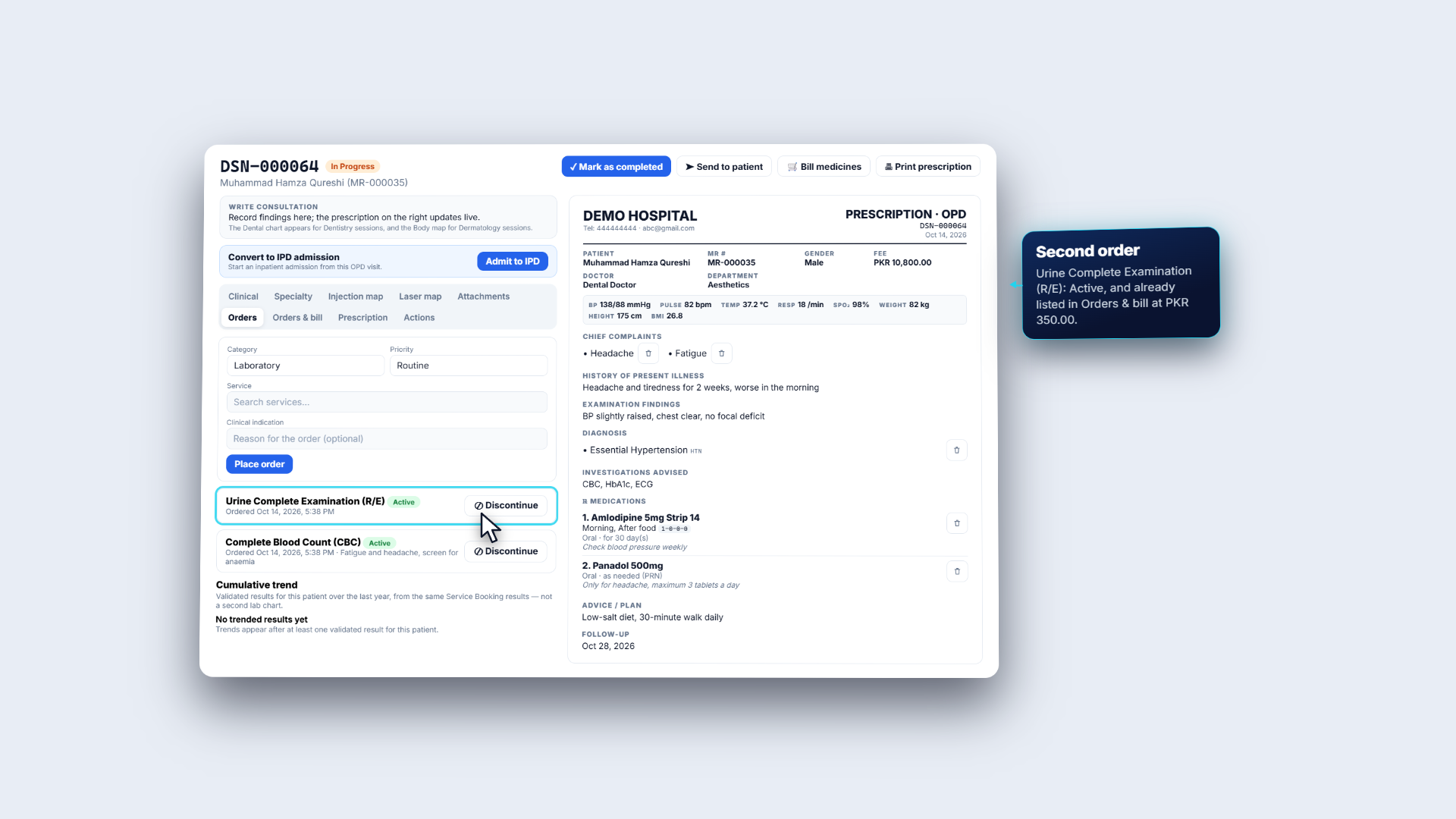
Open Orders. Choose Category (Laboratory, Imaging, Procedure or Consult) and Priority (Routine, Urgent or STAT). Search Service by name or code (LAB-CBC), add a Clinical indication (fatigue and headache, screen for anaemia) and press Place order: Order placed. The order appears as Active with Discontinue. A second order, Urine Complete Examination (R/E), is listed the same way, and it appears in Orders & bill at once, priced at PKR 350. Cumulative trend shows validated results for this patient; none exist yet.
Orders tab with CBC and Urine Complete Examination, and the Cumulative trend panel
5
Add charges and read the encounter bill
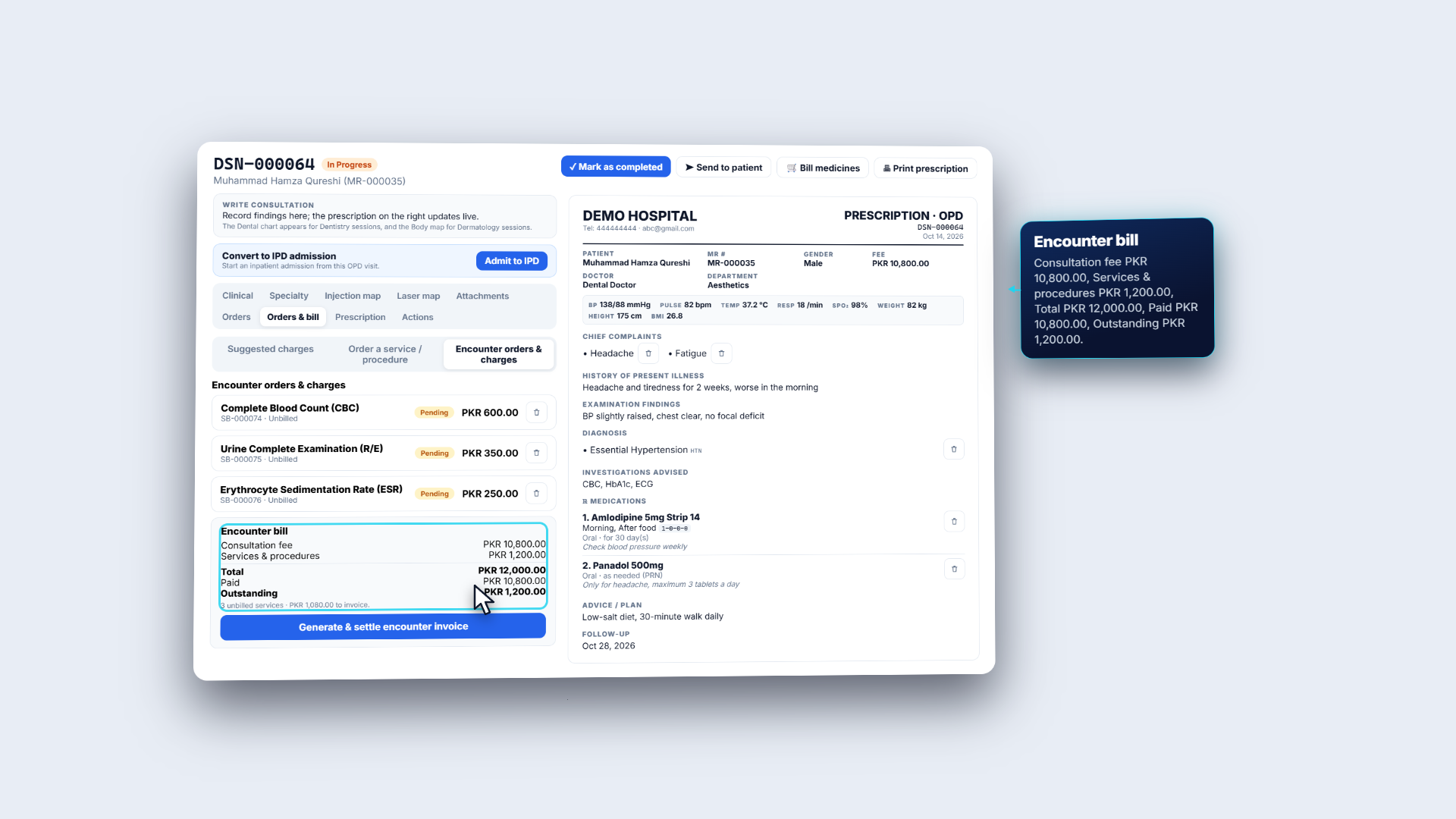
Open Orders & bill. It has Suggested charges, Order a service or procedure and Encounter orders & charges. Suggested charges come from specialty chart data and are never billed automatically. Pick Erythrocyte Sedimentation Rate (ESR) at PKR 250 in Order a service / procedure; the list shows each service with its price and Charge fills with it. Press Add charge: Charge added to the encounter. Each order shows its booking number and state: the new ESR charge (SB-000076) is Unbilled at PKR 250, and the two lab orders placed earlier are priced from the catalogue: Complete Blood Count (SB-000074) PKR 600 and Urine Complete Examination (SB-000075) PKR 350, both Unbilled. The Encounter bill reads consultation fee 10,800, services 1,200, total 12,000, paid 10,800, outstanding 1,200, and "3 unbilled services · PKR 1,080.00 to invoice."
Orders & bill tab with encounter charges and the Encounter bill
6
Settle the charges and complete the session
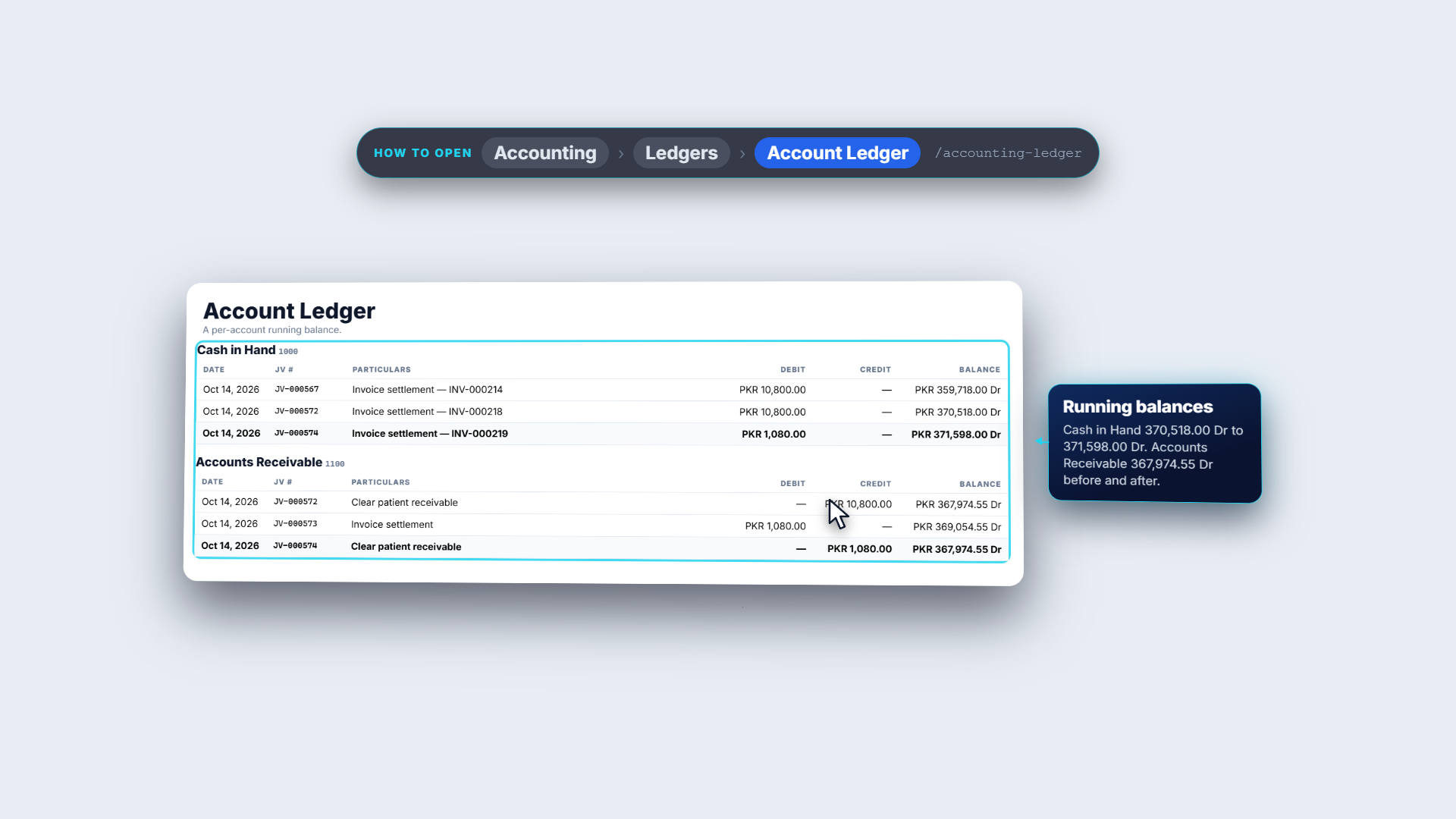
Press Generate & settle encounter invoice. It bills every unbilled service in one invoice (PKR 1,080.00 here, after the patient's discount). In Settle encounter charges choose a payment method (Cash, Card, Bank, Online, Credit or Insurance), then Post payment with Cash. You see Invoice INV-000219 posted, then the encounter receipt listing the three tests (600, 350 and 250), a discount of 120 and a total paid of PKR 1,080.00. In the ledger, INV-000219 lists the three tests at 600, 350 and 250, less a 120 discount, with no tax, total 1,080. Its journal JV-000573 debits Accounts Receivable 1,080 and Discount Allowed 120, and credits Service Income 1,200. The cash journal JV-000574 debits Cash in Hand 1,080 and credits Accounts Receivable 1,080, and the running balance of Cash in Hand rises from 370,518 to 371,598, and Accounts Receivable ends where it began, at 367,974.55. Now press Mark as completed. It asks for confirmation; while a service charge is unsettled it refuses with Settle or remove the outstanding service charges on this encounter before closing it. When all is settled the toast reads Session marked as completed and the badge shows Completed.
Account Ledger with INV-000219, JV-000573 and JV-000574
7
Attachments, actions and addenda
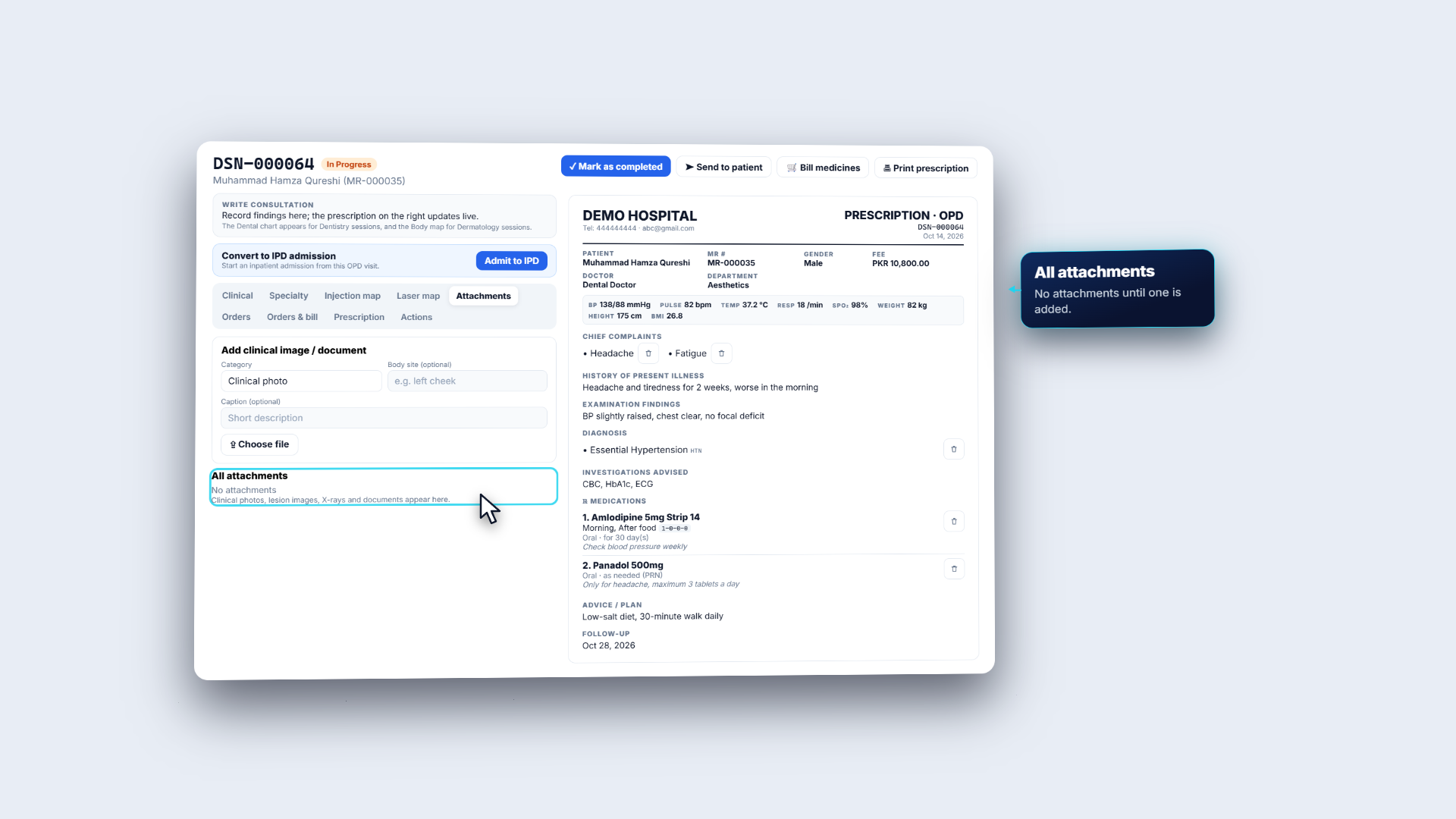
Attachments stores clinical images and documents for the visit. Choose a Category (Clinical photo, Lesion, Before, After, X-ray, OPG or Document), optionally add Body site and Caption, then Choose file. Until something is added, All attachments says No attachments. The Actions tab has Convert to IPD admission (patient, doctor, vitals, notes, symptoms, diagnoses and prescriptions carry across), Refer patient (to a specialist or another facility), Transfer to doctor (an optional reason and handover note) and Cancel session. In the header, Send to patient and Bill medicines appear once a medicine is prescribed. After completion the sheet is locked; add corrections as an addendum: Addendum appended.
Attachments tab with Category, Body site, Caption and Choose file
Check it worked
The sheet shows the vitals, history, findings, diagnosis, medicines, advice and the follow-up date of 28 October.
Every service line reads Billed on INV-000219 ("All service charges have been billed."), and the badge reads Completed.
INV-000219 is posted and paid, and its journals balance.
Common mistakes
Mistake
What you see
Fix
Completing with an unsettled charge
Settle or remove the outstanding service charges on this encounter before closing it.
Use Generate & settle encounter invoice, or remove the charge
Ordering a lab test that is already ordered on this visit
The Already ordered dialog asks for a reason (at least 5 characters)
Cancel, or give the reason for ordering again
Overriding a safety alert without thought
An override reason is stored with the prescription
Cancel, or give an honest justification
Editing a finished note
The sheet is locked
Append an addendum
Quick reference
Item
Meaning
DSN
The consultation session number
Orders & bill
Suggested charges, service orders and the encounter bill
Generate & settle encounter invoice
One invoice for every unbilled service
Medication safety alert
Warns on allergies and risks; overriding needs a reason
Addendum
An appended correction after completion
Frequently asked questions
Why can't I complete a consultation session? While a service charge is unsettled the session refuses with "Settle or remove the outstanding service charges on this encounter before closing it." Use Generate & settle encounter invoice, or remove the charge, then mark the session as completed.
What happens when I override a medication safety alert? You must enter an Override justification. It is stored with the prescription, so a later reader can see why the item was prescribed. Cancel keeps the item off the prescription.
How do I correct a note after the session is completed? The sheet is locked once the session is completed. Add an addendum: it is appended with the author and the time, and the original note is never edited.