How to set up a patient installment plan for an unpaid bill
You will turn a large unpaid invoice into a dated schedule, collect each installment as the patient pays, and cancel the plan if it falls through. Use it when a patient cannot pay a credit invoice in one go.
Who it is forCashier and billing clerkTime12 minutesProductHMSLevelIntermediate
Before you start
Steps
1
Open the installment plans
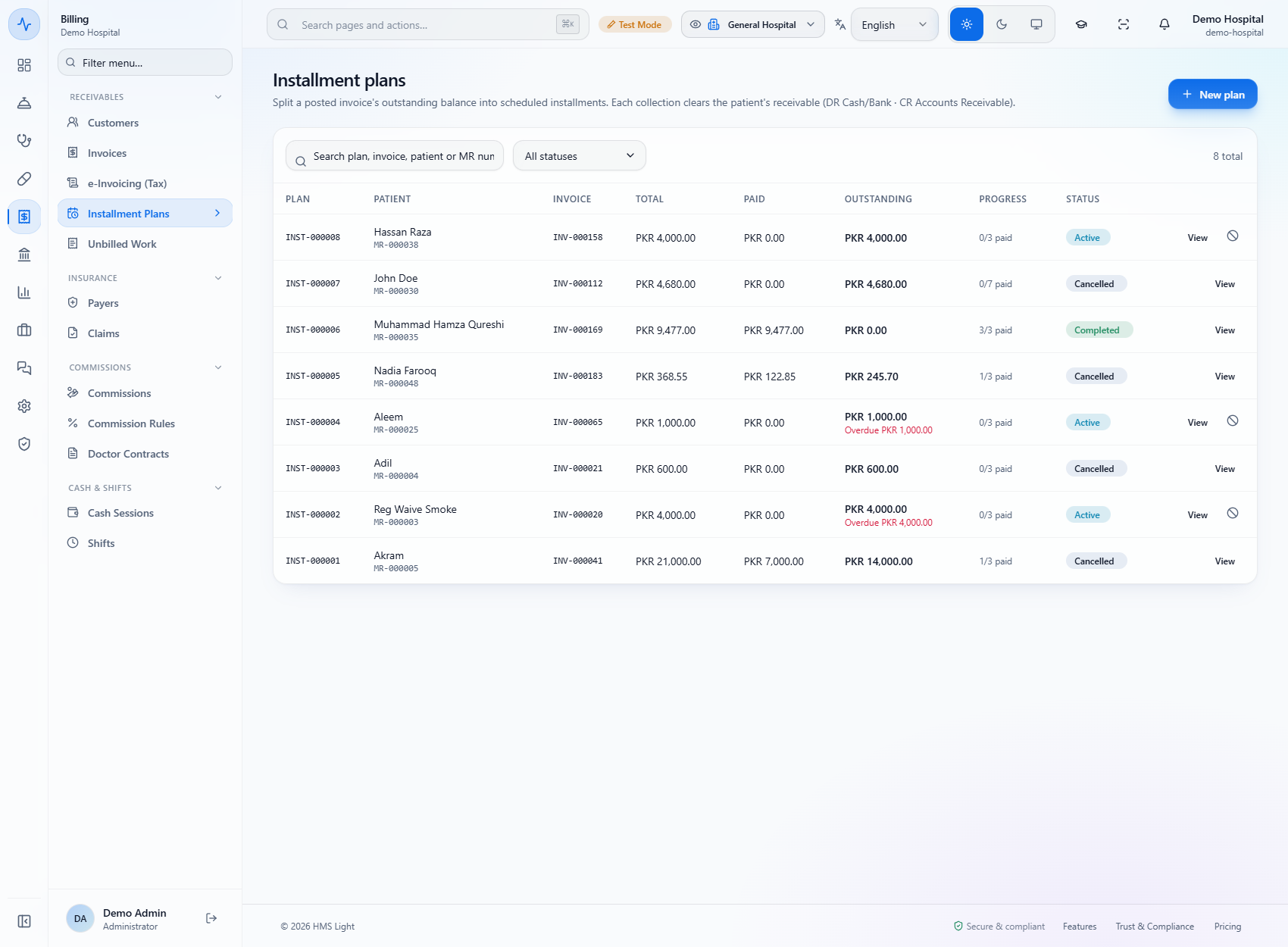
Open Billing › Receivables › Installment Plans. Each row is one plan with the Patient (name and MR number), the Invoice, its Total, Paid, Outstanding, Progress (for example 1/3 paid) and Status. A red Overdue amount means installments are past their due date. Type a patient name, MR number, plan or invoice number in the search box to find one plan, or use the status filter (All statuses, Active, Completed, Cancelled). Only an Active row has the cancel icon.
Installment plans list with plan numbers, totals, paid, outstanding, progress and status
2
Check the invoice first
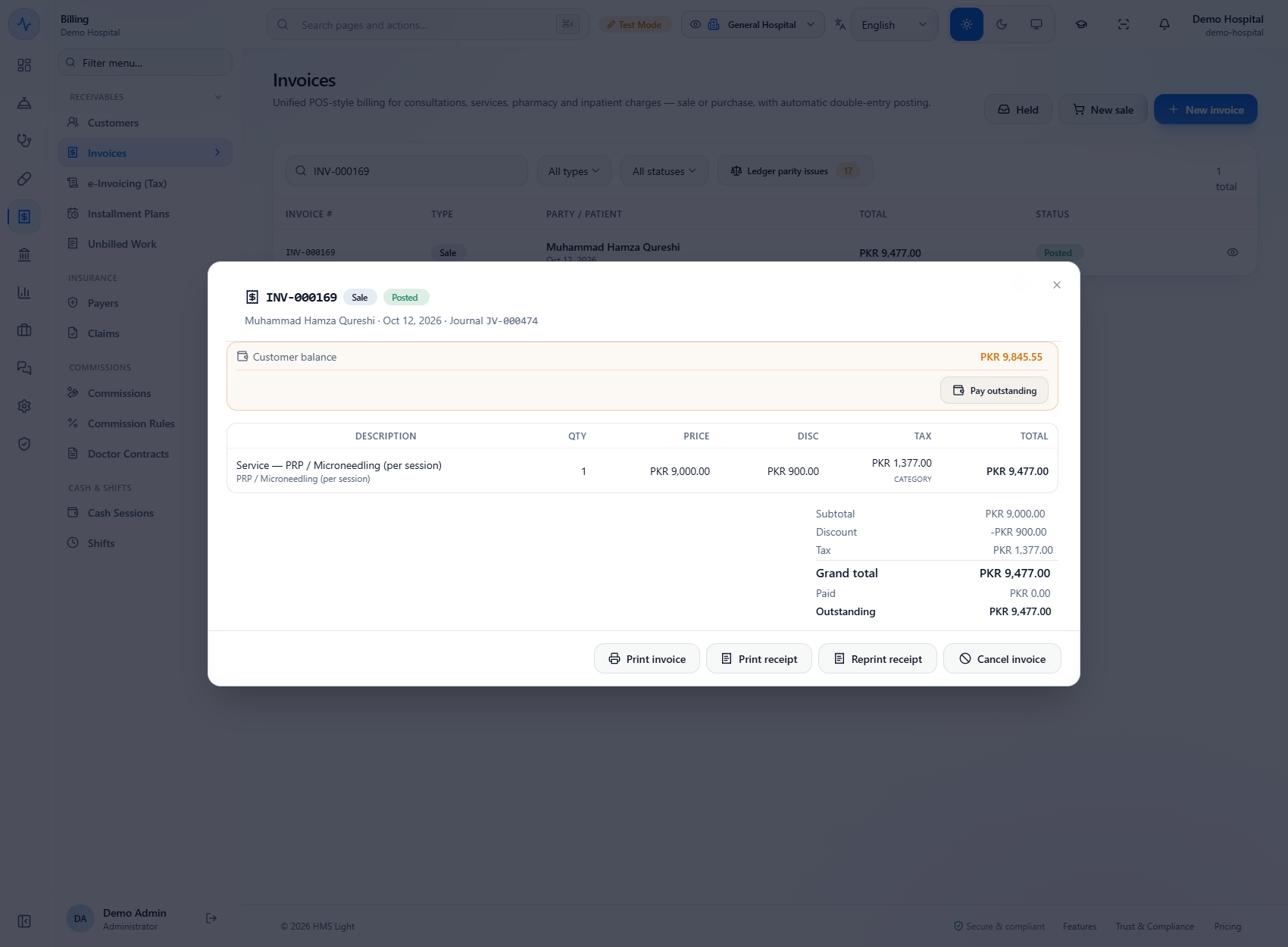
Only a posted sale invoice with a balance can go on a plan. Open the invoice and check Grand total, Paid and Outstanding.
Posted invoice INV-000169 with Customer balance PKR 9,845.55, Grand total PKR 9,477.00 and Outstanding PKR 9,477.00
3
Create the plan
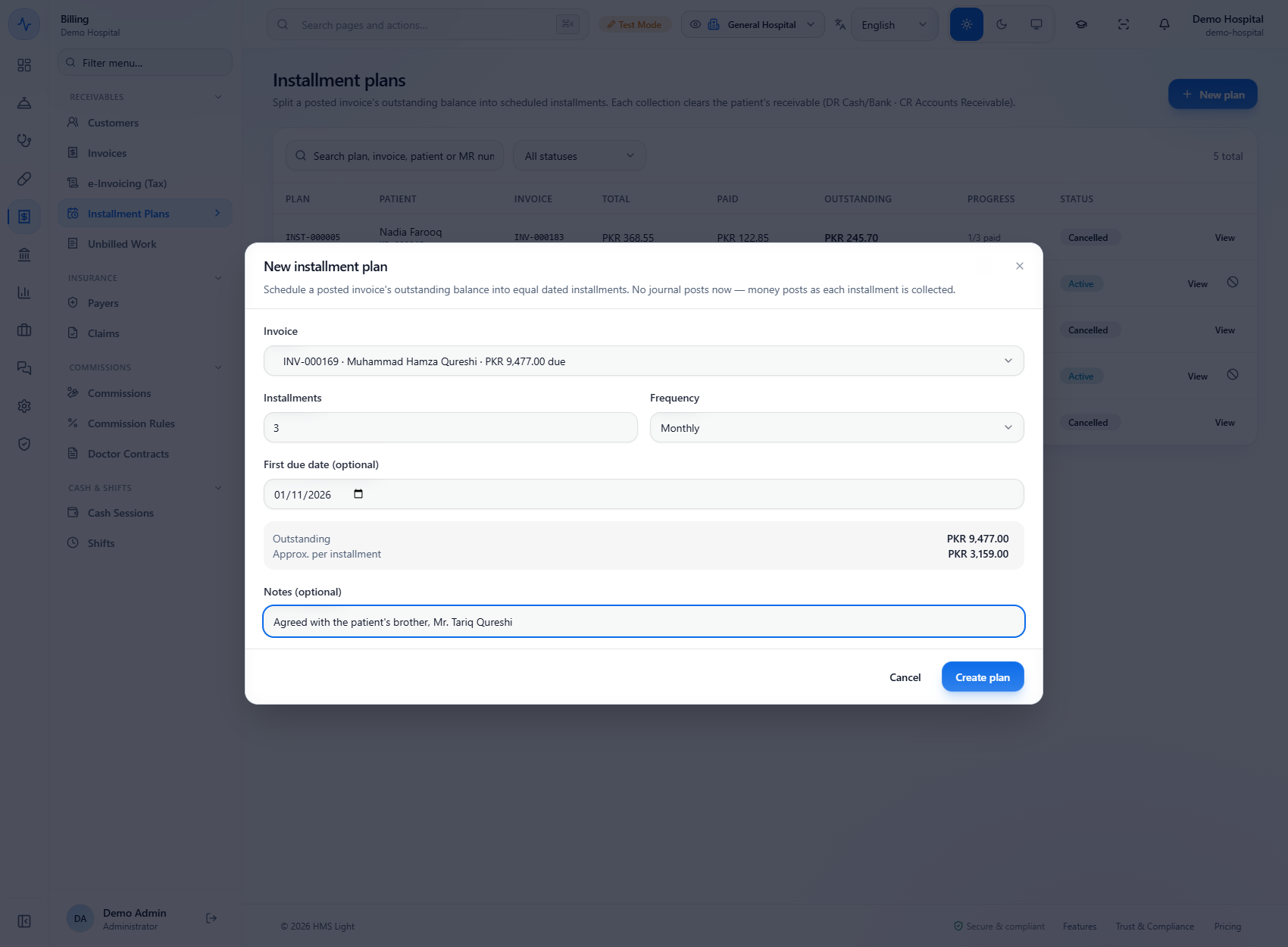
Click New plan. Choose the Invoice (it is listed as "INV-000169 · Muhammad Hamza Qureshi · PKR 9,477.00 due"), set Installments (2 to 60), the Frequency (Weekly, Every 2 weeks or Monthly) and the First due date (optional); here 3 installments, Monthly, first due 1 November 2026. The box shows Outstanding PKR 9,477.00 and the Approx. per installment: PKR 3,159.00. Add a note under Notes (optional), such as who agreed to the plan, then click Create plan. No journal posts now: money posts as each installment is collected.
New installment plan dialog with invoice, number of installments, frequency and first due date filled in
4
Read the schedule
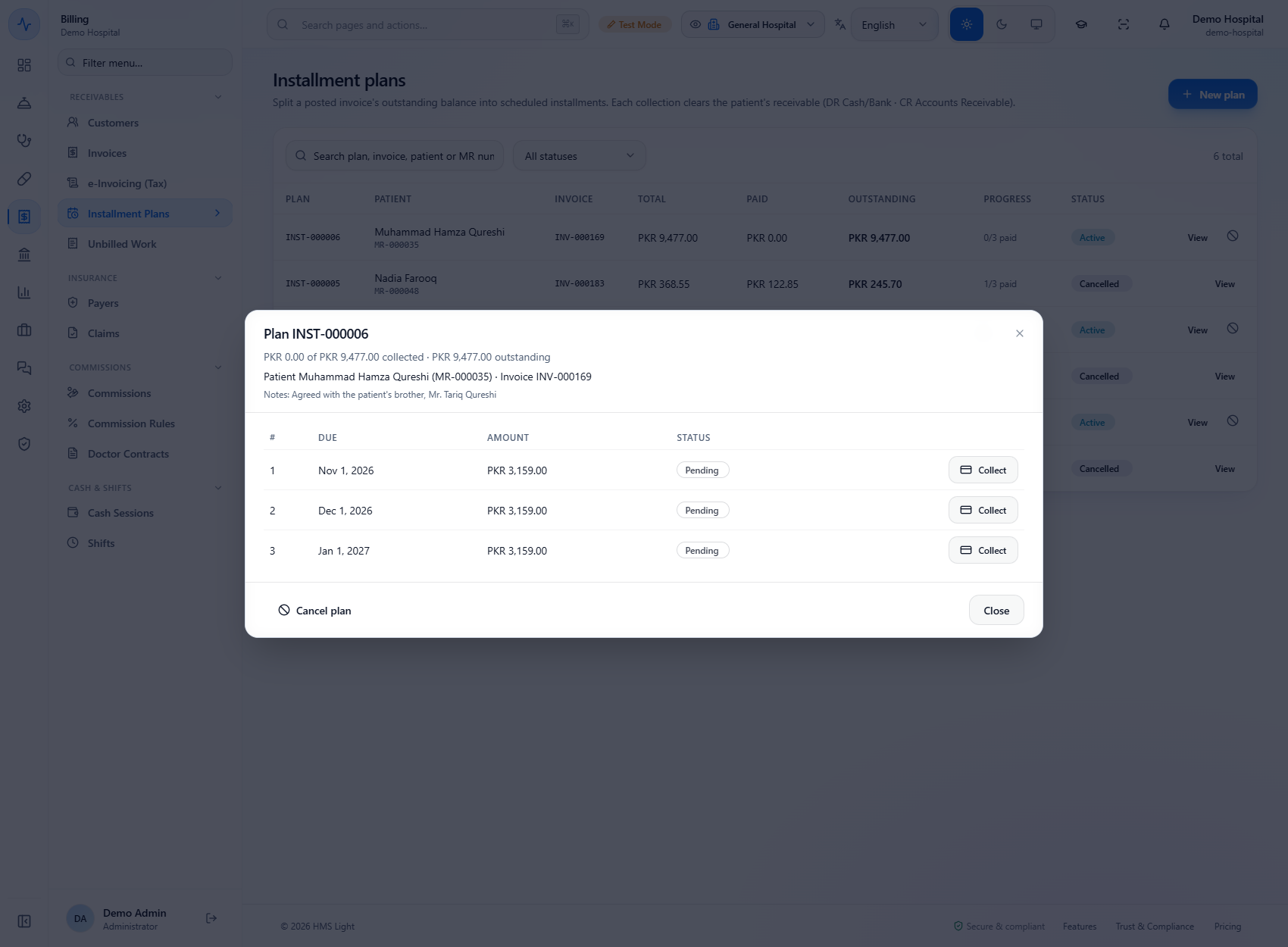
A toast says "Plan INST-000006 created" and the plan opens: PKR 0.00 of PKR 9,477.00 collected, the patient and invoice it belongs to, any notes you typed, and one row per due date (1 Nov, 1 Dec, 1 Jan), each PKR 3,159.00 and Pending with its own Collect button; Cancel plan sits at the bottom. Nothing is posted to the accounts yet.
Plan INST-000006 listing three pending installments of PKR 3,159.00
5
See what changed on the invoice
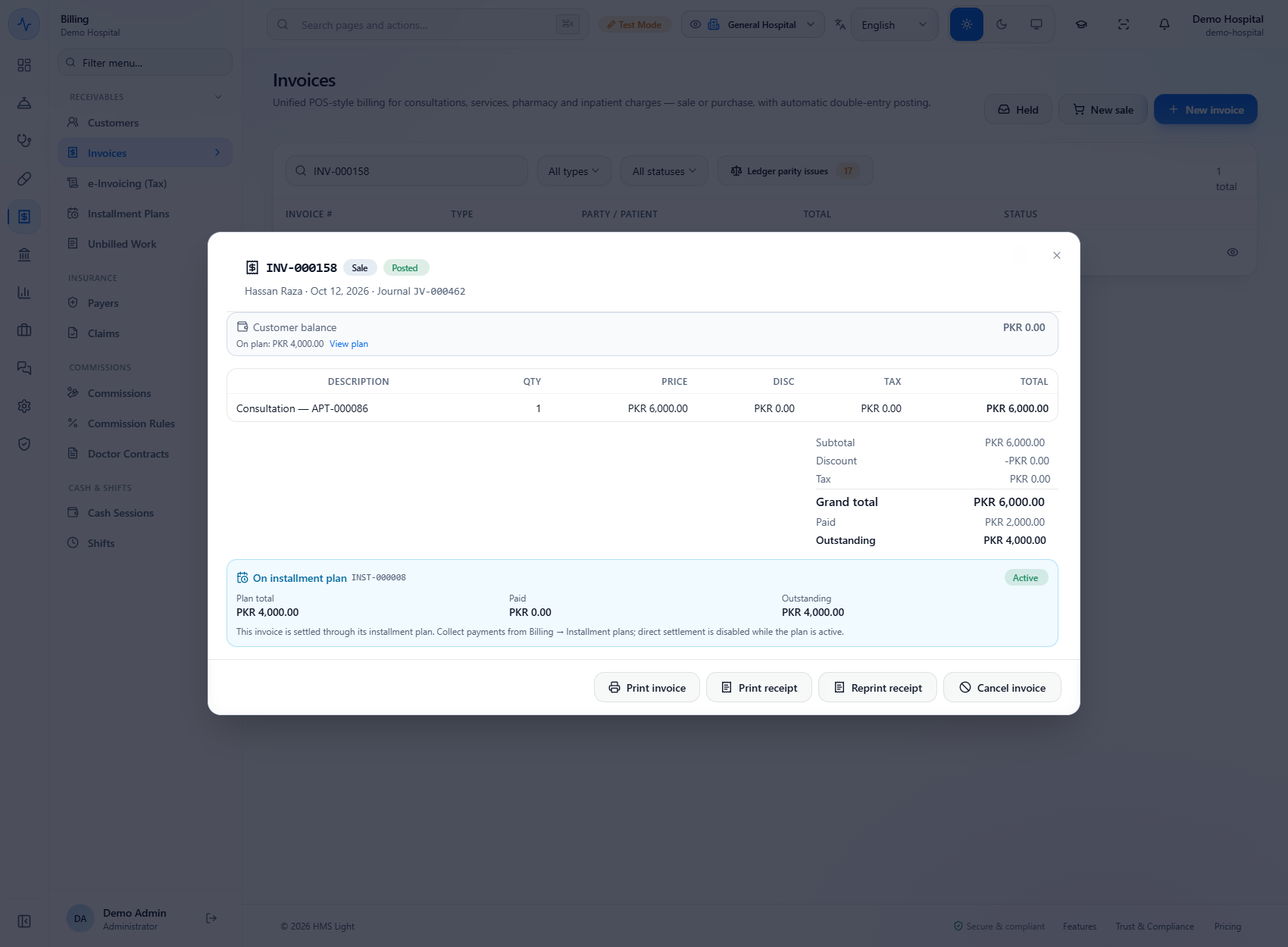
Open an invoice that has a plan, here INV-000158 (Hassan Raza) on plan INST-000008. It shows On installment plan INST-000008 Active with Plan total, Paid and Outstanding, and the customer balance reads PKR 0.00 with On plan: PKR 4,000.00 and View plan. The invoice says: "This invoice is settled through its installment plan. Collect payments from Billing → Installment plans; direct settlement is disabled while the plan is active."
Invoice INV-000158 of Hassan Raza showing the On installment plan INST-000008 block and On plan: PKR 4,000.00 in the customer balance
6
Collect the first installment
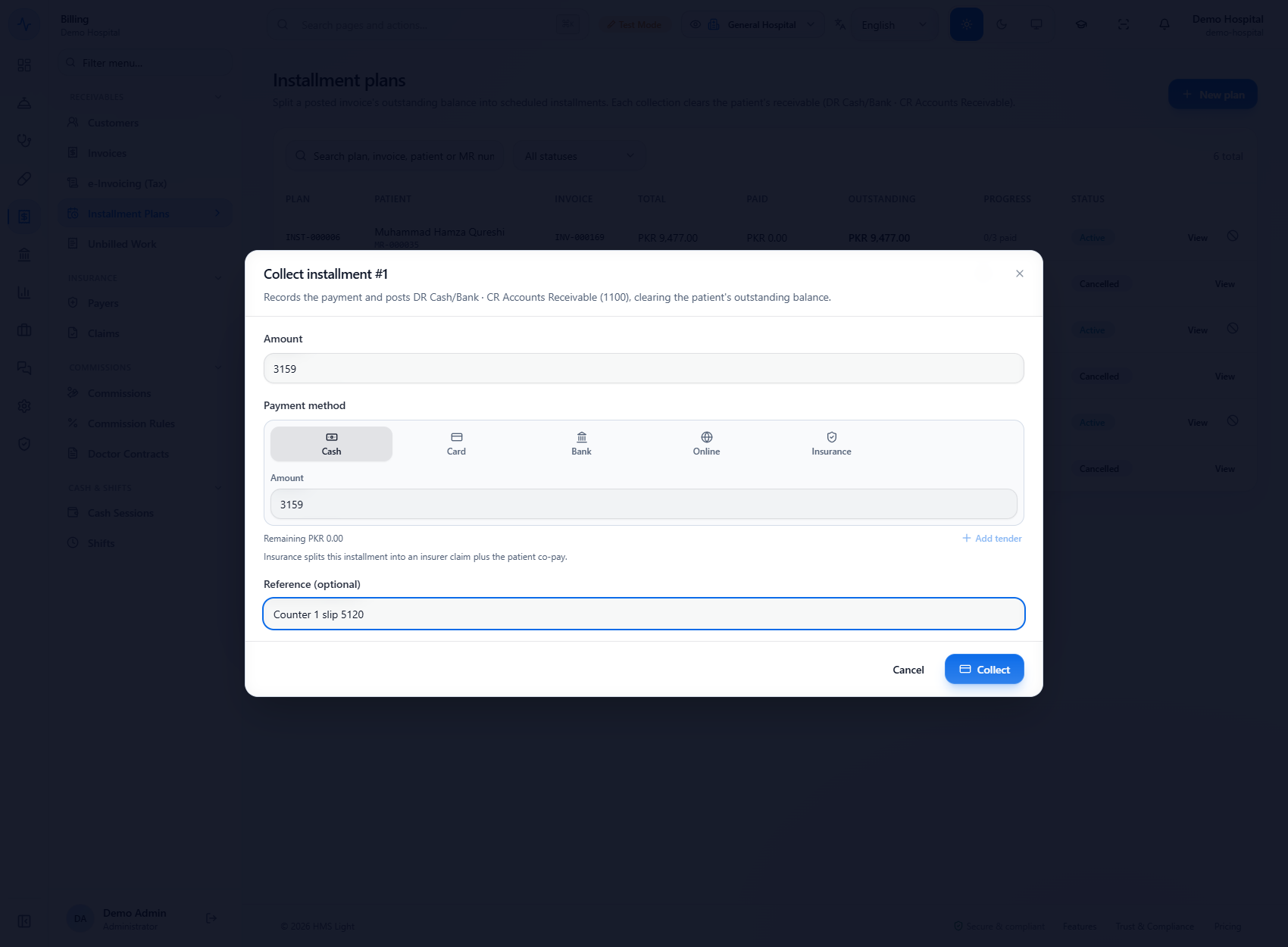
Open the plan, click Collect on installment 1. The dialog "Collect installment #1" fills the Amount with 3,159; choose Cash, type the slip number in Reference (optional) (here "Counter 1 slip 5120") and click Collect. The methods are Cash, Card, Bank, Online and Insurance; Insurance adds a payer picker and splits the installment into an insurer claim plus the patient co-pay. Credit is not offered because the money is already on the patient's account.
Collect installment #1 dialog with amount 3159, payment methods and reference
7
Give the receipt
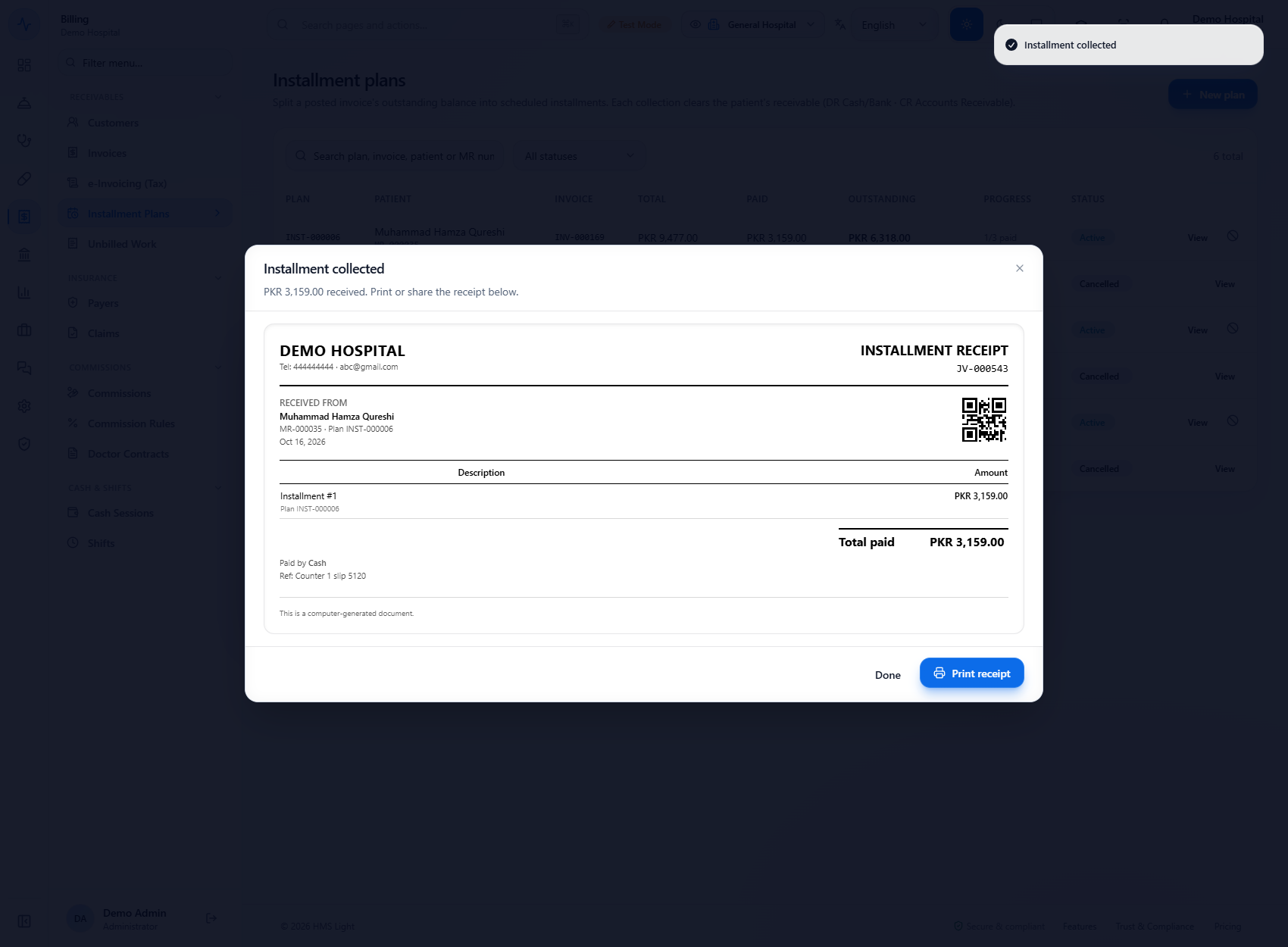
A toast says "Installment collected" and the receipt opens ("Installment collected - PKR 3,159.00 received") with the patient it is received from, the plan INST-000006, the installment number, Total paid, how it was paid (Paid by Cash) and the reference. The receipt number is the number of the posted accounting entry, here JV-000543, so you can trace it in the ledger. Click Print receipt for the patient, then Done.
Installment receipt for installment 1 paid by cash with the reference
8
Collect by bank transfer
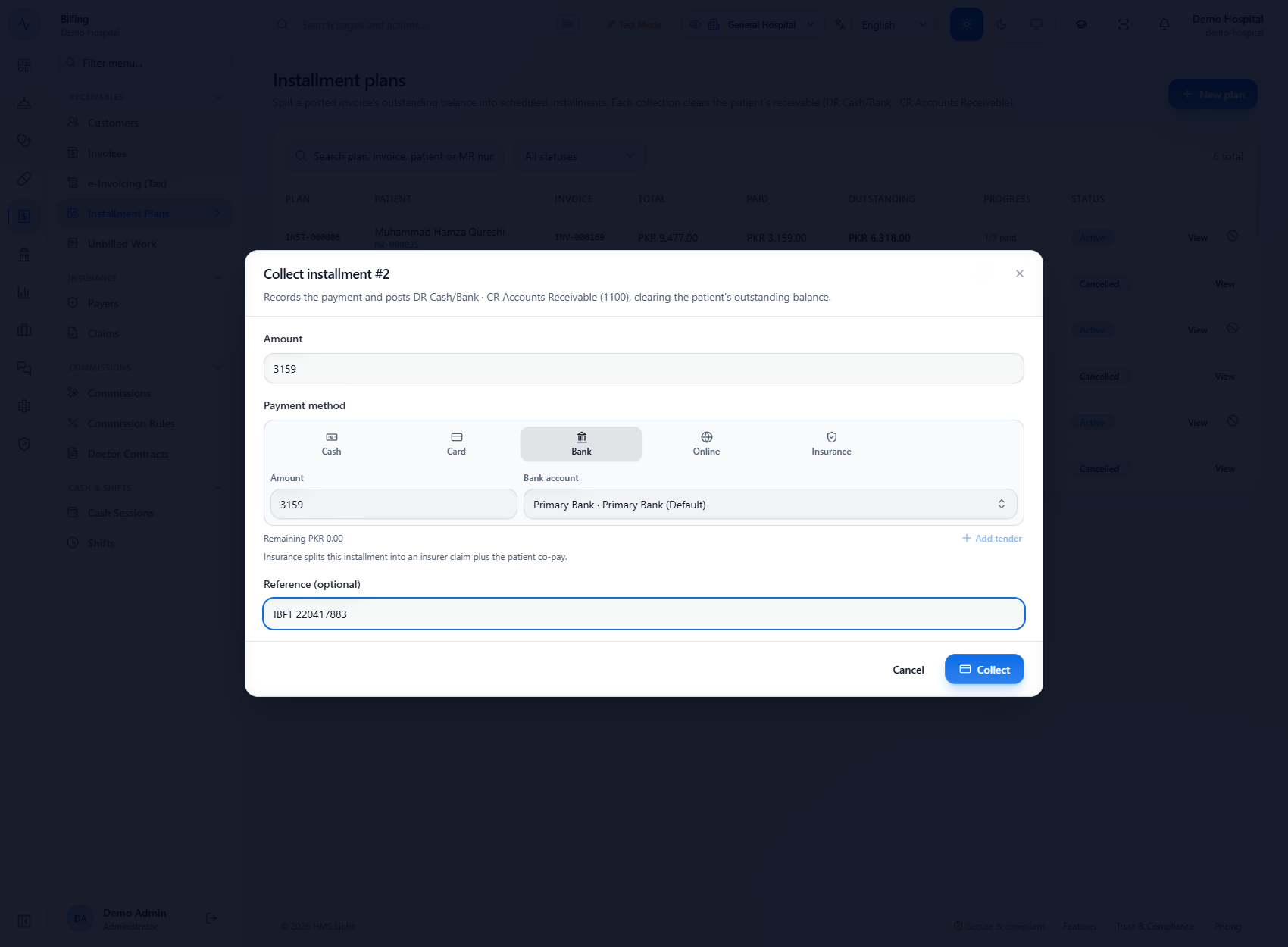
For installment 2 choose Bank, pick the Bank account ("Primary Bank · Primary Bank (Default)") that received the transfer and type the transfer number as the reference, here "IBFT 220417883". The receipt (JV-000544) says Paid by Bank transfer. The money goes to that bank account's ledger, not to the cash drawer.
Collect installment dialog with Bank selected and the Primary Bank account
9
Take a part payment
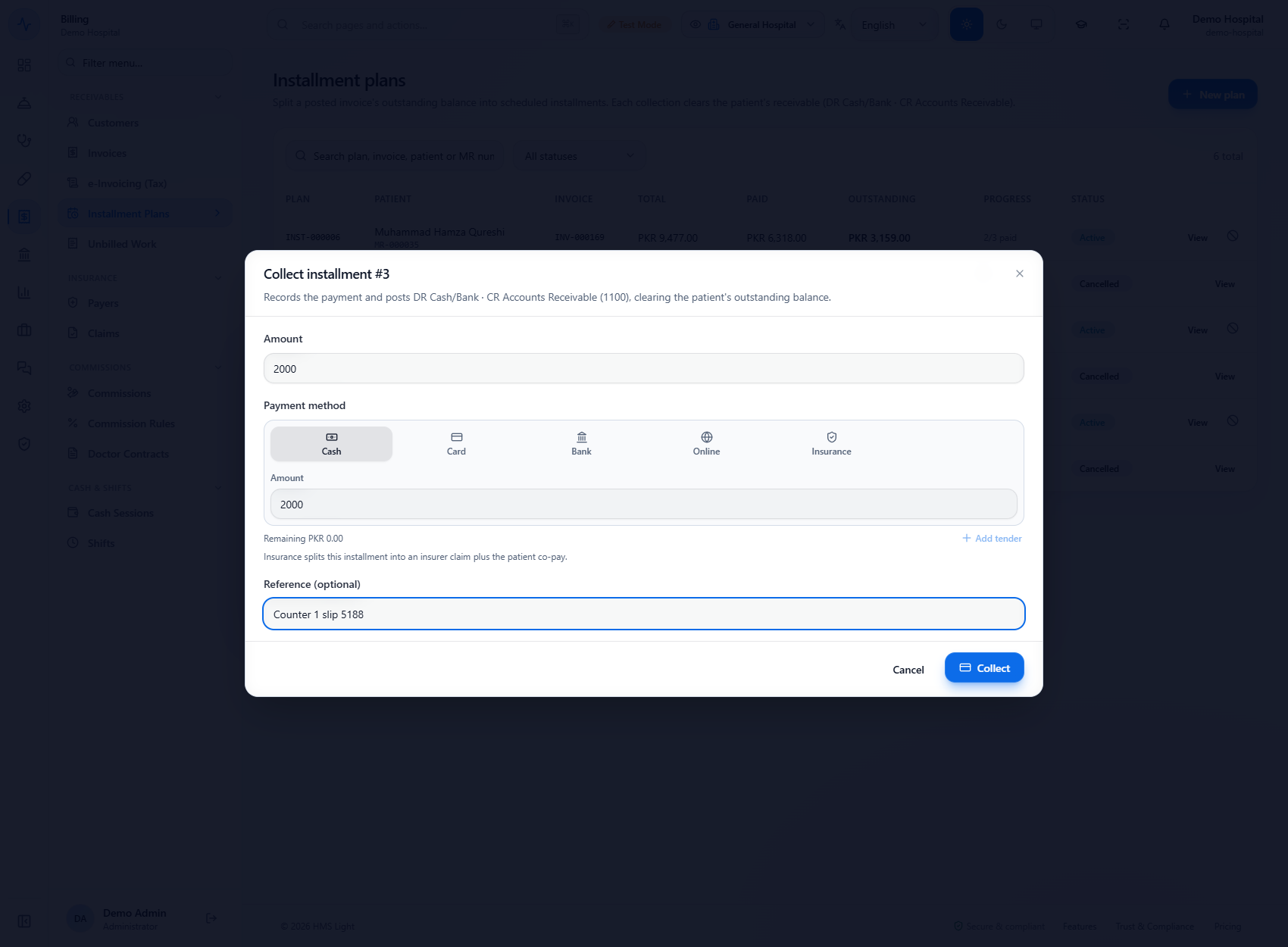
If the patient can pay only part of installment 3, type a smaller Amount, for example 2000 (receipt JV-000545). The row stays Pending and reads "PKR 3,159.00 (PKR 2,000.00 paid)". Next time the amount is filled in with the rest, PKR 1,159.00. Typing more than is due is refused with "Amount exceeds the installment outstanding balance".
Collect dialog for installment 3 with a part payment of PKR 2,000.00
10
Finish the plan
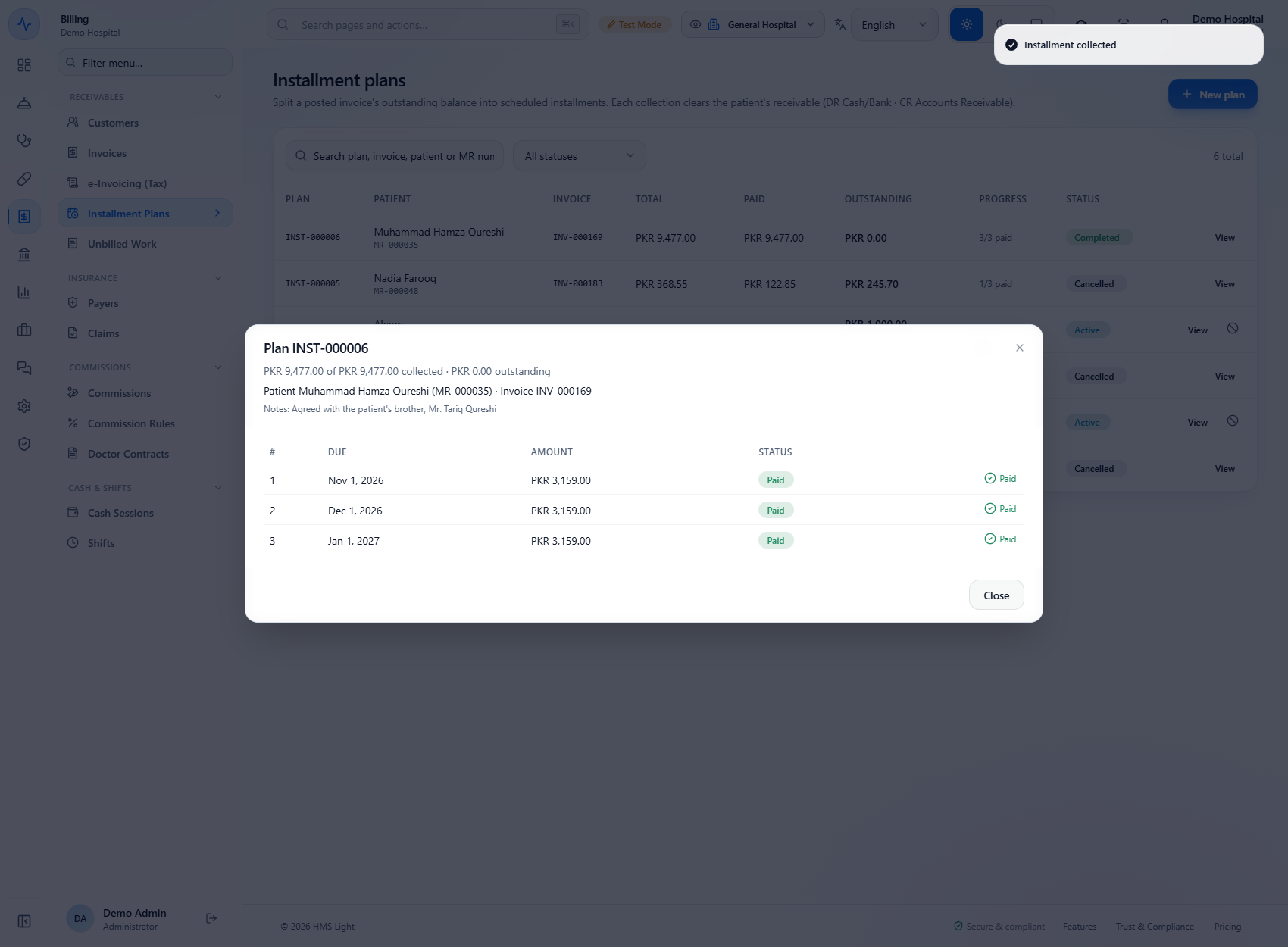
When the last amount is collected the plan shows PKR 9,477.00 of PKR 9,477.00 collected · PKR 0.00 outstanding, every row is Paid, and in the list the status is Completed (3/3 paid).
Plan INST-000006 with all three installments paid and PKR 0.00 outstanding
11
Follow up overdue installments
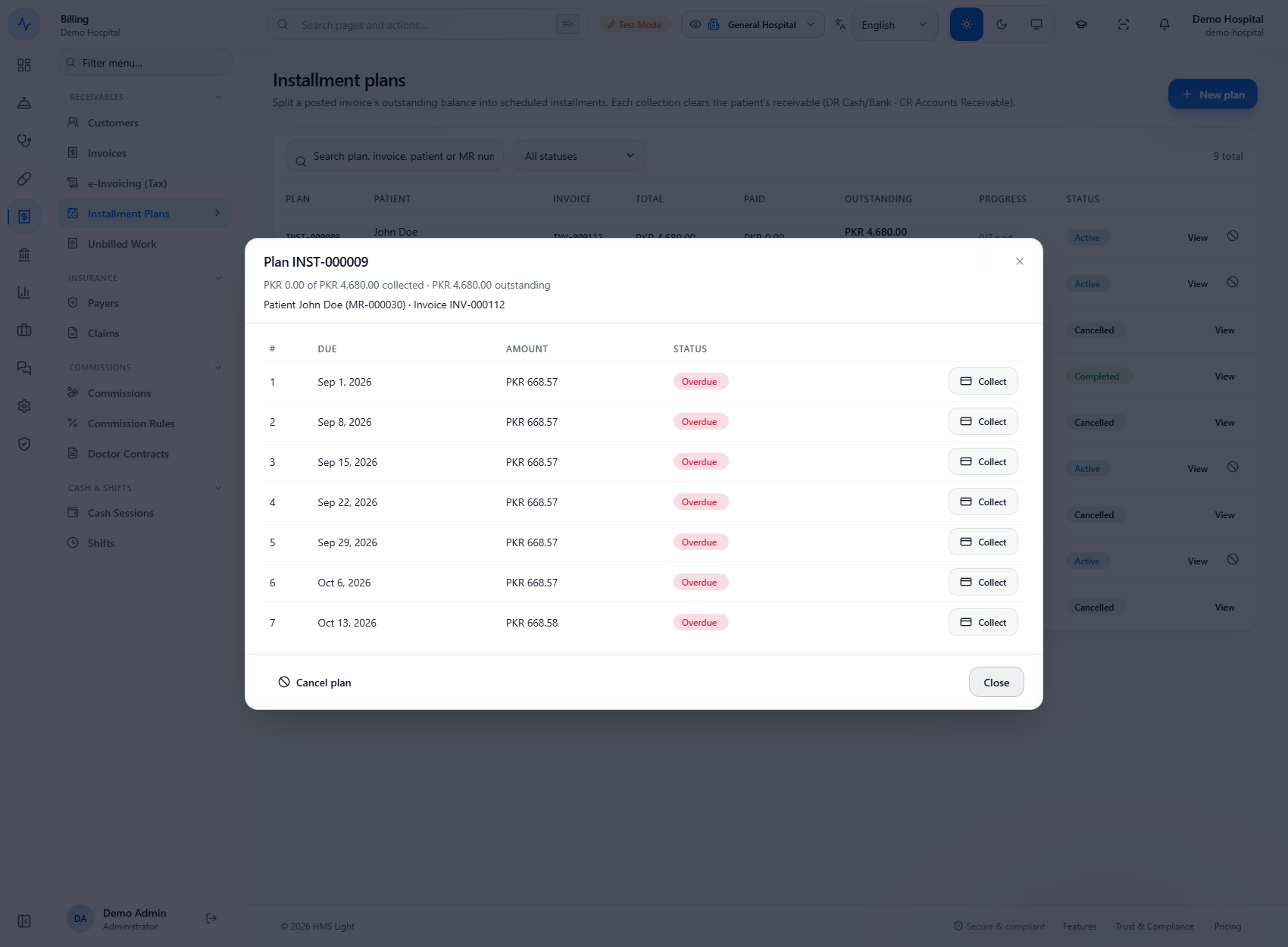
Late installments show a red Overdue badge, in the plan and in the list ("Overdue PKR 4,680.00"). On the invoice and in Patient 360 the banner says "On plan: PKR 4,680.00 (overdue PKR 4,680.00)". Here John Doe's invoice INV-000112 has 7 weekly installments from 1 September. When an amount does not divide evenly, the last installment takes the difference: six rows of PKR 668.57 and a last row of PKR 668.58.
Plan of seven weekly installments for John Doe, all marked Overdue, the last one slightly larger
12
Cancel a plan that will not be paid
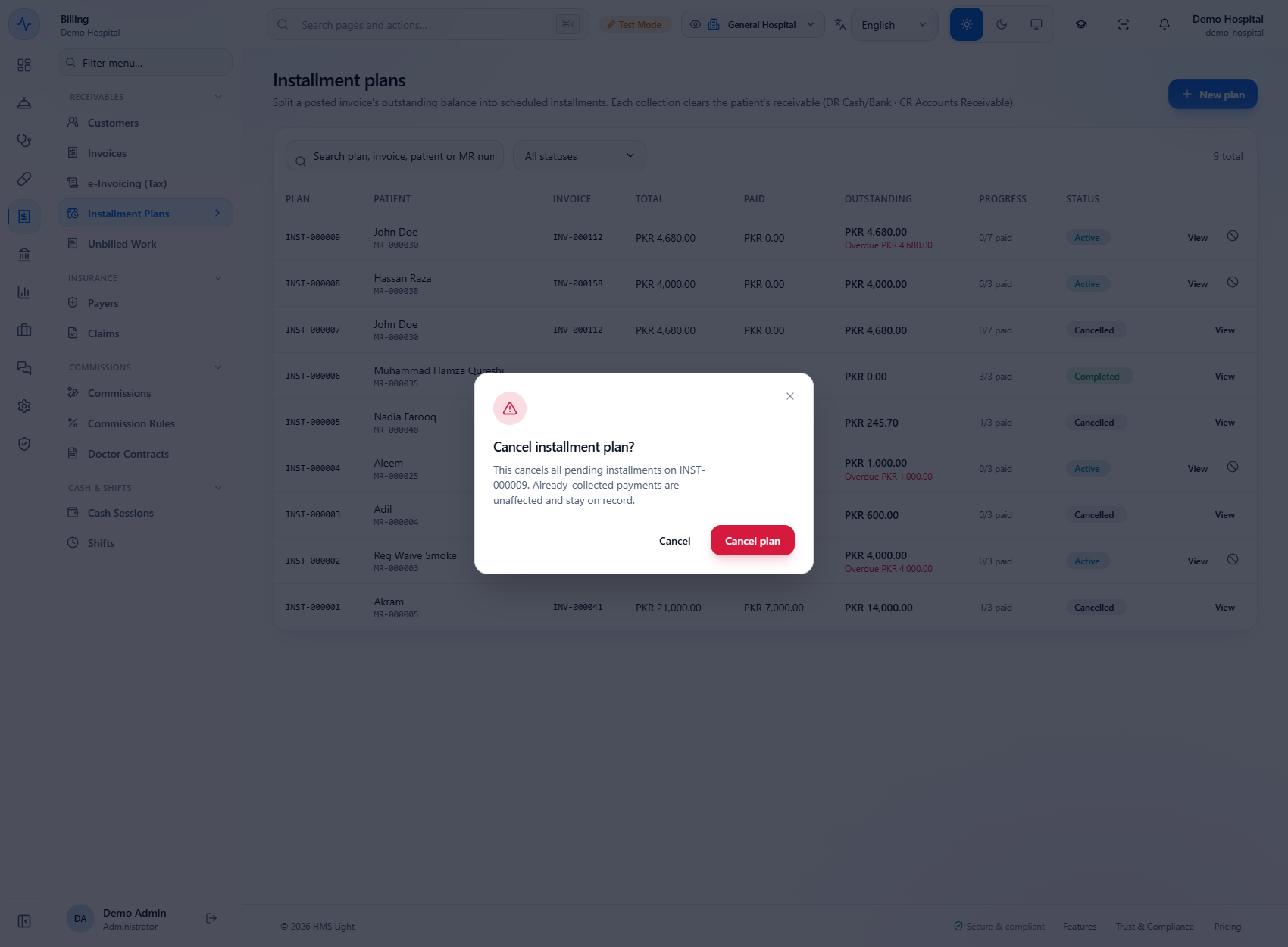
Click the cancel icon on the row (or Cancel plan in the plan) and confirm "Cancel installment plan?". Only installments still pending are cancelled; payments already collected stay on record, and the balance goes back to normal settlement. A toast says "Plan cancelled".
Confirmation asking to cancel installment plan INST-000009
Check it worked
Installment Plans: INST-000006 shows Completed, 3/3 paid, PKR 0.00 outstanding.
Account Ledger: four vouchers named "Settlement of INV-000169", JV-000543 to JV-000546, for 3,159.00 cash, 3,159.00 bank, 2,000.00 cash and 1,159.00 cash.
Patient 360 › Billing: the Installment plans panel lists each plan of the patient with its status (for John Doe: INST-000009 Active and INST-000007 Cancelled), and the invoice row carries a "Plan" badge.
Common mistakes
Mistake
What you see
Fix
Trying to put an invoice with an insurance claim on a plan
The invoice is not offered, or the plan is refused
Finish the claim first (insurance tutorials)
Typing more than the installment amount
"Amount exceeds the installment outstanding balance"
Type the amount due, or the part you received
Collecting the invoice from Pay outstanding
The invoice is greyed out as "On plan"
Collect from the plan
Cancelling the invoice while the plan is active
"This invoice is on an active installment plan. Cancel the plan first, then cancel the invoice."
Cancel the plan, then the invoice
Quick reference
Item
Meaning / rule
Installments
2 to 60
Frequency
Weekly (7 days), Every 2 weeks, Monthly (same day next month)
Last installment
Takes the rounding so the plan equals the balance
Payment methods
Cash, Card, Bank, Online, Insurance (no Credit)
Cancel plan
Voids only pending installments; no money moves
Ledger
Each collection: debit Cash in Hand or Bank, credit Accounts Receivable
Frequently asked questions
Can a patient pay an installment in parts? Yes. Type a smaller amount in Collect. The row stays pending with the amount paid, and the remainder is collected later.
Does creating a plan change the accounts? No. The plan only schedules the balance. Each collection posts its own entry: cash or bank debited and accounts receivable credited.
What happens to money already collected when I cancel a plan? It stays on record. Only installments still pending are cancelled, and the remaining balance is collected the normal way again.
Why can I not pay the invoice directly? While the plan is active the invoice is settled through its installments only, so a balance is never collected twice.